
Site-uri web multiple
Odoo allows you to create multiple websites from the same database. This can be useful, for example, if you have multiple brands operating under your organization, or if you want to create separate websites for different products/services or audiences.
Crearea unui alt site web
Crearea mai multor site-uri web necesită cel puțin un nume de domeniu. Există diferite alternative, dar înainte de a crea un alt site web, ar trebui fie
Înregistrează gratuit un nume de domeniu cu Odoo pentru primul site web, apoi, pentru al doilea site web, fie:
Folosește un nume de domeniu pe care l-ai achiziționat pentru primul site web, apoi, pentru al doilea site web, fie:
Once it is time to map your second domain name’s address to your second Odoo website, you can create <../../website_creation> it and map it
directly by entering the second website’s address in the Website Domain field (e.g.,
https://www.yourseconddomain.com or https://subdomain.yourdomain.com).
Sfat
Pentru a comuta de la frontend-ul unui site web la altul, apasă meniul drop-down de selecție a site-ului web din colțul din dreapta sus și selectează site-ul web la care vrei să comiți.

Configurație specifică site-ului web
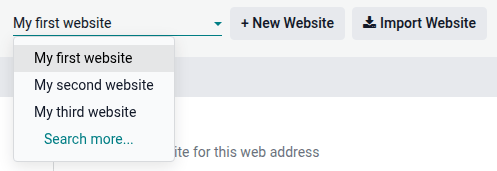
Majoritatea setărilor site-ului web sunt specifice fiecărui site. Pentru a accesa setările unui site web, accesează și selectează site-ul web dorit utilizând meniul drop-down de selectare a site-ului web din colțul din stânga sus al paginii de setări.
Notă
Setările partajate de toate site-urile web sunt indicate prin pictograma (informații).

Când creezi un alt site web, acesta folosește setările implicite; setările nu sunt copiate de la un site web la altul.
caracteristici de comerț electronic
Funcțiile eCommerce, cum ar fi produsele, categoriile eCommerce, listele de prețuri, reducerile, furnizorii de plăți etc., pot fi restricționate la un anumit site web.
Conturi de client
Pentru a permite clienților tăi să folosească același cont pe toate site-urile web, accesează și activează Shared Customer Accounts.
Costuri
Produsele pot avea prețuri diferite în funcție de site-ul web folosind liste de prețuri. Pentru aceasta:
Accesați .
Derulați în jos la secțiunea Magazin - Produse și selectați opțiunea Liste de prețuri Prețuri multiple per produs.
Faceți clic pe Liste de prețuri pentru a defini liste de prețuri noi sau pentru a le edita pe cele existente.
Selectați lista de prețuri sau faceți clic pe Nou pentru a crea una nouă, apoi selectați fila Configurare și setați câmpul Site web.
Disponibilitatea conținutului pe site-uri web
Notă
Toate aplicațiile legate de site-ul web instalate (de exemplu, eCommerce, eLearning, Forum etc.) și paginile lor asociate sunt, de asemenea, disponibile pe noul site web. Le poți elimina din meniul site-ului web.
În mod implicit, majoritatea înregistrărilor (produse, cursuri, postări pe forum etc.) create din frontend sunt afișate pe toate site-urile web. Pentru a restricționa conținutul la un singur site web, caută câmpul Website în backend.
De exemplu, pentru produse, accesează , selectează un produs, deschide fila eCommerce și specifică pe care site web ar trebui să fie disponibil produsul.

Sfat
Într-un mediu multi-companie, fiecare site web poate fi asociat unei companii specifice, astfel încât numai datele acelei companii (de exemplu, produse, evenimente etc.) să fie afișate pe site-ul web. Pentru a afișa date specifice companiei, accesează Website –> Configuration –> Settings și setează compania dorită în câmpul Company.
Notă
Când generează linkuri, de exemplu, un link al portalului clientului către o ofertă, Odoo folosește următoarea logică pentru a selecta domeniul site-ului web:
Dacă o companie are un singur site web, domeniul acelui site web este folosit.
Dacă o companie are multiple site-uri web, Odoo folosește domeniul site-ului web care a fost creat primul. Pentru a schimba ordinea de prioritate, activează modul dezvoltator, accesează și folosește pictograma (mâner de tragere) pentru a reordona site-urile web.
Dacă site-ul web al unei companii nu are domeniu, se folosește URL-ul de bază web.
Pagini de site
Pentru a modifica site-ul web pe care este publicată o pagină, procedează după cum urmează:
Accesați .
Deschideți panoul de căutare și selectați site-ul web pe care pagina este publicată în prezent.

Bifați caseta de selectare de lângă paginile pe care doriți să le modificați.
Faceți clic pe câmpul Site web și selectați site-ul web sau goliți-l pentru a publica pagina pe toate site-urile web.
Notă
Fiecare site trebuie să aibă propria pagină de pornire; nu puteți folosi aceeași pagină de pornire pentru mai multe site-uri web.
Raportare
Fiecare site web are propriile analize. Pentru a comuta între site-uri web, folosește butoanele din colțul din dreapta sus.

Alte date de raportare, cum ar fi datele tabloului de bord eCommerce, analizele vânzărilor online și vizitatorii, pot fi grupate după site web deschizând panoul de căutare și selectând Grupează după –> Site web.