
Urmărire link
Instrumentul de urmărire a link-urilor este utilizat pentru a crea link-uri urmărite pentru a măsura eficiența campaniilor de marketing, facilitând identificarea canalelor care generează cel mai mult trafic și luarea unor decizii mai informate.
Pentru a crea și gestiona link-uri urmărite, instalați modulul Link Tracker (website links).
Creare URL-uri trasabile
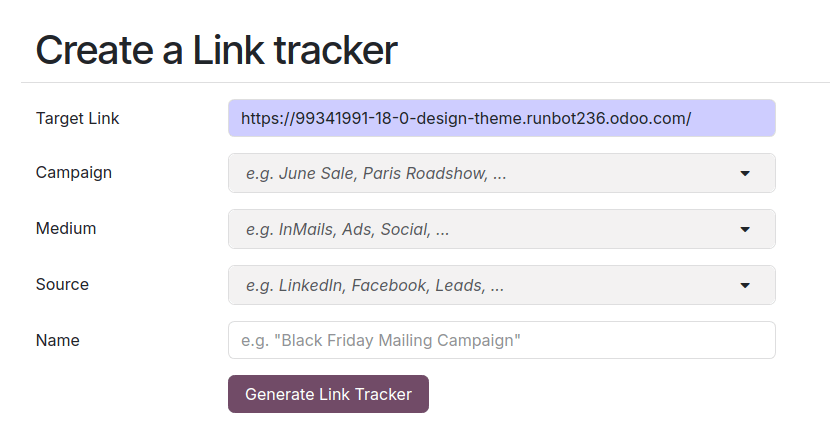
Pentru a crea și gestiona link-uri urmărite, navigați la . Completați următoarele informații și faceți clic pe Generare link urmărit pentru a crea un URL de urmărire.
URL: URL-ul care este ținta campaniei. Este completat automat cu URL-ul utilizat pentru accesarea meniului.
Campanie: campania specifică căreia ar trebui să fie asociat linkul. Acest parametru este utilizat pentru a distinge diferitele campanii.
Medium: Mediul descrie categoria sau metoda prin care vizitatorul ajunge pe site-ul dvs., cum ar fi căutarea organică, căutarea plătită, anunțul pe rețelele sociale, e-mailul etc.
Sursă: Sursa identifică platforma sau site-ul web specific care a trimis vizitatorii, cum ar fi un motor de căutare, newsletter sau site web.
Sfat
Campania, Mediul și Sursa sunt parametri UTM incorporați în URL-ul urmărit. Aceștia pot fi utilizați, de exemplu, pentru a personaliza vizibilitatea blocurilor de construcție ale site-ului web.
Prezentare generală a linkurilor urmărite
Pentru a obține o prezentare generală a link-urilor urmărite, accesați și derulați în jos la secțiunea Legăturile dvs. urmărite.

Statistica
Pentru a măsura performanța link-urilor urmărite, faceți clic pe linkul de urmărire și derulați în jos până la secțiunea Statistici pentru a obține o prezentare generală a numărului de clicuri pentru linkul urmărit. Implicit, graficul afișează numărul total de clicuri. Puteți schimba perioada în Luna trecută sau Săptămâna trecută utilizând opțiunile din partea dreaptă a antetului.