
UTM 빌더
링크 트래커는 마케팅 캠페인의 효과를 측정하기 위해 추적 링크를 생성하는 데 사용되며, 어떤 채널이 가장 많은 트래픽을 유도하는지 식별하고 더 많은 정보에 기반한 의사결정을 내리는 데 도움을 줍니다.
추적 링크를 생성하고 관리하려면 Link Tracker (website links) 모듈을 :ref:`설치 <general/install>`하세요.
추적용 URL 생성하기
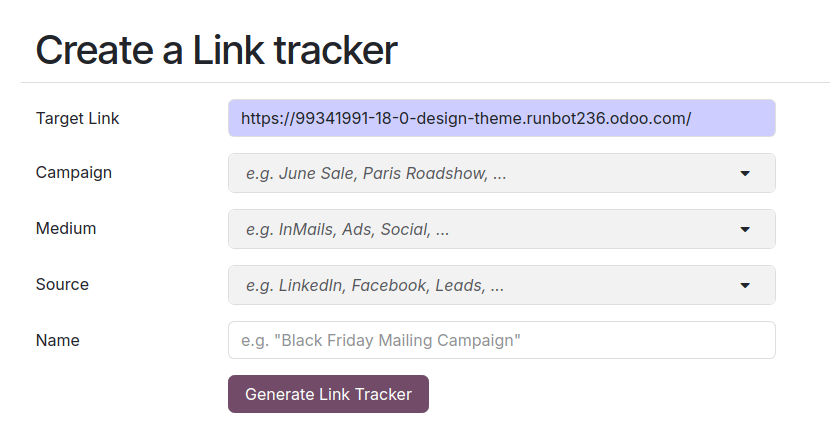
추적 링크를 생성하고 관리하려면 :menuselection:`Website –> Site –> Link Tracker`로 이동하세요. 다음 정보를 입력하고 :guilabel:`Generate tracked link`를 클릭하여 추적 URL을 생성하세요.
URL: 캠페인의 대상이 되는 URL입니다. 메뉴에 접근하는 데 사용된 URL로 자동으로 채워집니다.
캠페인: 링크를 연결시킬 캠페인입니다. 이 매개변수를 이용하여 다양한 캠페인 중에서 식별할 수 있습니다.
매체: 매체는 자연 검색, 유료 검색, 소셜 미디어 광고, 이메일 등 방문자가 사이트에 도달하게 되는 카테고리 또는 방식을 나타냅니다.
Source: 소스는 검색 엔진, 뉴스레터 또는 웹사이트와 같이 방문자를 참조한 특정 플랫폼이나 웹사이트를 식별합니다.
팁
Campaign, Medium, Source`는 추적 URL에 포함된 :abbr:`UTM (Urchin Tracking Module) 매개변수입니다. 이는 예를 들어 웹사이트 빌딩 블록의 :ref:`가시성 <website/visibility/conditions>`을 맞춤 설정하는 데 사용할 수 있습니다.
추적 링크 개요
추적 링크의 개요를 보려면 로 이동하여 추적 링크 섹션까지 아래로 스크롤을 내립니다.

통계
추적 링크의 성능을 측정하려면 추적 링크를 클릭하고 Statistics 섹션까지 스크롤을 내려 추적 링크의 클릭 수 개요를 확인하세요. 기본적으로 그래프는 총 클릭 수를 표시합니다. 제목 오른쪽의 옵션을 사용하여 기간을 Last Month 또는 :guilabel:`Last Week`로 변경할 수 있습니다.