
Link-Tracker
Der Link-Tracker wird verwendet, um nachverfolgbare Links zu erstellen und die Wirksamkeit von Marketingkampagnen zu messen. Dies erleichtert die Identifizierung, welche Kanäle den meisten Traffic generieren, und ermöglicht fundierte Entscheidungen.
Um nachverfolgbare Links zu erstellen und zu verwalten, installieren Sie das Modul Link Tracker (website links).
Nachverfolgbare URLs erstellen
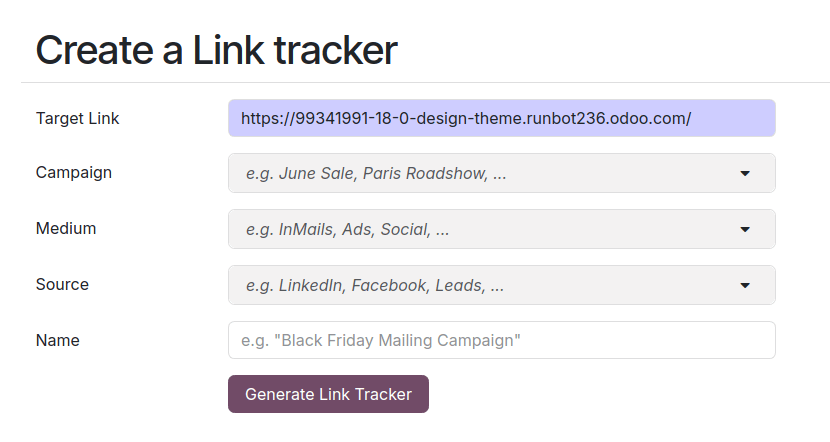
Um nachverfolgbare Links zu erstellen und zu verwalten, navigieren Sie zu . Füllen Sie die folgenden Informationen aus und klicken Sie auf Generate tracked link, um eine Tracking-URL zu erstellen.
URL: Die URL, die das Ziel der Kampagne ist. Sie wird automatisch mit der URL ausgefüllt, die zum Zugriff auf das Menü verwendet wurde.
Kampagne: Die spezifische Kampagne, mit der der Link verknüpft werden soll. Dieser Parameter wird verwendet, um die verschiedenen Kampagnen zu unterscheiden.
Medium: Das Medium beschreibt die Kategorie oder Methode, über die der Besucher auf Ihre Website gelangt, wie z. B. organische Suche, bezahlte Suche, Werbung in sozialen Medien, E-Mail usw.
Source: Die Quelle identifiziert die spezifische Plattform oder Website, die den Besucher verwiesen hat, wie z. B. eine Suchmaschine, einen Newsletter oder eine Website.
Tipp
Die Parameter Campaign, Medium und Source sind UTM-Parameter, die in die nachverfolgte URL integriert werden. Diese können beispielsweise verwendet werden, um die Sichtbarkeit von Website-Bausteinen anzupassen.
Übersicht verfolgter Links
Um einen Überblick über Ihre verfolgten Links zu erhalten, gehen Sie zu und scrollen Sie nach unten zum Abschnitt Ihre verfolgten Links.

Statistik
Um die Leistung nachverfolgbarer Links zu messen, klicken Sie auf den Track-Link und scrollen Sie nach unten zum Abschnitt Statistiken, um eine Übersicht über die Anzahl der Klicks für den nachverfolgten Link zu erhalten. Standardmäßig zeigt das Diagramm die Gesamtzahl der Klicks. Sie können den Zeitraum mithilfe der Optionen auf der rechten Seite der Überschrift auf Letzter Monat oder Letzte Woche ändern.