
360-Grad-Feedback
Mit Odoo Mitarbeiterbeurteilung können Manager Feedback zu ihren direkten Mitarbeitern von allen Mitarbeitern des Unternehmens einholen. Durch die Beiträge von Kollegen erhalten Manager ein umfassenderes Bild von den Stärken, Entwicklungsbereichen und Kooperationsfähigkeiten jedes einzelnen Mitarbeiters.
Dashboard für 360-Grad-Feedback
Im Abschnitt 360-Grad-Feedback werden Informationen zu allen Umfragen angezeigt, die derzeit in der Mitarbeiterbeurteilungsapp konfiguriert sind. Um die Umfragen und ihre Statistiken anzuzeigen, navigieren Sie zu .

Jede Beurteilung (oder Umfrage) wird in einer eigenen Zeile auf dem Dashboard 360-Grad-Feedback dargestellt, zusammen mit verschiedenen Informationen zu dieser Beurteilung.
Jede Beurteilung enthält die folgenden Informationen:
Name der Umfrage: Name der jeweiligen Umfrage.
Verantwortlich: der für die Umfrage verantwortliche Mitarbeiter, einschließlich des Monats und des Jahres, in denen er diese Verantwortung erhielt.
Fragen: Anzahl der Fragen in dieser Umfrage.
Abgeschlossen: Anzahl der Personen, die die Umfrage abgeschlossen haben.
Um die Umfrage zu testen, klicken Sie auf die Schaltfläche Testen auf der rechten Seite der Umfragezeile. Dadurch wird die Beurteilung in einem neuen Reiter geöffnet, um die Fragen in der Vorschau anzuzeigen, ohne Antworten zu übermitteln. Schließen Sie den Reiter, um zur Liste zurückzukehren.
Feedback anfragen
Um Feedback von einem Kollegen anzufordern, navigieren Sie zur Mitarbeiterbeurteilungsapp und öffnen Sie die Beurteilungskarte.
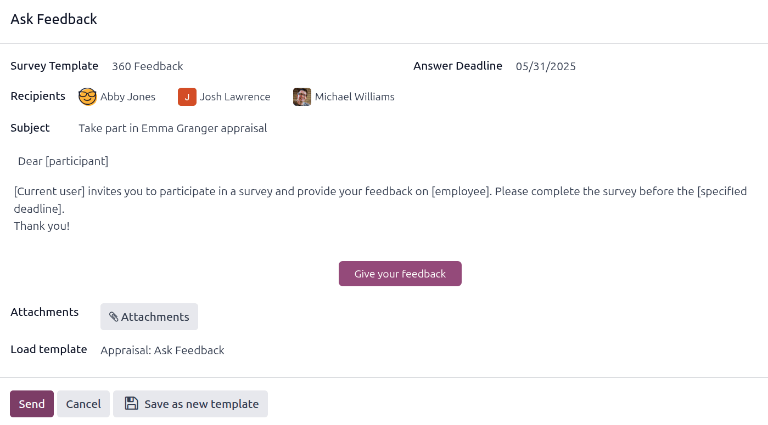
Klicken Sie auf die Schaltfläche Um Feedback bitten, und es öffnet sich ein E-Mail-Pop-up-Fenster Um Feedback bitten, das die E-Mail-Vorlage Beurteilung: Um Feedback bitten verwendet.
Bemerkung
Nur bestätigte Beurteilungen zeigen die Schaltfläche Um Feedback bitten.
Wählen Sie zunächst im Feld Empfänger über das Drop-down-Menü die Mitarbeiter aus, von denen Sie Feedback erhalten möchten. Es können mehrere Mitarbeiter ausgewählt werden. Das Datum für Antwortfrist wird automatisch auf den Tag festgelegt, an dem die Beurteilung fällig ist. Verwenden Sie die Kalenderauswahl, um das Datum bei Bedarf zu ändern.
Der Betreff wird mit Nehmen Sie an dieser Beurteilung teil (Name des Mitarbeiters) ausgefüllt, kann jedoch bei Bedarf geändert werden.
Geben Sie bei Bedarf weitere Kommentare in das dafür vorgesehene Feld ein. Die Kopie der E-Mail-Vorlage wird nicht im Pop-up-Fenster angezeigt.
Klicken Sie auf Senden, um die Feedback-Anfragen an die angegebenen Mitarbeiter zu senden.
Ergebnisse anzeigen
Um die Ergebnisse anzuzeigen, klicken Sie auf die Schaltfläche Feedbacks im Umfrageformular. Das Dashboard Feedback-Umfragen wird geladen und zeigt eine Liste aller Personen an, die um Feedback gebeten wurden. Jede Zeile zeigt die folgenden Informationen:
Mitarbeiter: Der Name des Mitarbeiters, der Feedback abgeben sollte.
Status: Ein Symbol, das anzeigt, ob das Feedback abgeschlossen oder neu ist.
Frist: Das Datum und die Uhrzeit, bis zu denen die Umfrage abgeschlossen werden muss.
Umfrage: Der Name der Umfrage, standardmäßig Meinungsformular für Mitarbeiter.

Bemerkung
Feedback-Anfragen, die gesendet wurden, aber nicht abgeschlossen wurden, werden als neu gekennzeichnet.
Um alle Antworten anzuzeigen, klicken Sie auf die Schaltfläche Ergebnisse anzeigen, und ein Pop-up-Fenster Umfrage auswählen wird geladen. Wählen Sie über das Drop-down-Menü 360-Grad-Feedback im Feld Umfrage aus und klicken Sie dann auf Ergebnisse anzeigen. Das gesammelte Feedback wird in einem neuen Reiter geladen.
Abgeschlossenes 360-Grad-Feedback
Feedback-Anfragen, die abgeschlossen wurden, zeigen ein grünes Status-Stichwort Abgeschlossen auf dem Feedback-Umfragen-Dashboard an.
Um die einzelnen Antworten eines ausgefüllten Feedbackformulars anzuzeigen, klicken Sie auf Antworten anzeigen am Ende der Zeile, und die individuellen Antworten des Mitarbeiters werden in einem neuen Reiter geladen.
Schließen Sie den Reiter, wenn die Prüfung abgeschlossen ist.
Neues 360-Grad-Feedback
Feedback-Anfragen, die gesendet wurden, aber noch nicht abgeschlossen sind, zeigen ein blaues Status-Stichwort Neu auf dem Feedback-Umfragen-Dashboard an.
Falls erforderlich, kann die Anfrage erneut gesendet werden. Klicken Sie auf Erneut senden am Ende der Zeile, und ein Pop-up-Fenster Um Feedback bitten wird geladen. Klicken Sie auf Senden, um die Feedback-Anfrage erneut zu senden.