
KI-Sprachtranskription
Odoo AI kann gesprochene Audioinhalte in Text transkribieren und aus diesem Transkript Zusammenfassungen generieren. Diese Funktion unterstützt sowohl Besprechungsaufzeichnungen als auch Echtzeit-Diktat und erleichtert die Erfassung von Notizen, Entscheidungen und Aktionspunkten ohne manuelles Tippen.
Sprachtranskription wandelt gesprochene Audioinhalte in ein schriftliches Transkript um. Sobald ein Transkript verfügbar ist, kann Odoo AI eine Zusammenfassung erstellen, die wichtige Informationen hervorhebt, wie z. B.:
wichtige Diskussionspunkte
Entscheidungen
Aktionspunkte
nächste Schritte
Transkription und Zusammenfassung können für Besprechungen, Anrufe, schnelle Diktate und interne Notizen verwendet werden.
Bemerkung
Sprachtranskripte können in den Feldern Beschreibung und Notizen der meisten Datensätze sowie in Wissensdatenbank-Artikeln erstellt werden.

Sprachtranskription funktioniert, indem während der Sitzung vorübergehend Audio aufgezeichnet, zur Transkription wiedergegeben und ein schriftliches Transkript sowie eine Zusammenfassung erstellt werden. Sobald der Transkriptionsprozess abgeschlossen ist, wird die Audioaufzeichnung automatisch verworfen. Die aufgezeichnete Audiodatei wird nicht gespeichert, ist nicht abspielbar und nicht über die Datenbank zugänglich.
Besprechung transkribieren
Um ein Sprachtranskript zu erstellen, geben Sie / ein, um die Powerbox zu öffnen. Wählen Sie Sprachtranskript aus der Dropdown-Liste. Dadurch wird ein neuer Textblock erstellt. Klicken Sie auf Notizen, um Notizen und Details zur Besprechung hinzuzufügen. Hier können Informationen wie eine Besprechungsagenda und Teilnehmer hinzugefügt werden. Klicken Sie auf Transkript, um zur Live-Ansicht des in Echtzeit erstellten Transkripts zu wechseln.
Wenn die Besprechung beginnen soll, klicken Sie auf Aufzeichnung starten.
Wichtig
Durch Klicken auf Aufzeichnung starten kann ein Pop-up im Browser erscheinen, das den Zugriff auf ein Mikrofon anfordert. Wenn die Berechtigung nicht erteilt wird, stoppt die Aufzeichnung und eine Fehlermeldung erscheint. Um diesen Fehler zu beheben, laden Sie die Seite neu und gewähren Sie Odoo Zugriff auf das Mikrofon.
Wenn die Besprechung beendet ist, klicken Sie auf Aufzeichnung stoppen. Die aufgezeichnete Audiodatei wird dann verarbeitet, um ein Transkript und eine AI-Zusammenfassung zu generieren. Sobald die Verarbeitung abgeschlossen ist, wird die Audioaufzeichnung automatisch verworfen, sodass nur das Transkript und die Zusammenfassung verfügbar bleiben.
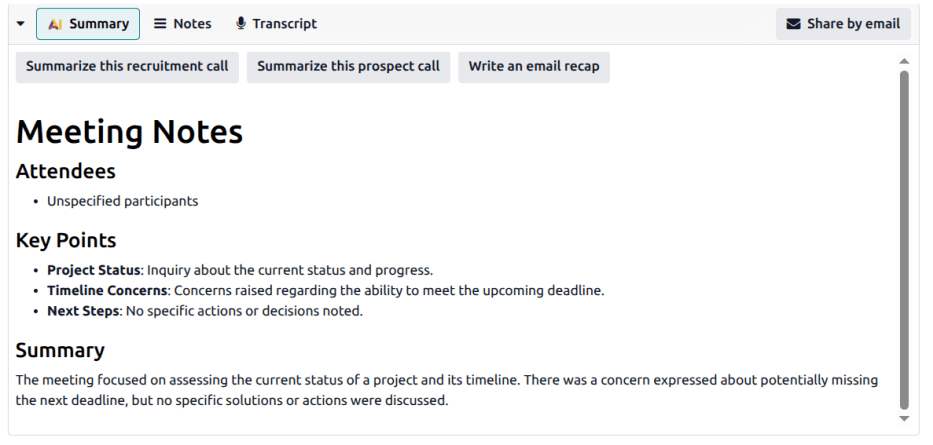
Die AI-Zusammenfassung kann manuell bearbeitet werden, um zusätzliche Einblicke zu bieten, z. B. die namentliche Identifizierung von Besprechungsteilnehmern oder die Angabe wichtiger Punkte. Die Besprechungsnotizen können dann in eine E-Mail-Zusammenfassung umgewandelt oder direkt per E-Mail geteilt werden, indem Sie auf die Schaltfläche Per E-Mail teilen klicken.