Formeln und Funktionen
Odoo Tabellenkalkulation unterstützt Funktionen, die in den meisten Tabellenkalkulationsprogrammen zu finden sind, sodass Sie Berechnungen durchführen, Informationen abrufen und Daten mithilfe von Formeln manipulieren können. Darüber hinaus können Sie durch die Verwendung von Odoo-spezifischen Funktionen mit Live-Odoo-Daten aus Ihrer Datenbank arbeiten.
Um die Datengenauigkeit zu gewährleisten, bietet Odoo Tabellenkalkulation verschiedene Möglichkeiten, um Fehler und Unstimmigkeiten zu beheben, die in Formeln und Funktionen auftreten.
Tipp
Verwenden Sie F2, um die Formel hinter einer aktiven Zelle anzuzeigen und bei Bedarf direkt in der Zelle zu bearbeiten.
Verfügbare Funktionen
In diesem Abschnitt werden die verfügbaren Funktionen nach Kategorien dargestellt. Odoo-spezifische Funktionen sind sowohl in der entsprechenden Kategorie als auch in einer speziellen Kategorie für Odoo enthalten:
Bemerkung
Formeln, die Funktionen enthalten, die nicht mit Excel kompatibel sind, werden beim Exportieren eines Arbeitsblatts durch ihr ausgewertetes Ergebnis ersetzt.
Array
Name und Argumente |
Beschreibung oder Link |
|---|---|
ARRAY.CONSTRAIN(input_range, rows, columns) |
Gibt ein Ergebnisarray zurück, das auf eine bestimmte Breite und Höhe beschränkt ist (mit Excel kompatibel) |
CHOOSECOLS(array, col_num, [col_num2, …]) |
|
CHOOSEROWS(array, row_num, [row_num2, …]) |
|
EXPAND(array, rows, [columns], [pad_with]) |
|
FLATTEN(range, [range2, …]) |
Glättet alle Werte aus einem oder mehreren Bereichen in einer einzigen Spalte (nicht mit Excel kompatibel) |
FREQUENCY(data, classes) |
|
HSTACK(range1, [range2, …]) |
|
MDETERM(square_matrix) |
|
MINVERSE(square_matrix) |
|
MMULT(matrix1, matrix2) |
|
SUMPRODUCT(range1, [range2, …]) |
|
SUMX2MY2(array_x, array_y) |
|
SUMX2PY2(array_x, array_y) |
|
SUMXMY2(array_x, array_y) |
|
TOCOL(array, [ignore], [scan_by_column]) |
|
TOROW(array, [ignore], [scan_by_column]) |
|
TRANSPOSE(range) |
|
VSTACK(range1, [range2, …]) |
|
WRAPCOLS(range, wrap_count, [pad_with]) |
|
WRAPROWS(range, wrap_count, [pad_with]) |
Datenbank
Name und Argumente |
Beschreibung oder Link |
|---|---|
DAVERAGE(database, field, criteria) |
|
DCOUNT(database, field, criteria) |
|
DCOUNTA(database, field, criteria) |
|
DGET(database, field, criteria) |
|
DMAX(database, field, criteria) |
|
DMIN(database, field, criteria) |
|
DPRODUCT(database, field, criteria) |
|
DSTDEV(database, field, criteria) |
|
DSTDEVP(database, field, criteria) |
|
DSUM(database, field, criteria) |
|
DVAR(database, field, criteria) |
|
DVARP(database, field, criteria) |
Datum
Name und Argumente |
Beschreibung oder Link |
|---|---|
DATE(year, month, day) |
|
DATEDIF(start_date, end_date, unit) |
|
DATEVALUE(date_string) |
|
DAY(date) |
|
DAYS(end_date, start_date) |
|
DAYS360(start_date, end_date, [method]) |
|
EDATE(start_date, months) |
|
EOMONTH(start_date, months) |
|
HOUR(time) |
|
ISOWEEKNUM(date) |
|
MINUTE(time) |
|
MONTH(date) |
|
MONTH.END(date) |
Letzter Tag des Monats nach einem Datum (nicht mit Excel kompatibel) |
MONTH.START(date) |
Erster Tag des Monats vor einem Datum (nicht mit Excel kompatibel) |
NETWORKDAYS(start_date, end_date, [holidays]) |
|
NETWORKDAYS.INTL(start_date, end_date, [weekend], [holidays]) |
|
NOW() |
|
QUARTER(date) |
Quartal des Jahres, in das ein bestimmtes Datum fällt (nicht mit Excel kompatibel) |
QUARTER.END(date) |
Letzter Tag des Quartals des Jahres, in das ein bestimmtes Datum fällt (nicht mit Excel kompatibel) |
QUARTER.START(date) |
Erster Tag des Quartals des Jahres, in das ein bestimmtes Datum fällt (nicht mit Excel kompatibel) |
SECOND(time) |
|
TIME(hour, minute, second) |
|
TIMEVALUE(time_string) |
|
TODAY() |
|
WEEKDAY(date, [type]) |
|
WEEKNUM(date, [type]) |
|
WORKDAY(start_date, num_days, [holidays]) |
|
WORKDAY.INTL(start_date, num_days, [weekend], [holidays]) |
|
YEAR(date) |
|
YEAR.END(date) |
Letzter Tag des Jahres, in das ein bestimmtes Datum fällt (nicht mit Excel kompatibel) |
YEAR.START(date) |
Erster Tag des Jahres, in das ein bestimmtes Datum fällt (nicht mit Excel kompatibel) |
YEARFRAC(start_date, end_date, [day_count_convention]) |
Genaue Anzahl der Jahre zwischen zwei Daten (nicht mit Excel kompatibel) |
Technik
Name und Argumente |
Beschreibung oder Link |
|---|---|
DELTA(number1, [number2]) |
Filter
Name und Argumente |
Beschreibung oder Link |
|---|---|
FILTER(range, condition1, [condition2, …]) |
|
ODOO.FILTER.LABEL(filter_name) |
Gibt die Bezeichnung des aktuellen Werts eines Tabellenfilters zurück (nicht kompatibel mit Excel) |
ODOO.FILTER.VALUE(filter_name) |
Gibt den aktuellen Wert eines Tabellenfilters zurück (nicht mit Excel kompatibel) |
SORT(range, [sort_column, …], [is_ascending, …]) |
|
UNIQUE(range, [by_column], [exactly_once]) |
Finanziell
Name und Argumente |
Beschreibung oder Link |
|---|---|
ACCRINTM(issue, maturity, rate, redemption, [day_count_convention]) |
|
AMORLINC(cost, purchase_date, first_period_end, salvage, period, rate, [day_count_convention]) |
|
COUPDAYBS(settlement, maturity, frequency, [day_count_convention]) |
|
COUPDAYS(settlement, maturity, frequency, [day_count_convention]) |
|
COUPDAYSNC(settlement, maturity, frequency, [day_count_convention]) |
|
COUPNCD(settlement, maturity, frequency, [day_count_convention]) |
|
COUPNUM(settlement, maturity, frequency, [day_count_convention]) |
|
COUPPCD(settlement, maturity, frequency, [day_count_convention]) |
|
CUMIPMT(rate, number_of_periods, present_value, first_period, last_period, [end_or_beginning]) |
|
CUMPRINC(rate, number_of_periods, present_value, first_period, last_period, [end_or_beginning]) |
|
DB(cost, salvage, life, period, [month]) |
|
DDB(cost, salvage, life, period, [factor]) |
|
DISC(settlement, maturity, price, redemption, [day_count_convention]) |
|
DOLLARDE(fractional_price, unit) |
|
DOLLARFR(decimal_price, unit) |
|
DURATION(settlement, maturity, rate, yield, frequency, [day_count_convention]) |
|
EFFECT(nominal_rate, periods_per_year) |
|
FV(rate, number_of_periods, payment_amount, [present_value], [end_or_beginning]) |
|
FVSCHEDULE(principal, rate_schedule) |
|
INTRATE(settlement, maturity, investment, redemption, [day_count_convention]) |
|
IPMT(rate, period, number_of_periods, present_value, [future_value], [end_or_beginning]) |
|
IRR(cashflow_amounts, [rate_guess]) |
|
ISPMT(rate, period, number_of_periods, present_value) |
|
MDURATION(settlement, maturity, rate, yield, frequency, [day_count_convention]) |
|
MIRR(cashflow_amounts, financing_rate, reinvestment_return_rate) |
|
NOMINAL(effective_rate, periods_per_year) |
|
NPER(rate, payment_amount, present_value, [future_value], [end_or_beginning]) |
|
NPV(discount, cashflow1, [cashflow2, …]) |
|
ODOO.ACCOUNT.GROUP(type) |
Gibt die Konto-IDs eine bestimmten Gruppe zurück (nicht mit Excel kompatibel) |
ODOO.BALANCE(account_codes, date_range, [offset], [company_id], [include_unposted]) |
Gibt den Gesamtsaldo für die angegebenen Konten und den Zeitraum zurück (nicht kompatibel mit Excel) |
ODOO.BALANCE.TAG(account_tag_ids, [date_range], [offset], [company_id], [include_unposted]) |
Gibt den Saldo der Konten für die angegebenen Tags und den Zeitraum zurück (nicht kompatibel mit Excel) |
ODOO.CREDIT(account_codes, date_range, [offset], [company_id], [include_unposted]) |
Gibt den Gesamtkredit für die angegebenen Konten und den Zeitraum zurück (nicht kompatibel mit Excel) |
ODOO.CURRENCY.RATE(currency_from, currency_to, [date]) |
Nimmt zwei Währungscodes als Argumente und gibt den Wechselkurs von der ersten zur zweiten Währung als Fließkommazahl zurück (nicht Excel-kompatibel) |
ODOO.DEBIT(account_codes, date_range, [offset], [company_id], [include_unposted]) |
Gibt die Gesamtsollbuchung für die angegebenen Konten und den Zeitraum zurück (nicht Excel-kompatibel) |
ODOO.FISCALYEAR.END(day, [company_id]) |
Gibt das Enddatum des Geschäftsjahres zurück, das das angegebene Datum einschließt (nicht mit Excel kompatibel) |
ODOO.FISCALYEAR.START(day, [company_id]) |
Gibt das Anfangsdatum des Geschäftsjahres zurück, das das angegebene Datum einschließt (nicht mit Excel kompatibel) |
ODOO.PARTNER.BALANCE(partner_ids, [account_codes], [date_range], [offset], [company_id], [include_unposted]) |
Gibt den Partnersaldo für die angegebenen Konten und den Zeitraum zurück (nicht Excel-kompatibel) |
ODOO.RESIDUAL([account_codes], [date_range], [offset], [company_id], [include_unposted]) |
Gibt den Restbetrag für die angegebenen Konten und den Zeitraum zurück (nicht Excel-kompatibel) |
PDURATION(rate, present_value, future_value) |
|
PMT(rate, number_of_periods, present_value, [future_value], [end_or_beginning]) |
|
PPMT(rate, period, number_of_periods, present_value, [future_value], [end_or_beginning]) |
|
PRICE(settlement, maturity, rate, yield, redemption, frequency, [day_count_convention]) |
|
PRICEDISC(settlement, maturity, discount, redemption, [day_count_convention]) |
|
PRICEMAT(settlement, maturity, issue, rate, yield, [day_count_convention]) |
|
PV(rate, number_of_periods, payment_amount, [future_value], [end_or_beginning]) |
|
RATE(number_of_periods, payment_per_period, present_value, [future_value], [end_or_beginning], [rate_guess]) |
|
RECEIVED(settlement, maturity, investment, discount, [day_count_convention]) |
|
RRI(number_of_periods, present_value, future_value) |
|
SLN(cost, salvage, life) |
|
SYD(cost, salvage, life, period) |
|
TBILLEQ(settlement, maturity, discount) |
|
TBILLPRICE(settlement, maturity, discount) |
|
TBILLYIELD(settlement, maturity, price) |
|
VDB(cost, salvage, life, start, end, [factor], [no_switch]) |
|
XIRR(cashflow_amounts, cashflow_dates, [rate_guess]) |
|
XNPV(discount, cashflow_amounts, cashflow_dates) |
|
YIELD(settlement, maturity, rate, price, redemption, frequency, [day_count_convention]) |
|
YIELDDISC(settlement, maturity, price, redemption, [day_count_convention]) |
|
YIELDMAT(settlement, maturity, issue, rate, price, [day_count_convention]) |
Information
Name und Argumente |
Beschreibung oder Link |
|---|---|
CELL(info_type, reference) |
|
ISBLANK(value) |
|
ISERR(value) |
|
ISERROR(value) |
|
ISFORMULA(cell_reference) |
|
ISLOGICAL(value) |
|
ISNA(value) |
|
ISNONTEXT(value) |
|
ISNUMBER(value) |
|
ISTEXT(value) |
|
NA() |
Logisch
Name und Argumente |
Beschreibung oder Link |
|---|---|
AND(logical_expression1, [logical_expression2, …]) |
|
FALSE() |
|
IF(logical_expression, value_if_true, [value_if_false]) |
|
IFERROR(value, [value_if_error]) |
|
IFNA(value, [value_if_error]) |
|
IFS(condition1, value1, [condition2, …], [value2, …]) |
|
NOT(logical_expression) |
|
OR(logical_expression1, [logical_expression2, …]) |
|
SWITCH(Ausdruck, Fall1, Wert1, [Fall2, …], [Wert2, …], [Standard]) |
|
TRUE() |
|
XOR(logical_expression1, [logical_expression2, …]) |
Nachschlagen
Name und Argumente |
Beschreibung oder Link |
|---|---|
ADDRESS(row, column, [absolute_relative_mode], [use_a1_notation], [sheet]) |
|
COLUMN([cell_reference]) |
|
COLUMNS(range) |
|
HLOOKUP(search_key, range, index, [is_sorted]) |
|
INDEX(reference, row, column) |
|
INDIRECT(reference, [use_a1_notation]) |
|
LOOKUP(search_key, search_array, [result_range]) |
|
MATCH(search_key, range, [search_type]) |
|
OFFSET(reference, rows, cols, [height], [width]) |
|
PIVOT(pivot_id, [row_count], [include_total], [include_column_titles], [column_count]) |
Erstellt eine Pivot-Tabelle (nicht Excel-kompatibel) |
PIVOT.HEADER(pivot_id, [domain_field_name, …], [domain_value, …]) |
Gibt die Kopfzeile einer Pivot-Tabelle zurück (nicht Excel-kompatibel) |
PIVOT.VALUE(pivot_id, measure_name, [domain_field_name, …], [domain_value, …]) |
Gibt den Wert aus einer Pivot-Tabelle zurück (nicht Excel-kompatibel) |
ROW([cell_reference]) |
|
ROWS(range) |
|
VLOOKUP(search_key, range, index, [is_sorted]) |
|
XLOOKUP(search_key, lookup_range, return_range, [if_not_found], [match_mode], [search_mode]) |
Mathe
Name und Argumente |
Beschreibung oder Link |
|---|---|
ABS(value) |
|
ACOS(value) |
|
ACOSH(value) |
|
ACOT(value) |
|
ACOTH(value) |
|
ASIN(value) |
|
ASINH(value) |
|
ATAN(value) |
|
ATAN2(x, y) |
|
ATANH(value) |
|
CEILING(value, [factor]) |
|
CEILING.MATH(number, [significance], [mode]) |
|
CEILING.PRECISE(number, [significance]) |
|
COS(angle) |
|
COSH(value) |
|
COT(angle) |
|
COTH(value) |
|
COUNTBLANK(value1, [value2, …]) |
|
COUNTIF(range, criterion) |
|
COUNTIFS(criteria_range1, criterion1, [criteria_range2, …], [criterion2, …]) |
|
CSC(angle) |
|
CSCH(value) |
|
DECIMAL(value, base) |
|
DEGREES(angle) |
|
EXP(value) |
|
FLOOR(value, [factor]) |
|
FLOOR.MATH(number, [significance], [mode]) |
|
FLOOR.PRECISE(number, [significance]) |
|
INT(value) |
|
ISEVEN(value) |
|
ISO.CEILING(number, [significance]) |
|
ISODD(value) |
|
LN(value) |
|
LOG(value, [base]) |
Gibt den Logarithmus einer Zahl für eine gegebene Basis zurück (nicht Excel-kompatibel) |
MOD(dividend, divisor) |
|
MUNIT(dimension) |
|
ODD(value) |
|
PI() |
|
POWER(base, exponent) |
|
PRODUCT(factor1, [factor2, …]) |
|
RAND() |
|
RANDARRAY([rows], [columns], [min], [max], [whole_number]) |
|
RANDBETWEEN(low, high) |
|
ROUND(value, [places]) |
|
ROUNDDOWN(value, [places]) |
|
ROUNDUP(value, [places]) |
|
SEC(angle) |
|
SECH(value) |
|
SEQUENCE(rows, [columns], [start], ][step]) |
|
SIN(angle) |
|
SINH(value) |
|
SQRT(value) |
|
SUBTOTAL(Funktionscode, Ref1, [Ref2, …]) |
|
SUM(value1, [value2, …]) |
|
SUMIF(criteria_range, criterion, [sum_range]) |
|
SUMIFS(sum_range, criteria_range1, criterion1, [criteria_range2, …], [criterion2, …]) |
|
TAN(angle) |
|
TANH(value) |
|
TRUNC(value, [places]) |
Operatoren
Name und Argumente |
Beschreibung oder Link |
|---|---|
ADD(value1, value2) |
Summe von zwei Zahlen (nicht mit Excel kompatibel) |
CONCAT(value1, value2) |
|
DIVIDE(dividend, divisor) |
Eine Zahl geteilt durch eine andere (nicht mit Excel kompatibel) |
EQ(value1, value2) |
Gleich (nicht mit Excel kompatibel) |
GT(value1, value2) |
Unbedingt größer als (nicht mit Excel kompatibel) |
GTE(value1, value2) |
Größer oder gleich (nicht mit Excel kompatibel) |
LT(value1, value2) |
Kleiner als (nicht mit Excel kompatibel) |
LTE(value1, value2) |
Kleiner oder gleich (nicht mit Excel kompatibel) |
MINUS(value1, value2) |
Differenz zwischen zwei Zahlen (nicht mit Excel kompatibel) |
MULTIPLY(factor1, factor2) |
Produkt von zwei Zahlen (nicht mit Excel kompatibel) |
NE(value1, value2) |
Nicht gleich (nicht mit Excel kompatibel) |
POW(base, exponent) |
Eine Zahl zu einer Potenz hochgezählt (nicht mit Excel kompatibel) |
UMINUS(value) |
Eine Zahl mit umgekehrtem Zeichen (nicht mit Excel kompatibel) |
UNARY.PERCENT(percentage) |
Wert, der als Prozentsatz interpretiert wird (nicht mit Excel kompatibel) |
UPLUS(value) |
Eine bestimmte Zahl, unverändert (nicht mit Excel kompatibel) |
Parser
Name und Argumente |
Beschreibung oder Link |
|---|---|
CONVERT(number, from_unit, to_unit) |
Statistisch
Name und Argumente |
Beschreibung oder Link |
|---|---|
AVEDEV(value1, [value2, …]) |
|
AVERAGE(value1, [value2, …]) |
|
AVERAGEA(value1, [value2, …]) |
|
AVERAGEIF(criteria_range, criterion, [average_range]) |
|
AVERAGEIFS(average_range, criteria_range1, criterion1, [criteria_range2, …], [criterion2, …]) |
|
AVERAGE.WEIGHTED(values, weights, [additional_values, …], [additional_weights, …]) |
Gewichteter Durchschnitt (nicht mit Excel kompatibel) |
CORREL(data_y, data_x) |
|
COUNT(value1, [value2, …]) |
|
COUNTA(value1, [value2, …]) |
|
COVAR(data_y, data_x) |
|
COVARIANCE.P(data_y, data_x) |
|
COVARIANCE.S(data_y, data_x) |
|
FORECAST(x, data_y, data_x) |
|
GROWTH(known_data_y, [known_data_x], [new_data_x], [b]) |
Passt Punkte an exponentiellen Wachstumstrend an (nicht mit Excel kompatibel) |
INTERCEPT(data_y, data_x) |
|
LARGE(data, n) |
|
LINEST(data_y, [data_x], [calculate_b], [verbose]) |
|
LOGEST(data_y, [data_x], [calculate_b], [verbose]) |
|
MATTHEWS(data_x, data_y) |
Berechnet den Matthews-Korrelationskoeffizienten eines Datensatzes (nicht Excel-kompatibel) |
MAX(value1, [value2, …]) |
|
MAXA(value1, [value2, …]) |
|
MAXIFS(range, criteria_range1, criterion1, [criteria_range2, …], [criterion2, …]) |
|
MEDIAN(value1, [value2, …]) |
|
MIN(value1, [value2, …]) |
|
MINA(value1, [value2, …]) |
|
MINIFS(range, criteria_range1, criterion1, [criteria_range2, …], [criterion2, …]) |
|
PEARSON(data_y, data_x) |
|
PERCENTILE(data, percentile) |
|
PERCENTILE.EXC(data, percentile) |
|
PERCENTILE.INC(data, percentile) |
|
POLYFIT.COEFFS(data_y, data_x, order, [intercept]) |
Berechnet die Koeffizienten der polynomialen Regression des Datensatzes (nicht Excel-kompatibel) |
POLYFIT.FORECAST(x, data_y, data_x, order, [intercept]) |
Sagt Werte vorher durch Berechnung einer polynomialen Regression des Datensatzes (nicht Excel-kompatibel) |
QUARTILE(data, quartile_number) |
|
QUARTILE.EXC(data, quartile_number) |
|
QUARTILE.INC(data, quartile_number) |
|
RANK(value, data, [is_ascending]) |
|
RSQ(data_y, data_x) |
|
SLOPE(data_y, data_x) |
|
SMALL(data, n) |
|
SPEARMAN(data_y, data_x) |
Berechnet den Spearman-Rangkorrelationskoeffizienten eines Datensatzes (nicht Excel-kompatibel) |
STDEV(value1, [value2, …]) |
|
STDEV.P(value1, [value2, …]) |
|
STDEV.S(value1, [value2, …]) |
|
STDEVA(value1, [value2, …]) |
|
STDEVP(value1, [value2, …]) |
|
STDEVPA(value1, [value2, …]) |
|
STEYX(data_y, data_x) |
|
TREND(known_data_y, [known_data_x], [new_data_x], [b]) |
Passt die Punkte an einen linearen Trend an, der mit Hilfe der Methode der kleinsten Quadrate ermittelt wurde (nicht mit Excel kompatibel) |
VAR(value1, [value2, …]) |
|
VAR.P(value1, [value2, …]) |
|
VAR.S(value1, [value2, …]) |
|
VARA(value1, [value2, …]) |
|
VARP(value1, [value2, …]) |
|
VARPA(value1, [value2, …]) |
Text
Name und Argumente |
Beschreibung oder Link |
|---|---|
CHAR(table_number) |
|
CLEAN(text) |
|
CONCATENATE(string1, [string2, …]) |
|
EXACT(string1, string2) |
|
FIND(search_for, text_to_search, [starting_at]) |
|
JOIN(delimiter, value_or_array1, [value_or_array2, …]) |
Verkettet Elemente von Arrays mit Begrenzer (nicht mit Excel kompatibel) |
LEFT(text, [number_of_characters]) |
|
LEN(text) |
|
LOWER(text) |
|
MID(text, starting_at, extract_length) |
|
PROPER(text_to_capitalize) |
|
REPLACE(text, position, length, new_text) |
|
REGEXEXTRACT(Text, Muster, [Rückgabemodus], [Groß-/Kleinschreibung]) |
|
RIGHT(text, [number_of_characters]) |
|
SEARCH(search_for, text_to_search, [starting_at]) |
|
SPLIT(text, delimiter, [split_by_each], [remove_empty_text]) |
Teilt Text nach bestimmten Trennzeichen auf (nicht Excel-kompatibel) |
SUBSTITUTE(text_to_search, search_for, replace_with, [occurrence_number]) |
|
TEXT(number, format) |
|
TEXTAFTER(Text, Trennzeichen, [Instanznummer], [Übereinstimmungsmodus], [Übereinstimmungsende], [falls_nicht_gefunden]) |
|
TEXTBEFORE(Text, Trennzeichen, [Instanznummer], [Übereinstimmungsmodus], [Übereinstimmungsende], [falls_nicht_gefunden]) |
|
TEXTJOIN(delimiter, ignore_empty, text1, [text2, …]) |
|
TEXTSPLIT(Text, Spalten_Trennzeichen, [Zeilen_Trennzeichen], [Leerwerte_ignorieren], [Vergleichsmodus], [Auffüllen_mit]) |
|
TRIM(text) |
|
UPPER(text) |
|
VALUE(text) |
Web
Name und Argumente |
Beschreibung oder Link |
|---|---|
HYPERLINK(url, [link_label]) |
Odoo-spezifische Funktionen
Dieser Abschnitt enthält Funktionen, die direkt mit Ihrer Odoo-Datenbank interagieren.
Array
Name und Argumente |
Beschreibung oder Link |
|---|---|
ARRAY.CONSTRAIN(input_range, rows, columns) |
Gibt ein Ergebnisarray zurück, das auf eine bestimmte Breite und Höhe beschränkt ist (mit Excel kompatibel) |
FLATTEN(range, [range2, …]) |
Glättet alle Werte aus einem oder mehreren Bereichen in einer einzigen Spalte (nicht mit Excel kompatibel) |
Datum
Name und Argumente |
Beschreibung oder Link |
|---|---|
MONTH.END(date) |
Letzter Tag des Monats nach einem Datum (nicht mit Excel kompatibel) |
MONTH.START(date) |
Erster Tag des Monats vor einem Datum (nicht mit Excel kompatibel) |
QUARTER(date) |
Quartal des Jahres, in das ein bestimmtes Datum fällt (nicht mit Excel kompatibel) |
QUARTER.END(date) |
Letzter Tag des Quartals des Jahres, in das ein bestimmtes Datum fällt (nicht mit Excel kompatibel) |
QUARTER.START(date) |
Erster Tag des Quartals des Jahres, in das ein bestimmtes Datum fällt (nicht mit Excel kompatibel) |
YEAR.END(date) |
Letzter Tag des Jahres, in das ein bestimmtes Datum fällt (nicht mit Excel kompatibel) |
YEAR.START(date) |
Erster Tag des Jahres, in das ein bestimmtes Datum fällt (nicht mit Excel kompatibel) |
YEARFRAC(start_date, end_date, [day_count_convention]) |
Genaue Anzahl der Jahre zwischen zwei Daten (nicht mit Excel kompatibel) |
Finanziell
Name und Argumente |
Beschreibung oder Link |
|---|---|
ODOO.ACCOUNT.GROUP(type) |
Gibt die Konto-IDs eine bestimmten Gruppe zurück (nicht mit Excel kompatibel) |
ODOO.BALANCE(account_codes, date_range, [offset], [company_id], [include_unposted]) |
Gibt den Gesamtsaldo für die angegebenen Konten und den Zeitraum zurück (nicht kompatibel mit Excel) |
ODOO.BALANCE.TAG(account_tag_ids, [date_range], [offset], [company_id], [include_unposted]) |
Gibt den Saldo der Konten für die angegebenen Tags und den Zeitraum zurück (nicht kompatibel mit Excel) |
ODOO.CREDIT(account_codes, date_range, [offset], [company_id], [include_unposted]) |
Gibt den Gesamtkredit für die angegebenen Konten und den Zeitraum zurück (nicht kompatibel mit Excel) |
ODOO.CURRENCY.RATE(currency_from, currency_to, [date]) |
Nimmt zwei Währungscodes als Argumente und gibt den Wechselkurs von der ersten zur zweiten Währung als Fließkommazahl zurück (nicht Excel-kompatibel) |
ODOO.DEBIT(account_codes, date_range, [offset], [company_id], [include_unposted]) |
Gibt die Gesamtsollbuchung für die angegebenen Konten und den Zeitraum zurück (nicht Excel-kompatibel) |
ODOO.FISCALYEAR.START(day, [company_id]) |
Gibt das Anfangsdatum des Geschäftsjahres zurück, das das angegebene Datum einschließt (nicht mit Excel kompatibel) |
ODOO.FISCALYEAR.END(day, [company_id]) |
Gibt das Enddatum des Geschäftsjahres zurück, das das angegebene Datum einschließt (nicht mit Excel kompatibel) |
ODOO.PARTNER.BALANCE(partner_ids, [account_codes], [date_range], [offset], [company_id], [include_unposted]) |
Gibt den Partnersaldo für die angegebenen Konten und den Zeitraum zurück (nicht Excel-kompatibel) |
ODOO.RESIDUAL([account_codes], [date_range], [offset], [company_id], [include_unposted]) |
Gibt den Restbetrag für die angegebenen Konten und den Zeitraum zurück (nicht Excel-kompatibel) |
Nachschlagen
Name und Argumente |
Beschreibung oder Link |
|---|---|
PIVOT(pivot_id, [row_count], [include_total], [include_column_titles], [column_count]) |
Erstellt eine Pivot-Tabelle (nicht Excel-kompatibel) |
PIVOT.HEADER(pivot_id, [domain_field_name, …], [domain_value, …]) |
Gibt die Kopfzeile einer Pivot-Tabelle zurück (nicht Excel-kompatibel) |
PIVOT.VALUE(pivot_id, measure_name, [domain_field_name, …], [domain_value, …]) |
Gibt den Wert aus einer Pivot-Tabelle zurück (nicht Excel-kompatibel) |
Mathe
Name und Argumente |
Beschreibung oder Link |
|---|---|
COUNTUNIQUE(value1, [value2, …]) |
Zählt die Anzahl der eindeutigen Werte in einem Bereich (nicht mit Excel kompatibel) |
COUNTUNIQUEIFS(range, criteria_range1, criterion1, [criteria_range2, …], [criterion2, …]) |
Zählt die Anzahl der eindeutigen Werte in einem Bereich, gefiltert nach einer Reihe von Kriterien (nicht mit Excel kompatibel). |
Diverse
Name und Argumente |
Beschreibung oder Link |
|---|---|
FORMAT.LARGE.NUMBER(value, [unit]) |
Wendet ein großes Zahlenformat an (nicht kompatibel mit Excel) |
ODOO.LIST(list_id, index, field_name) |
Gibt den Wert aus einer Liste zurück (nicht kompatibel mit Excel) |
ODOO.LIST.HEADER(list_id, field_name) |
Gibt die Kopfzeile einer Liste zurück (nicht kompatibel mit Excel) |
ODOO.SURVEY(survey_id) |
Gibt die Ergebnisse einer Odoo-Umfrage zurück (nicht mit Excel kompatibel) |
Operatoren
Name und Argumente |
Beschreibung oder Link |
|---|---|
ADD(value1, value2) |
Summe von zwei Zahlen (nicht mit Excel kompatibel) |
DIVIDE(dividend, divisor) |
Eine Zahl geteilt durch eine andere (nicht mit Excel kompatibel) |
EQ(value1, value2) |
Gleich (nicht mit Excel kompatibel) |
GT(value1, value2) |
Unbedingt größer als (nicht mit Excel kompatibel) |
GTE(value1, value2) |
Größer oder gleich (nicht mit Excel kompatibel) |
LT(value1, value2) |
Kleiner als (nicht mit Excel kompatibel) |
LTE(value1, value2) |
Kleiner oder gleich (nicht mit Excel kompatibel) |
MINUS(value1, value2) |
Differenz zwischen zwei Zahlen (nicht mit Excel kompatibel) |
MULTIPLY(factor1, factor2) |
Produkt von zwei Zahlen (nicht mit Excel kompatibel) |
NE(value1, value2) |
Nicht gleich (nicht mit Excel kompatibel) |
POW(base, exponent) |
Eine Zahl zu einer Potenz hochgezählt (nicht mit Excel kompatibel) |
UMINUS(value) |
Eine Zahl mit umgekehrtem Zeichen (nicht mit Excel kompatibel) |
UNARY.PERCENT(percentage) |
Wert, der als Prozentsatz interpretiert wird (nicht mit Excel kompatibel) |
UPLUS(value) |
Eine bestimmte Zahl, unverändert (nicht mit Excel kompatibel) |
Statistisch
Name und Argumente |
Beschreibung oder Link |
|---|---|
AVERAGE.WEIGHTED(values, weights, [additional_values, …], [additional_weights, …]) |
Gewichteter Durchschnitt (nicht mit Excel kompatibel) |
GROWTH(known_data_y, [known_data_x], [new_data_x], [b]) |
Passt Punkte an exponentiellen Wachstumstrend an (nicht mit Excel kompatibel) |
MATTHEWS(data_x, data_y) |
Berechnet den Matthews-Korrelationskoeffizienten eines Datensatzes (nicht Excel-kompatibel) |
POLYFIT.COEFFS(data_y, data_x, order, [intercept]) |
Berechnet die Koeffizienten der polynomialen Regression des Datensatzes (nicht Excel-kompatibel) |
POLYFIT.FORECAST(x, data_y, data_x, order, [intercept]) |
Sagt Werte vorher durch Berechnung einer polynomialen Regression des Datensatzes (nicht Excel-kompatibel) |
SPEARMAN(data_y, data_x) |
Berechnet den Spearman-Rangkorrelationskoeffizienten eines Datensatzes (nicht Excel-kompatibel) |
TREND(known_data_y, [known_data_x], [new_data_x], [b]) |
Passt die Punkte an einen linearen Trend an, der mit Hilfe der Methode der kleinsten Quadrate ermittelt wurde (nicht mit Excel kompatibel) |
Text
Name und Argumente |
Beschreibung oder Link |
|---|---|
JOIN(delimiter, value_or_array1, [value_or_array2, …]) |
Verkettet Elemente von Arrays mit Begrenzer (nicht mit Excel kompatibel) |
Fehlerbehebung
Fehler verstehen
Wenn eine Formel keinen Wert zurückgeben kann, zeigt die Zelle eine Fehlermeldung an, die den Fehlertyp angibt. Beispielsweise weist #NV darauf hin, dass bei der Verwendung einer Nachschlagefunktion kein Wert gefunden wurde, #NAME? zeigt an, dass ein Funktionsname falsch geschrieben oder nicht erkannt wurde, während #BAD_EXPR auf ein Problem mit den Argumenten einer Funktion hinweist.
Wenn Sie mit dem Mauszeiger über eine Zelle mit einer Fehlermeldung fahren, wird eine Karte mit weiteren Details zum Fehler angezeigt.
Tipp
Verwenden Sie die Funktion WENNFEHLER, um ein alternatives Ergebnis anzugeben, wenn ein Fehler auftritt. Um beispielsweise bei der Verwendung einer SVERWEIS-Funktion mehrere
#NV-Fehler zu vermeiden, gibt die folgende FormelNicht gefundenstatt#NVzurück:=WENNFEHLER(SVERWEIS(D1; A:B; 1; 0); "Nicht gefunden").Verwenden Sie in einem großen Datensatz die Unregelmäßigkeitskarte, um Zellen visuell hervorzuheben, deren Formeln nicht mit dem Muster der umliegenden Zellen übereinstimmen.
Formelinkonsistenzen erkennen
Probleme mit Formeln – wie das versehentliche Überschreiben einer Formel mit einem festen Wert, das Beschädigen eines Zellbezugs oder das Nichtbeachten der Argumente einer Funktion – können dazu führen, dass falsche Werte angezeigt werden. In einem großen Datensatz können solche Fehler manuell besonders schwer zu erkennen sein.
Die Unregelmäßigkeitskarte von Odoo Tabellen analysiert Formeln auf Muster und hebt Anomalien visuell hervor: Zellen, deren Formeln demselben Muster folgen, haben dieselbe Farbe, während Anomalien in einer anderen Farbe dargestellt werden.
Um das Werkzeug zu verwenden, klicken Sie in der Menüleiste auf und prüfen Sie dann die Tabellenkalkulation auf Inkonsistenzen. Um die Unregelmäßigkeitskarte zu deaktivieren, klicken Sie im Banner unter der Symbolleiste auf Unregelmäßigkeitskarte oder Deaktivieren.
Example
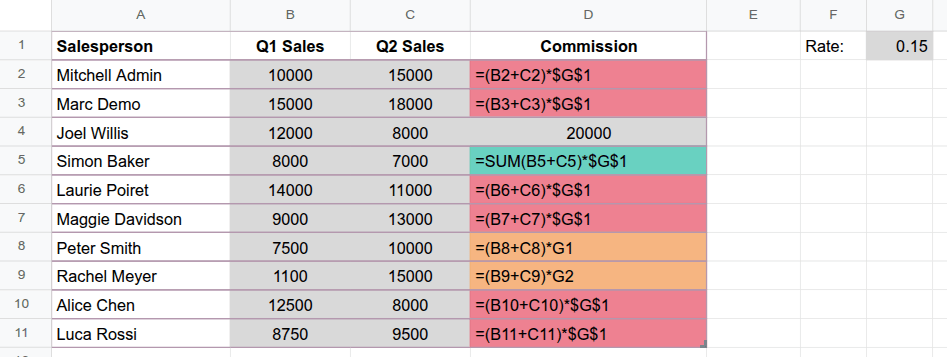
Im Beispiel (in dem die Formeln durch Auswahl von in der Menüleiste sichtbar gemacht wurden), enthält Spalte D den Provisionsbetrag, der im ersten und zweiten Quartal verdient wurde. Dieser wird berechnet, indem die in Spalten B und C dargestellten Verkäufe der beiden Quartale addiert und dann mit dem Bonussatz in Zelle G1 multipliziert werden.
Die Unregelmäßigkeitskarte erkennt die Muster in den Formeln in Spalte D. Zellen, die dem Muster der ursprünglichen Formel in Zelle D2 folgen, haben dieselbe rote Farbe, während die folgenden Anomalien separat hervorgehoben werden:
Zelle D4: Diese Zelle enthält einen statischen Wert anstelle der Formel.
Zelle D5: Die Formel in dieser Zelle folgt nicht dem Muster der ursprünglichen Formel.
Zellen D8 und D9: In Zelle D8 fehlt der absolute Bezug (
$) aufG1. Wenn die Formel in Zelle D9 gezogen wird, entsteht ein Bezugsfehler, da Zelle G2 leer ist. Da die Formeln in den beiden Zellen demselben Muster folgen, haben sie dieselbe Farbe.