Formulas and functions
Odoo Spreadsheet supports functions found in most spreadsheet solutions, allowing you to perform calculations, retrieve information, and manipulate data using formulas. In addition, using Odoo-specific functions allows you to work with live Odoo data from your database.
To help ensure data accuracy, Odoo Spreadsheet offers various ways to troubleshoot errors and inconsistencies in formulas and functions.
Tip
Use F2 to view the formula behind an active cell, and, if desired, edit it directly in the
cell.
Available functions
This section presents the available functions by category. Odoo-specific functions are included both in the relevant category and in a dedicated Odoo category:
Note
สูตรที่มีฟังก์ชันซึ่งไม่รองรับกับ Excel จะถูกแทนที่ด้วยผลลัพธ์ที่คำนวณแล้วเมื่อส่งออกสเปรดชีต
อาร์เรย์
ชื่อและอาร์กิวเมนต์ |
คำอธิบายหรือลิงก์ |
|---|---|
ARRAY.CONSTRAIN(input_range, rows, columns) |
ส่งกลับอาร์เรย์ผลลัพธ์ที่ถูกจำกัดความกว้างและความสูงเฉพาะ (ไม่รองรับกับ Excel) |
CHOOSECOLS(array, col_num, [col_num2, ...]) |
|
CHOOSEROWS(array, row_num, [row_num2, ...]) |
|
EXPAND(array, rows, [columns], [pad_with]) |
|
FLATTEN(range, [range2, ...]) |
แปลงค่าทั้งหมดจากหนึ่งช่วงหรือมากกว่าให้เป็นคอลัมน์เดียว (ไม่รองรับกับ Excel) |
FREQUENCY(data, classes) |
|
HSTACK(range1, [range2, ...]) |
|
MDETERM(square_matrix) |
|
MINVERSE(square_matrix) |
|
MMULT(matrix1, matrix2) |
|
SUMPRODUCT(range1, [range2, ...]) |
|
SUMX2MY2(array_x, array_y) |
|
SUMX2PY2(array_x, array_y) |
|
SUMXMY2(array_x, array_y) |
|
TOCOL(array, [ignore], [scan_by_column]) |
|
TOROW(array, [ignore], [scan_by_column]) |
|
TRANSPOSE(range) |
|
VSTACK(range1, [range2, ...]) |
|
WRAPCOLS(range, wrap_count, [pad_with]) |
|
WRAPROWS(range, wrap_count, [pad_with]) |
ฐานข้อมูล
ชื่อและอาร์กิวเมนต์ |
คำอธิบายหรือลิงก์ |
|---|---|
DAVERAGE(database, field, criteria) |
|
DCOUNT(database, field, criteria) |
|
DCOUNTA(database, field, criteria) |
|
DGET(database, field, criteria) |
|
DMAX(database, field, criteria) |
|
DMIN(database, field, criteria) |
|
DPRODUCT(database, field, criteria) |
|
DSTDEV(database, field, criteria) |
|
DSTDEVP(database, field, criteria) |
|
DSUM(database, field, criteria) |
|
DVAR(database, field, criteria) |
|
DVARP(database, field, criteria) |
วันที่
ชื่อและอาร์กิวเมนต์ |
คำอธิบายหรือลิงก์ |
|---|---|
DATE(year, month, day) |
|
DATEDIF(start_date, end_date, unit) |
|
DATEVALUE(date_string) |
|
DAY(date) |
|
DAYS(end_date, start_date) |
|
DAYS360(start_date, end_date, [method]) |
|
EDATE(start_date, months) |
|
EOMONTH(start_date, months) |
|
HOUR(time) |
|
ISOWEEKNUM(date) |
|
MINUTE(time) |
|
MONTH(date) |
|
MONTH.END(date) |
วันสุดท้ายของเดือนถัดจากวันที่ (ไม่เข้ากันกับ Excel) |
MONTH.START(date) |
วันแรกของเดือนก่อนหน้าวันที่ (ไม่เข้ากันกับ Excel) |
NETWORKDAYS(start_date, end_date, [holidays]) |
|
NETWORKDAYS.INTL(start_date, end_date, [weekend], [holidays]) |
|
NOW() |
|
QUARTER(date) |
ไตรมาสของปีที่วันที่ที่ระบุตรงกับ (ไม่เข้ากันกับ Excel) |
QUARTER.END(date) |
วันสุดท้ายของไตรมาสของปีที่วันที่ที่ระบุตรงกับ (ไม่เข้ากันกับ Excel) |
QUARTER.START(date) |
วันแรกของไตรมาสของปีที่วันที่ที่ระบุตรงกับ (ไม่เข้ากันกับ Excel) |
SECOND(time) |
|
TIME(hour, minute, second) |
|
TIMEVALUE(time_string) |
|
TODAY() |
|
WEEKDAY(date, [type]) |
|
WEEKNUM(date, [type]) |
|
WORKDAY(start_date, num_days, [holidays]) |
|
WORKDAY.INTL(start_date, num_days, [weekend], [holidays]) |
|
YEAR(date) |
|
YEAR.END(date) |
วันสุดท้ายของปีที่วันที่ที่ระบุตรงกับ (ใช้ไม่ได้กับ Excel) |
YEAR.START(date) |
วันแรกของปีที่วันที่ที่ระบุตรงกับ (ใช้ไม่ได้กับ Excel) |
YEARFRAC(start_date, end_date, [day_count_convention]) |
จำนวนปีที่แน่นอนระหว่างสองวันที่ (ใช้ไม่ได้กับ Excel) |
วิศวกรรม
ชื่อและอาร์กิวเมนต์ |
คำอธิบายหรือลิงก์ |
|---|---|
DELTA(number1, [number2]) |
ตัวกรอง
ชื่อและอาร์กิวเมนต์ |
คำอธิบายหรือลิงก์ |
|---|---|
FILTER(range, condition1, [condition2, ...]) |
|
ODOO.FILTER.LABEL(filter_name) |
Returns the label of the current value of a spreadsheet filter (not compatible with Excel) |
ODOO.FILTER.VALUE(filter_name) |
ส่งกลับค่าปัจจุบันของตัวกรองสปรีดชีต (ใช้ไม่ได้กับ Excel) |
SORT(range, [sort_column, ...], [is_ascending, ...]) |
|
UNIQUE(range, [by_column], [exactly_once]) |
การเงิน
ชื่อและอาร์กิวเมนต์ |
คำอธิบายหรือลิงก์ |
|---|---|
ACCRINTM(issue, maturity, rate, redemption, [day_count_convention]) |
|
AMORLINC(cost, purchase_date, first_period_end, salvage, period, rate, [day_count_convention]) |
|
COUPDAYBS(settlement, maturity, frequency, [day_count_convention]) |
|
COUPDAYS(settlement, maturity, frequency, [day_count_convention]) |
|
COUPDAYSNC(settlement, maturity, frequency, [day_count_convention]) |
|
COUPNCD(settlement, maturity, frequency, [day_count_convention]) |
|
COUPNUM(settlement, maturity, frequency, [day_count_convention]) |
|
COUPPCD(settlement, maturity, frequency, [day_count_convention]) |
|
CUMIPMT(rate, number_of_periods, present_value, first_period, last_period, [end_or_beginning]) |
|
CUMPRINC(rate, number_of_periods, present_value, first_period, last_period, [end_or_beginning]) |
|
DB(cost, salvage, life, period, [month]) |
|
DDB(cost, salvage, life, period, [factor]) |
|
DISC(settlement, maturity, price, redemption, [day_count_convention]) |
|
DOLLARDE(fractional_price, unit) |
|
DOLLARFR(decimal_price, unit) |
|
DURATION(settlement, maturity, rate, yield, frequency, [day_count_convention]) |
|
EFFECT(nominal_rate, periods_per_year) |
|
FV(rate, number_of_periods, payment_amount, [present_value], [end_or_beginning]) |
|
FVSCHEDULE(principal, rate_schedule) |
|
INTRATE(settlement, maturity, investment, redemption, [day_count_convention]) |
|
IPMT(rate, period, number_of_periods, present_value, [future_value], [end_or_beginning]) |
|
IRR(cashflow_amounts, [rate_guess]) |
|
ISPMT(rate, period, number_of_periods, present_value) |
|
MDURATION(settlement, maturity, rate, yield, frequency, [day_count_convention]) |
|
MIRR(cashflow_amounts, financing_rate, reinvestment_return_rate) |
|
NOMINAL(effective_rate, periods_per_year) |
|
NPER(rate, payment_amount, present_value, [future_value], [end_or_beginning]) |
|
NPV(discount, cashflow1, [cashflow2, ...]) |
|
ODOO.ACCOUNT.GROUP(type) |
ส่งคืน ID ของบัญชีในกลุ่มที่กำหนด (ไม่เข้ากันกับ Excel) |
ODOO.BALANCE(account_codes, date_range, [offset], [company_id], [include_unposted]) |
ส่งกลับยอดคงเหลือทั้งหมดสำหรับบัญชีและช่วงเวลาที่ระบุ (ไม่สามารถใช้ร่วมกับ Excel ได้) |
ODOO.BALANCE.TAG(account_tag_ids, [date_range], [offset], [company_id], [include_unposted]) |
ส่งกลับยอดคงเหลือของบัญชีสำหรับแท็กและช่วงเวลาที่ระบุ (ไม่สามารถใช้ร่วมกับ Excel ได้) |
ODOO.CREDIT(account_codes, date_range, [offset], [company_id], [include_unposted]) |
ส่งกลับบัตรเครดิตทั้งหมดสำหรับบัญชีและช่วงเวลาที่ระบุ (ไม่สามารถใช้ร่วมกับ Excel ได้) |
ODOO.CURRENCY.RATE(currency_from, currency_to, [date]) |
รับรหัสสกุลเงินสองรหัสเป็นอาร์กิวเมนต์ และส่งกลับอัตราแลกเปลี่ยนจากสกุลเงินแรกไปยังสกุลที่สองเป็นทศนิยม (ไม่สามารถใช้ร่วมกับ Excel ได้) |
ODOO.DEBIT(account_codes, date_range, [offset], [company_id], [include_unposted]) |
ส่งคืนยอดเดบิตรวมสำหรับบัญชีและงวดที่ระบุ (ไม่รองรับกับ Excel) |
ODOO.FISCALYEAR.END(day, [company_id]) |
ส่งคืนวันที่สิ้นสุดของปีบัญชีที่ครอบคลุมวันที่ที่กำหนด (ไม่เข้ากันกับ Excel) |
ODOO.FISCALYEAR.START(day, [company_id]) |
ส่งคืนวันที่เริ่มต้นของปีบัญชีที่ครอบคลุมวันที่ที่กำหนด (ไม่เข้ากันกับ Excel) |
ODOO.PARTNER.BALANCE(partner_ids, [account_codes], [date_range], [offset], [company_id], [include_unposted]) |
ส่งคืนยอดคงเหลือของคู่ค้าสำหรับบัญชีและงวดที่ระบุ (ไม่รองรับกับ Excel) |
ODOO.RESIDUAL([account_codes], [date_range], [offset], [company_id], [include_unposted]) |
ส่งคืนจำนวนคงเหลือสำหรับบัญชีและงวดที่ระบุ (ไม่รองรับกับ Excel) |
PDURATION(rate, present_value, future_value) |
|
PMT(rate, number_of_periods, present_value, [future_value], [end_or_beginning]) |
|
PPMT(rate, period, number_of_periods, present_value, [future_value], [end_or_beginning]) |
|
PRICE(settlement, maturity, rate, yield, redemption, frequency, [day_count_convention]) |
|
PRICEDISC(settlement, maturity, discount, redemption, [day_count_convention]) |
|
PRICEMAT(settlement, maturity, issue, rate, yield, [day_count_convention]) |
|
PV(rate, number_of_periods, payment_amount, [future_value], [end_or_beginning]) |
|
RATE(number_of_periods, payment_per_period, present_value, [future_value], [end_or_beginning], [rate_guess]) |
|
RECEIVED(settlement, maturity, investment, discount, [day_count_convention]) |
|
RRI(number_of_periods, present_value, future_value) |
|
SLN(cost, salvage, life) |
|
SYD(cost, salvage, life, period) |
|
TBILLEQ(settlement, maturity, discount) |
|
TBILLPRICE(settlement, maturity, discount) |
|
TBILLYIELD(settlement, maturity, price) |
|
VDB(cost, salvage, life, start, end, [factor], [no_switch]) |
|
XIRR(cashflow_amounts, cashflow_dates, [rate_guess]) |
|
XNPV(discount, cashflow_amounts, cashflow_dates) |
|
YIELD(settlement, maturity, rate, price, redemption, frequency, [day_count_convention]) |
|
YIELDDISC(settlement, maturity, price, redemption, [day_count_convention]) |
|
YIELDMAT(settlement, maturity, issue, rate, price, [day_count_convention]) |
ข้อมูล
ชื่อและอาร์กิวเมนต์ |
คำอธิบายหรือลิงก์ |
|---|---|
CELL(info_type, reference) |
|
ISBLANK(value) |
|
ISERR(value) |
|
ISERROR(value) |
|
ISFORMULA(cell_reference) |
|
ISLOGICAL(value) |
|
ISNA(value) |
|
ISNONTEXT(value) |
|
ISNUMBER(value) |
|
ISTEXT(value) |
|
NA() |
ตรรกะ
ชื่อและอาร์กิวเมนต์ |
คำอธิบายหรือลิงก์ |
|---|---|
AND(logical_expression1, [logical_expression2, ...]) |
|
FALSE() |
|
IF(logical_expression, value_if_true, [value_if_false]) |
|
IFERROR(value, [value_if_error]) |
|
IFNA(value, [value_if_error]) |
|
IFS(condition1, value1, [condition2, ...], [value2, ...]) |
|
NOT(logical_expression) |
|
OR(logical_expression1, [logical_expression2, ...]) |
|
SWITCH(expression, case1, value1, [case2, ...], [value2, ...], [default]) |
|
TRUE() |
|
XOR(logical_expression1, [logical_expression2, ...]) |
ค้นหา
ชื่อและอาร์กิวเมนต์ |
คำอธิบายหรือลิงก์ |
|---|---|
ADDRESS(row, column, [absolute_relative_mode], [use_a1_notation], [sheet]) |
|
COLUMN([cell_reference]) |
|
COLUMNS(range) |
|
HLOOKUP(search_key, range, index, [is_sorted]) |
|
INDEX(reference, row, column) |
|
INDIRECT(reference, [use_a1_notation]) |
|
LOOKUP(search_key, search_array, [result_range]) |
|
MATCH(search_key, range, [search_type]) |
|
OFFSET(reference, rows, cols, [height], [width]) |
|
PIVOT(pivot_id, [row_count], [include_total], [include_column_titles], [column_count]) |
สร้างตารางสรุปข้อมูล (ไม่รองรับกับ Excel) |
PIVOT.HEADER(pivot_id, [domain_field_name, ...], [domain_value, ...]) |
ส่งคืนส่วนหัวของตารางสรุปข้อมูล (ไม่รองรับกับ Excel) |
PIVOT.VALUE(pivot_id, measure_name, [domain_field_name, ...], [domain_value, ...]) |
ส่งคืนค่าจากตารางสรุปข้อมูล (ไม่รองรับกับ Excel) |
ROW([cell_reference]) |
|
ROWS(range) |
|
VLOOKUP(search_key, range, index, [is_sorted]) |
|
XLOOKUP(search_key, lookup_range, return_range, [if_not_found], [match_mode], [search_mode]) |
คณิตศาสตร์
ชื่อและอาร์กิวเมนต์ |
คำอธิบายหรือลิงก์ |
|---|---|
ABS(value) |
|
ACOS(value) |
|
ACOSH(value) |
|
ACOT(value) |
|
ACOTH(value) |
|
ASIN(value) |
|
ASINH(value) |
|
ATAN(value) |
|
ATAN2(x, y) |
|
ATANH(value) |
|
CEILING(value, [factor]) |
|
CEILING.MATH(number, [significance], [mode]) |
|
CEILING.PRECISE(number, [significance]) |
|
COS(angle) |
|
COSH(value) |
|
COT(angle) |
|
COTH(value) |
|
COUNTBLANK(value1, [value2, ...]) |
|
COUNTIF(range, criterion) |
|
COUNTIFS(criteria_range1, criterion1, [criteria_range2, ...], [criterion2, ...]) |
|
CSC(angle) |
|
CSCH(value) |
|
DECIMAL(value, base) |
|
DEGREES(angle) |
|
EXP(value) |
|
FLOOR(value, [factor]) |
|
FLOOR.MATH(number, [significance], [mode]) |
|
FLOOR.PRECISE(number, [significance]) |
|
INT(value) |
|
ISEVEN(value) |
|
ISO.CEILING(number, [significance]) |
|
ISODD(value) |
|
LN(value) |
|
LOG(value, [base]) |
ส่งคืนลอการิทึมของตัวเลขสำหรับฐานที่กำหนด (ไม่รองรับกับ Excel) |
MOD(dividend, divisor) |
|
MUNIT(dimension) |
|
ODD(value) |
|
PI() |
|
POWER(base, exponent) |
|
PRODUCT(factor1, [factor2, ...]) |
|
RAND() |
|
RANDARRAY([rows], [columns], [min], [max], [whole_number]) |
|
RANDBETWEEN(low, high) |
|
ROUND(value, [places]) |
|
ROUNDDOWN(value, [places]) |
|
ROUNDUP(value, [places]) |
|
SEC(angle) |
|
SECH(value) |
|
SEQUENCE(rows, [columns], [start], ][step]) |
|
SIN(angle) |
|
SINH(value) |
|
SQRT(value) |
|
SUBTOTAL(function_code, ref1, [ref2, ...]) |
|
SUM(value1, [value2, ...]) |
|
SUMIF(criteria_range, criterion, [sum_range]) |
|
SUMIFS(sum_range, criteria_range1, criterion1, [criteria_range2, ...], [criterion2, ...]) |
|
TAN(angle) |
|
TANH(value) |
|
TRUNC(value, [places]) |
ตัวดำเนินการ
ชื่อและอาร์กิวเมนต์ |
คำอธิบายหรือลิงก์ |
|---|---|
ADD(value1, value2) |
ผลรวมของตัวเลขสองตัว (ไม่สามารถใช้ร่วมกับ Excel ได้) |
CONCAT(value1, value2) |
|
DIVIDE(dividend, divisor) |
ตัวเลขหนึ่งหารด้วยอีกตัวเลขหนึ่ง (ไม่สามารถใช้ร่วมกับ Excel ได้) |
EQ(value1, value2) |
เท่ากับ (ไม่สามารถใช้ร่วมกับ Excel ได้) |
GT(value1, value2) |
มากกว่าอย่างเคร่งครัด (ไม่สามารถใช้ร่วมกับ Excel ได้) |
GTE(value1, value2) |
มากกว่าหรือเท่ากับ (ไม่สามารถใช้ร่วมกับ Excel ได้) |
LT(value1, value2) |
น้อยกว่า (ไม่สามารถใช้ร่วมกับ Excel ได้) |
LTE(value1, value2) |
น้อยกว่าหรือเท่ากับ (ไม่สามารถใช้ร่วมกับ Excel ได้) |
MINUS(value1, value2) |
ผลต่างของตัวเลขสองตัว (ไม่สามารถใช้ร่วมกับ Excel ได้) |
MULTIPLY(factor1, factor2) |
ผลคูณของตัวเลขสองตัว (ใช้ร่วมกับ Excel ไม่ได้) |
NE(value1, value2) |
ไม่เท่ากับ (ใช้ร่วมกับ Excel ไม่ได้) |
POW(base, exponent) |
ตัวเลขยกกำลัง (ใช้ร่วมกับ Excel ไม่ได้) |
UMINUS(value) |
ตัวเลขที่มีการเซ็นกลับด้าน (ใช้ร่วมกับ Excel ไม่ได้) |
UNARY.PERCENT(percentage) |
ค่าที่ตีความเป็นเปอร์เซ็นต์ (ใช้ร่วมกับ Excel ไม่ได้) |
UPLUS(value) |
ตัวเลขที่ระบุโดยไม่มีการเปลี่ยนแปลง (ใช้ร่วมกับ Excel ไม่ได้) |
Parser
ชื่อและอาร์กิวเมนต์ |
คำอธิบายหรือลิงก์ |
|---|---|
CONVERT(number, from_unit, to_unit) |
เชิงสถิติ
ชื่อและอาร์กิวเมนต์ |
คำอธิบายหรือลิงก์ |
|---|---|
AVEDEV(value1, [value2, ...]) |
|
AVERAGE(value1, [value2, ...]) |
|
AVERAGEA(value1, [value2, ...]) |
|
AVERAGEIF(criteria_range, criterion, [average_range]) |
|
AVERAGEIFS(average_range, criteria_range1, criterion1, [criteria_range2, ...], [criterion2, ...]) |
|
AVERAGE.WEIGHTED(values, weights, [additional_values, ...], [additional_weights, ...]) |
ค่าเฉลีย์ถ่วงน้ำหนัก (ไม่รองรับกับ Excel) |
CORREL(data_y, data_x) |
|
COUNT(value1, [value2, ...]) |
|
COUNTA(value1, [value2, ...]) |
|
COVAR(data_y, data_x) |
|
COVARIANCE.P(data_y, data_x) |
|
COVARIANCE.S(data_y, data_x) |
|
FORECAST(x, data_y, data_x) |
|
GROWTH(known_data_y, [known_data_x], [new_data_x], [b]) |
ปรับจุดให้เข้ากับแนวโน้มการเติบโตแบบเลขชี้กำลัง (ไม่รองรับกับ Excel) |
INTERCEPT(data_y, data_x) |
|
LARGE(data, n) |
|
LINEST(data_y, [data_x], [calculate_b], [verbose]) |
|
LOGEST(data_y, [data_x], [calculate_b], [verbose]) |
|
MATTHEWS(data_x, data_y) |
คำนวณค่าสัมประสิทธิ์สหสัมพันธ์ Matthews ของชุดข้อมูล (ไม่รองรับกับ Excel) |
MAX(value1, [value2, ...]) |
|
MAXA(value1, [value2, ...]) |
|
MAXIFS(range, criteria_range1, criterion1, [criteria_range2, ...], [criterion2, ...]) |
|
MEDIAN(value1, [value2, ...]) |
|
MIN(value1, [value2, ...]) |
|
MINA(value1, [value2, ...]) |
|
MINIFS(range, criteria_range1, criterion1, [criteria_range2, ...], [criterion2, ...]) |
|
PEARSON(data_y, data_x) |
|
PERCENTILE(data, percentile) |
|
PERCENTILE.EXC(data, percentile) |
|
PERCENTILE.INC(data, percentile) |
|
POLYFIT.COEFFS(data_y, data_x, order, [intercept]) |
คำนวณค่าสัมประสิทธิ์ของการถดถอยพหุนามของชุดข้อมูล (ไม่รองรับกับ Excel) |
POLYFIT.FORECAST(x, data_y, data_x, order, [intercept]) |
ทำนายค่าโดยการคำนวณการถดถอยพหุนามของชุดข้อมูล (ไม่รองรับกับ Excel) |
QUARTILE(data, quartile_number) |
|
QUARTILE.EXC(data, quartile_number) |
|
QUARTILE.INC(data, quartile_number) |
|
RANK(value, data, [is_ascending]) |
|
RSQ(data_y, data_x) |
|
SLOPE(data_y, data_x) |
|
SMALL(data, n) |
|
SPEARMAN(data_y, data_x) |
คำนวณค่าสัมประสิทธิ์สหสัมพันธ์อันดับของสเปียร์แมนของชุดข้อมูล (ไม่รองรับกับ Excel) |
STDEV(value1, [value2, ...]) |
|
STDEV.P(value1, [value2, ...]) |
|
STDEV.S(value1, [value2, ...]) |
|
STDEVA(value1, [value2, ...]) |
|
STDEVP(value1, [value2, ...]) |
|
STDEVPA(value1, [value2, ...]) |
|
STEYX(data_y, data_x) |
|
TREND(known_data_y, [known_data_x], [new_data_x], [b]) |
ปรับจุดข้อมูลให้เข้ากับแนวโน้มเชิงเส้นที่ได้มาจากวิธีกำลังสองน้อยที่สุด (ไม่เข้ากันกับ Excel) |
VAR(value1, [value2, ...]) |
|
VAR.P(value1, [value2, ...]) |
|
VAR.S(value1, [value2, ...]) |
|
VARA(value1, [value2, ...]) |
|
VARP(value1, [value2, ...]) |
|
VARPA(value1, [value2, ...]) |
ข้อความ
ชื่อและอาร์กิวเมนต์ |
คำอธิบายหรือลิงก์ |
|---|---|
CHAR(table_number) |
|
CLEAN(text) |
|
CONCATENATE(string1, [string2, ...]) |
|
EXACT(string1, string2) |
|
FIND(search_for, text_to_search, [starting_at]) |
|
JOIN(delimiter, value_or_array1, [value_or_array2, ...]) |
เชื่อมต่อองค์ประกอบของอาร์เรย์ด้วยตัวคั่น (ไม่สามารถใช้งานร่วมกับ Excel ได้) |
LEFT(text, [number_of_characters]) |
|
LEN(text) |
|
LOWER(text) |
|
MID(text, starting_at, extract_length) |
|
PROPER(text_to_capitalize) |
|
REPLACE(text, position, length, new_text) |
|
REGEXEXTRACT(text, pattern, [return_mode], [case_sensitivity]) |
|
RIGHT(text, [number_of_characters]) |
|
SEARCH(search_for, text_to_search, [starting_at]) |
|
SPLIT(text, delimiter, [split_by_each], [remove_empty_text]) |
แยกข้อความตามตัวคั่นอักขระที่ระบุ (ไม่รองรับกับ Excel) |
SUBSTITUTE(text_to_search, search_for, replace_with, [occurrence_number]) |
|
TEXT(number, format) |
|
TEXTAFTER(text, delimiter, [instance_num], [match_mode], [match_end], [if_not_found]) |
|
TEXTBEFORE(text, delimiter, [instance_num], [match_mode], [match_end], [if_not_found]) |
|
TEXTJOIN(delimiter, ignore_empty, text1, [text2, ...]) |
|
TEXTSPLIT(text, col_delimiter, [row_delimiter], [ignore_empty], [match_mode], [pad_with]) |
|
TRIM(text) |
|
UPPER(text) |
|
VALUE(text) |
เว็บ
ชื่อและอาร์กิวเมนต์ |
คำอธิบายหรือลิงก์ |
|---|---|
HYPERLINK(url, [link_label]) |
ฟังก์ชันเฉพาะของ Odoo
ส่วนนี้ประกอบด้วยฟังก์ชันที่ทำงานโดยตรงกับฐานข้อมูล Odoo ของคุณ
อาร์เรย์
ชื่อและอาร์กิวเมนต์ |
คำอธิบายหรือลิงก์ |
|---|---|
ARRAY.CONSTRAIN(input_range, rows, columns) |
ส่งกลับอาร์เรย์ผลลัพธ์ที่ถูกจำกัดความกว้างและความสูงเฉพาะ (ไม่รองรับกับ Excel) |
FLATTEN(range, [range2, ...]) |
แปลงค่าทั้งหมดจากหนึ่งช่วงหรือมากกว่าให้เป็นคอลัมน์เดียว (ไม่รองรับกับ Excel) |
วันที่
ชื่อและอาร์กิวเมนต์ |
คำอธิบายหรือลิงก์ |
|---|---|
MONTH.END(date) |
วันสุดท้ายของเดือนถัดจากวันที่ (ไม่เข้ากันกับ Excel) |
MONTH.START(date) |
วันแรกของเดือนก่อนหน้าวันที่ (ไม่เข้ากันกับ Excel) |
QUARTER(date) |
ไตรมาสของปีที่วันที่ที่ระบุตรงกับ (ไม่เข้ากันกับ Excel) |
QUARTER.END(date) |
วันสุดท้ายของไตรมาสของปีที่วันที่ที่ระบุตรงกับ (ไม่เข้ากันกับ Excel) |
QUARTER.START(date) |
วันแรกของไตรมาสของปีที่วันที่ที่ระบุตรงกับ (ไม่เข้ากันกับ Excel) |
YEAR.END(date) |
วันสุดท้ายของปีที่วันที่ที่ระบุตรงกับ (ใช้ไม่ได้กับ Excel) |
YEAR.START(date) |
วันแรกของปีที่วันที่ที่ระบุตรงกับ (ใช้ไม่ได้กับ Excel) |
YEARFRAC(start_date, end_date, [day_count_convention]) |
จำนวนปีที่แน่นอนระหว่างสองวันที่ (ใช้ไม่ได้กับ Excel) |
การเงิน
ชื่อและอาร์กิวเมนต์ |
คำอธิบายหรือลิงก์ |
|---|---|
ODOO.ACCOUNT.GROUP(type) |
ส่งคืน ID ของบัญชีในกลุ่มที่กำหนด (ไม่เข้ากันกับ Excel) |
ODOO.BALANCE(account_codes, date_range, [offset], [company_id], [include_unposted]) |
ส่งกลับยอดคงเหลือทั้งหมดสำหรับบัญชีและช่วงเวลาที่ระบุ (ไม่สามารถใช้ร่วมกับ Excel ได้) |
ODOO.BALANCE.TAG(account_tag_ids, [date_range], [offset], [company_id], [include_unposted]) |
ส่งกลับยอดคงเหลือของบัญชีสำหรับแท็กและช่วงเวลาที่ระบุ (ไม่สามารถใช้ร่วมกับ Excel ได้) |
ODOO.CREDIT(account_codes, date_range, [offset], [company_id], [include_unposted]) |
ส่งกลับบัตรเครดิตทั้งหมดสำหรับบัญชีและช่วงเวลาที่ระบุ (ไม่สามารถใช้ร่วมกับ Excel ได้) |
ODOO.CURRENCY.RATE(currency_from, currency_to, [date]) |
รับรหัสสกุลเงินสองรหัสเป็นอาร์กิวเมนต์ และส่งกลับอัตราแลกเปลี่ยนจากสกุลเงินแรกไปยังสกุลที่สองเป็นทศนิยม (ไม่สามารถใช้ร่วมกับ Excel ได้) |
ODOO.DEBIT(account_codes, date_range, [offset], [company_id], [include_unposted]) |
ส่งคืนยอดเดบิตรวมสำหรับบัญชีและงวดที่ระบุ (ไม่รองรับกับ Excel) |
ODOO.FISCALYEAR.START(day, [company_id]) |
ส่งคืนวันที่เริ่มต้นของปีบัญชีที่ครอบคลุมวันที่ที่กำหนด (ไม่เข้ากันกับ Excel) |
ODOO.FISCALYEAR.END(day, [company_id]) |
ส่งคืนวันที่สิ้นสุดของปีบัญชีที่ครอบคลุมวันที่ที่กำหนด (ไม่เข้ากันกับ Excel) |
ODOO.PARTNER.BALANCE(partner_ids, [account_codes], [date_range], [offset], [company_id], [include_unposted]) |
ส่งคืนยอดคงเหลือของคู่ค้าสำหรับบัญชีและงวดที่ระบุ (ไม่รองรับกับ Excel) |
ODOO.RESIDUAL([account_codes], [date_range], [offset], [company_id], [include_unposted]) |
ส่งคืนจำนวนคงเหลือสำหรับบัญชีและงวดที่ระบุ (ไม่รองรับกับ Excel) |
ค้นหา
ชื่อและอาร์กิวเมนต์ |
คำอธิบายหรือลิงก์ |
|---|---|
PIVOT(pivot_id, [row_count], [include_total], [include_column_titles], [column_count]) |
สร้างตารางสรุปข้อมูล (ไม่รองรับกับ Excel) |
PIVOT.HEADER(pivot_id, [domain_field_name, ...], [domain_value, ...]) |
ส่งคืนส่วนหัวของตารางสรุปข้อมูล (ไม่รองรับกับ Excel) |
PIVOT.VALUE(pivot_id, measure_name, [domain_field_name, ...], [domain_value, ...]) |
ส่งคืนค่าจากตารางสรุปข้อมูล (ไม่รองรับกับ Excel) |
คณิตศาสตร์
ชื่อและอาร์กิวเมนต์ |
คำอธิบายหรือลิงก์ |
|---|---|
COUNTUNIQUE(value1, [value2, ...]) |
นับจำนวนค่าที่ไม่ซ้ำกันในช่วง (ไม่สามารถใช้งานร่วมกับ Excel ได้) |
COUNTUNIQUEIFS(range, criteria_range1, criterion1, [criteria_range2, ...], [criterion2, ...]) |
นับจำนวนค่าที่ไม่ซ้ำกันในช่วง โดยกรองด้วยชุดของเกณฑ์ (ไม่สามารถใช้งานร่วมกับ Excel ได้) |
ข้อมูลเบ็ดเตล็ด
ชื่อและอาร์กิวเมนต์ |
คำอธิบายหรือลิงก์ |
|---|---|
FORMAT.LARGE.NUMBER(value, [unit]) |
ใช้รูปแบบตัวเลขขนาดใหญ่ (ไม่สามารถใช้งานร่วมกับ Excel ได้) |
ODOO.LIST(list_id, index, field_name) |
ส่งคืนค่าจากรายการ (ไม่สามารถใช้งานร่วมกับ Excel ได้) |
ODOO.LIST.HEADER(list_id, field_name) |
ส่งคืนหัวเรื่องของรายการ (ไม่สามารถใช้งานร่วมกับ Excel ได้) |
ODOO.SURVEY(survey_id) |
Returns the results of an Odoo survey (not compatible with Excel) |
ตัวดำเนินการ
ชื่อและอาร์กิวเมนต์ |
คำอธิบายหรือลิงก์ |
|---|---|
ADD(value1, value2) |
ผลรวมของตัวเลขสองตัว (ไม่สามารถใช้ร่วมกับ Excel ได้) |
DIVIDE(dividend, divisor) |
ตัวเลขหนึ่งหารด้วยอีกตัวเลขหนึ่ง (ไม่สามารถใช้ร่วมกับ Excel ได้) |
EQ(value1, value2) |
เท่ากับ (ไม่สามารถใช้ร่วมกับ Excel ได้) |
GT(value1, value2) |
มากกว่าอย่างเคร่งครัด (ไม่สามารถใช้ร่วมกับ Excel ได้) |
GTE(value1, value2) |
มากกว่าหรือเท่ากับ (ไม่สามารถใช้ร่วมกับ Excel ได้) |
LT(value1, value2) |
น้อยกว่า (ไม่สามารถใช้ร่วมกับ Excel ได้) |
LTE(value1, value2) |
น้อยกว่าหรือเท่ากับ (ไม่สามารถใช้ร่วมกับ Excel ได้) |
MINUS(value1, value2) |
ผลต่างของตัวเลขสองตัว (ไม่สามารถใช้ร่วมกับ Excel ได้) |
MULTIPLY(factor1, factor2) |
ผลคูณของตัวเลขสองตัว (ใช้ร่วมกับ Excel ไม่ได้) |
NE(value1, value2) |
ไม่เท่ากับ (ใช้ร่วมกับ Excel ไม่ได้) |
POW(base, exponent) |
ตัวเลขยกกำลัง (ใช้ร่วมกับ Excel ไม่ได้) |
UMINUS(value) |
ตัวเลขที่มีการเซ็นกลับด้าน (ใช้ร่วมกับ Excel ไม่ได้) |
UNARY.PERCENT(percentage) |
ค่าที่ตีความเป็นเปอร์เซ็นต์ (ใช้ร่วมกับ Excel ไม่ได้) |
UPLUS(value) |
ตัวเลขที่ระบุโดยไม่มีการเปลี่ยนแปลง (ใช้ร่วมกับ Excel ไม่ได้) |
เชิงสถิติ
ชื่อและอาร์กิวเมนต์ |
คำอธิบายหรือลิงก์ |
|---|---|
AVERAGE.WEIGHTED(values, weights, [additional_values, ...], [additional_weights, ...]) |
ค่าเฉลีย์ถ่วงน้ำหนัก (ไม่รองรับกับ Excel) |
GROWTH(known_data_y, [known_data_x], [new_data_x], [b]) |
ปรับจุดให้เข้ากับแนวโน้มการเติบโตแบบเลขชี้กำลัง (ไม่รองรับกับ Excel) |
MATTHEWS(data_x, data_y) |
คำนวณค่าสัมประสิทธิ์สหสัมพันธ์ Matthews ของชุดข้อมูล (ไม่รองรับกับ Excel) |
POLYFIT.COEFFS(data_y, data_x, order, [intercept]) |
คำนวณค่าสัมประสิทธิ์ของการถดถอยพหุนามของชุดข้อมูล (ไม่รองรับกับ Excel) |
POLYFIT.FORECAST(x, data_y, data_x, order, [intercept]) |
ทำนายค่าโดยการคำนวณการถดถอยพหุนามของชุดข้อมูล (ไม่รองรับกับ Excel) |
SPEARMAN(data_y, data_x) |
คำนวณค่าสัมประสิทธิ์สหสัมพันธ์อันดับของสเปียร์แมนของชุดข้อมูล (ไม่รองรับกับ Excel) |
TREND(known_data_y, [known_data_x], [new_data_x], [b]) |
ปรับจุดข้อมูลให้เข้ากับแนวโน้มเชิงเส้นที่ได้มาจากวิธีกำลังสองน้อยที่สุด (ไม่เข้ากันกับ Excel) |
ข้อความ
ชื่อและอาร์กิวเมนต์ |
คำอธิบายหรือลิงก์ |
|---|---|
JOIN(delimiter, value_or_array1, [value_or_array2, ...]) |
เชื่อมต่อองค์ประกอบของอาร์เรย์ด้วยตัวคั่น (ไม่สามารถใช้งานร่วมกับ Excel ได้) |
การแก้ไขปัญหา
Understand errors
When a formula is unable to return a value, the cell displays an error message that identifies the
type of error. For example, #N/A indicates that a value is not found when using a lookup function,
#NAME? indicates that a function name is misspelled or unrecognised, while #BAD_EXPR indicates
an issue with the arguments of a function.
Hovering over a cell with an error message reveals a card that provides more details about the error.
Tip
Use the IFERROR function to provide an alternative result when an error occurs. For example, to avoid multiple
#N/Aerrors when using a VLOOKUP function, the following formula returnsNot Foundinstead of#N/A:=IFERROR(VLOOKUP(D1, A:B, 1, 0), "Not Found").In a large dataset, use the Irregularity map to visually highlight cells whose formulas are not consistent with the pattern established by surrounding cells.
Detect formula inconsistencies
Issues with formulas, such as accidentally overwriting a formula with a fixed value, breaking a cell reference, or not respecting the arguments of a function, can result in incorrect values being displayed. In a large dataset, such errors can be particularly difficult to identify manually.
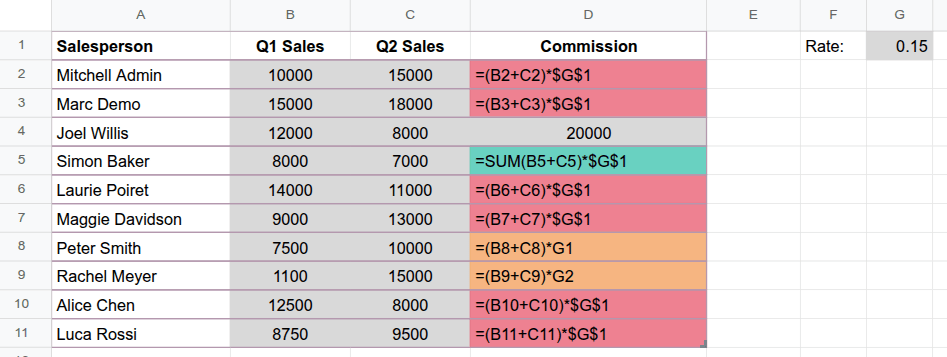
Odoo Spreadsheet's Irregularity map analyzes formulas for patterns and highlights anomalies visually: cells whose formulas follow the same pattern share the same color, while anomalies are shown in a different color.
To use the tool, click from the menu bar, then check the spreadsheet for inconsistencies. To turn off the irregularity map, click Irregularity map or Turn off on the banner below the toolbar.
Example
In the example (in which the formulas have been made visible by selecting from the menu bar), column D contains the amount of commission earned over the first and second quarters. This is calculated by adding the sales of the two quarters, shown in columns B and C, then multiplying it by the bonus rate in cell G1.
The irregularity map identifies the patterns in the formulas in column D. Cells that follow the pattern of the initial formula used in cell D2 have the same red color, while the following anomalies are highlighted separately:
Cell D4: This cell features a static value instead of the formula.
Cell D5: The formula in this cell does not follow the pattern of the initial formula.
Cells D8 and D9: Cell D8 is missing the absolute reference (
$) onG1; when the formula is dragged to cell D9, this creates a referencing error because cell G2 is empty. As the formulas in the two cells follow the same pattern, they share the same color.