
Trascrizione vocale AI
Odoo AI può trascrivere audio parlato in testo e generare riepiloghi da tale trascrizione. Questa funzionalità supporta sia le registrazioni di riunioni che la dettatura in tempo reale, rendendo più facile acquisire note, decisioni ed elementi di azione senza digitazione manuale.
La trascrizione vocale converte l’audio parlato in una trascrizione scritta. Una volta disponibile una trascrizione, Odoo AI può generare un riepilogo che evidenzia le informazioni chiave, come:
punti di discussione chiave
decisioni
elementi di azione
prossimi passi
La trascrizione e la sintesi possono essere utilizzate per riunioni, chiamate, dettati rapidi e note interne.
Nota
Le trascrizioni vocali possono essere create nei campi Descrizione e Note della maggior parte dei record, nonché negli articoli di Knowledge.
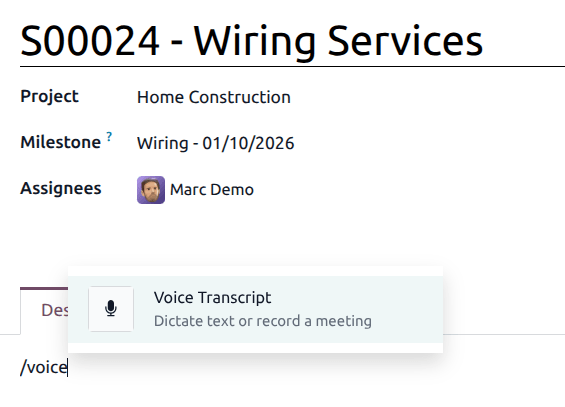
La trascrizione vocale funziona registrando temporaneamente l’audio durante la sessione, riproducendolo per la trascrizione e generando una trascrizione scritta e un riepilogo. Una volta completato il processo di trascrizione, la registrazione audio viene automaticamente eliminata. L’audio registrato non viene memorizzato, non è riproducibile né accessibile dal database.
Trascrivere una riunione
Per creare una trascrizione vocale, digitare / per aprire il powerbox. Selezionare Trascrizione vocale dall’elenco a discesa. Questo crea un nuovo blocco di testo. Fare clic su Note per aggiungere note e dettagli relativi alla riunione. Qui è possibile aggiungere informazioni come l’ordine del giorno della riunione e i partecipanti. Fare clic su Trascrizione per passare a una visualizzazione in tempo reale della trascrizione creata.
Quando la riunione è pronta per iniziare, fare clic su Avvia registrazione.
Importante
Facendo clic su Avvia registrazione potrebbe apparire un pop-up nel browser che richiede l’accesso al microfono. Se il permesso non viene concesso, la registrazione si interrompe e appare un messaggio di errore. Per risolvere questo errore, aggiornare la pagina e consentire a Odoo l’accesso al microfono.
Al termine della riunione, fare clic su Interrompi registrazione. L’audio registrato viene quindi elaborato per generare una trascrizione e un riepilogo AI. Una volta completata l’elaborazione, la registrazione audio viene automaticamente eliminata, lasciando disponibili solo la trascrizione e il riepilogo.

Il riepilogo AI può essere modificato manualmente per fornire ulteriori dettagli, come identificare i partecipanti alla riunione per nome o specificare i punti chiave. Le note della riunione possono quindi essere convertite in un riepilogo via email o condivise direttamente via email facendo clic sul pulsante Condividi via email.