
Convertire i Lead in opportunità
When moving opportunities through the CRM pipeline, Leads act as a qualifying step before a formal opportunity is created. Enabling Leads provides additional time to review an opportunity’s potential and gauge its viability before it’s assigned to a salesperson.
Configurazione
Per attivare le impostazioni relative ai lead, accedi all’app e spunta la casella Lead. Infine, fai clic su Salva.

Activating this feature adds the Leads menu option to the header bar located along the top of the screen.

Once the Leads setting has been activated, it applies to all sales teams by default. To turn off
leads for a specific team, navigate to .
Then, select a team from the list to open that team’s configuration page. Clear the
Leads checkbox, located beneath the Sales Team field, then click
:icon: fa-cloud-upload Save.

Convertire un Contatto in Opportunità
Per convertire un lead in opportunità, accedi all’app e fai clic sul lead dall’elenco per aprirlo.
Avvertimento
Attempting to convert a lead with a 100% probability into an opportunity will result in an error message.

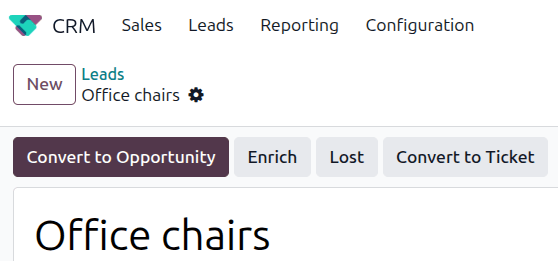
Fai clic sul pulsante Converti opportunità, nella parte in alto a sinistra della pagina.
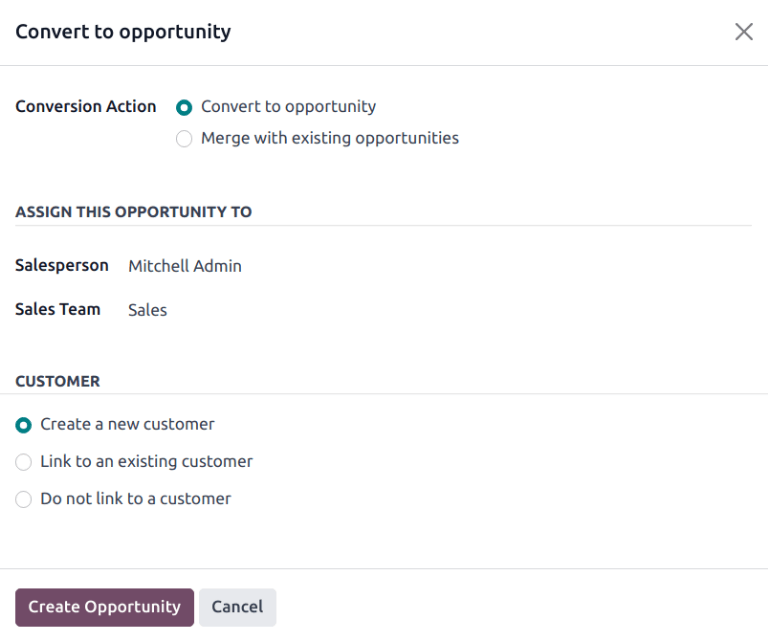
This opens a Convert to opportunity pop-up. Here, select the Convert to opportunity option in the Conversion Action field.
Then, select a Salesperson and a Sales Team to which the opportunity should be assigned. Neither field is required, but if a selection is made in the Salesperson field, the Sales Team is automatically populated based on the assignee’s assigned team.
Se il lead è già stato assegnato a un addetto vendite o a un team, vengono popolati automaticamente con le informazioni.
Nella sezione Cliente, scegli una delle seguenti opzioni:
Create a new customer: Choose this option to use the information in the lead to create a new customer record.
Link to an existing customer: Choose this option, then select a customer from the drop-down menu to link this opportunity to.
Infine, quando tutte le impostazioni sono state configurate, fai clic su Crea opportunità.
Per visualizzare l’opportunità appena creata, apri l’app .
Unire lead e opportunità simili
If a Similar Leads smart button appears at the top of the page for the lead, a similar lead or opportunity already exists in the database. Before converting the current lead, click the smart button to check if the leads should be merged.

To merge this lead with an existing similar lead or opportunity, click the Convert to Opportunity button and select Merge with existing opportunities in the Conversion Action field. This generates a list of the similar leads/opportunities to be merged.
When merging, Odoo gives priority to whichever lead/opportunity was created in the system first, merging the information into the first created lead/opportunity. The resulting record is an opportunity.