
Più siti web
Odoo consente di creare più siti web a partire dallo stesso database. Ciò può essere utile, ad esempio, se la tua azienda gestisce più marchi, oppure per creare siti web distinti per prodotti/servizi diversi o per destinatari diversi. In questi casi, disporre di siti web distinti può aiutare a evitare confusione e rendere più semplice personalizzare le strategie di outreach digitale e raggiungere il pubblico di riferimento.
Ogni sito web può essere progettato e configurato in modo indipendente con il proprio nome di dominio, tema, pagine, menu, lingue, prodotti, team di vendita assegnato, ecc. È inoltre possibile condividere contenuti e pagine.
Suggerimento
I contenuti duplicati (ad esempio, pagine e contenuti condivisi tra più siti web) possono avere un impatto negativo su Ottimizzazione per i motori di ricerca (SEO).
Creare un sito web
Per creare un nuovo sito web, procedi come segue:
Vai a .
fai clic su + nuovo sito web;

specifica il nome del sito web e il dominio del sito web. Ogni sito web deve essere pubblicato sotto il proprio dominio;
adatta il Nome dell’azienda, le Lingue e la Lingua predefinita se necessario;
fai clic sul pulsante Crea.
A questo punto puoi iniziare a creare il tuo nuovo sito web.
Nota
Per impostazione predefinita, tutte le app relative al sito web che hai installato (ad es. E-commerce, Forum, Blog, ecc.) e le relative pagine del sito web sono disponibili anche sul nuovo sito web. Puoi rimuoverle modificando il menu del sito web.
Passare da un sito web all’altro
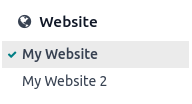
Per passare da un sito web all’altro, clicca sul menu accanto al pulsante +Nuovo nell’angolo in alto a destra e seleziona il sito web che desideri aprire.

Nota
Quando si cambia sito web, si viene reindirizzati alla homepage dell’altro sito web.
Configurazione specifica del sito web
La maggior parte delle impostazioni del sito web sono specifiche per ciascun sito web, il che significa che possono essere abilitate/disabilitate per singolo sito web. Per adattare le impostazioni di un sito web, andare in . Selezionare il sito web desiderato nel campo Impostazioni del sito web nella parte superiore della pagina Impostazioni, nel banner giallo. Quindi, adattare le opzioni per quel sito web specifico.
Nota
I siti web vengono creati con le impostazioni predefinite; le impostazioni non vengono copiate da un sito web all’altro.
In un ambiente multi-azienda, ogni sito web può essere collegato a un’azienda specifica nel database in modo che sul sito web vengano visualizzati solo i dati relativi all’azienda (ad esempio, prodotti, lavori, eventi, ecc.). Per visualizzare i dati specifici dell’azienda, impostare l’azienda desiderata nel campo Azienda.
Disponibilità dei contenuti
Per impostazione predefinita, pagine, prodotti, eventi, ecc. creati dal frontend (utilizzando il pulsante +Nuovo) sono disponibili solo sul sito web dal quale sono stati creati. I record creati dal backend, invece, sono resi disponibili su tutti i siti web per impostazione predefinita. La disponibilità del contenuto può essere modificata nel backend, nel campo Sito web. Ad esempio, per i prodotti, andare in , quindi selezionare il prodotto e andare nella scheda Vendite. Per i forum, andare in , quindi selezionare il forum.

I record e le funzionalità possono essere resi disponibili:
Su tutti i siti web: lasciare vuoto il campo Sito web;
Solo su un sito web: impostare il campo Sito web di conseguenza;
Su alcuni siti web: in questo caso, è necessario duplicare l’elemento e impostare il campo Sito web.
Pagine del sito web
Per modificare il sito web sul quale deve essere pubblicata una pagina, procedere come segue:
Vai a .
Apri il pannello di ricerca e seleziona il sito web sul quale la pagina è attualmente pubblicata.
Spunta la casella di controllo accanto alle pagine che desideri modificare.
Fai clic sul campo Sito web e seleziona il sito web, oppure lascialo vuoto per pubblicare la pagina su tutti i siti web.
Nota
Ogni sito web deve avere la propria homepage; non puoi utilizzare la stessa homepage per più siti web.
Funzionalità E-commerce
Le funzionalità di e-commerce come prodotti, categorie e-commerce, listini prezzi, sconti, fornitori di pagamento, ecc. possono essere limitate a un sito web specifico.
Account clienti
È possibile consentire ai clienti di utilizzare lo stesso account su tutti i siti web abilitando la casella di controllo Account clienti condivisi nelle impostazioni del sito web.
Tariffazione
I prodotti possono avere prezzi diversi in base al sito web utilizzando i listini prezzi. È richiesta la seguente configurazione:
Vai a .
Scorri verso il basso fino alla sezione Negozio - Prodotti e seleziona l’opzione Listini prezzi Prezzi multipli per prodotto.
Fai clic su Listini prezzi per definire nuovi listini o modificare quelli esistenti.
Seleziona il listino prezzi o fai clic su Nuovo per crearne uno nuovo, quindi seleziona la scheda Configurazione e imposta il campo Sito web.
Reportistica
Analitiche
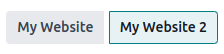
Ogni sito web ha le proprie statistiche. Per passare da un sito web all’altro, fare clic sui pulsanti nell’angolo in alto a destra.
Altri dati di reportistica
Altri dati di reportistica come i dati della dashboard e-commerce, le analisi delle vendite online e i visitatori possono essere raggruppati per sito web se necessario. Aprire il pannello di ricerca e selezionare Raggruppa per –> Sito web.