
Beberapa website
Odoo memungkinkan Anda membuat beberapa website dari database yang sama. Ini dapat berguna, misalnya, jika Anda memiliki beberapa merek yang beroperasi di bawah organisasi Anda, atau untuk membuat website terpisah untuk produk/layanan yang berbeda, atau audiens yang berbeda. Dalam kasus ini, memiliki website yang berbeda dapat membantu menghindari kebingungan dan memudahkan penyesuaian strategi Outreach digital Anda serta menjangkau audiens target Anda.
Each website can be designed and configured independently with its own domain name, theme, pages, menus, languages, products, assigned sales team, etc. They can also share content and pages.
Tip
Duplicate content (i.e., pages and content shared between multiple websites) can have a negative impact on Optimasi Mesin Pencari (SEO).
Pembuatan website
Untuk membuat website baru, lakukan langkah-langkah berikut:
Buka .
Klik + New Website.

Tentukan Website Name dan Website domain. Setiap website harus dipublikasikan di bawah domain miliknya sendiri.
Sesuaikan Company name, Languages dan Default language jika diperlukan.
Klik tombol Create.
Anda kemudian dapat mulai membangun website baru Anda.
Catatan
Secara default, semua aplikasi terkait website yang telah Anda instal (misalnya eCommerce, Forum, Blog, dll.) dan halaman website terkait mereka juga tersedia di website baru. Anda dapat menghapusnya dengan mengubah menu website.
Beralih antar website
Untuk beralih dari satu website ke website lain, klik menu di sebelah tombol +New di pojok kanan atas dan pilih website yang ingin Anda tuju.
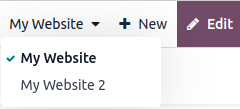
Catatan
Saat Anda beralih website, Anda akan diarahkan ke halaman beranda website lainnya.
Konfigurasi khusus website
Sebagian besar pengaturan website bersifat spesifik per website, yang berarti dapat diaktifkan/dinonaktifkan per website. Untuk menyesuaikan pengaturan untuk sebuah website, buka . Pilih website yang diinginkan pada kolom Settings of Website di bagian atas halaman Settings, di banner kuning. Kemudian, sesuaikan opsi untuk website tertentu tersebut.
Catatan
Website dibuat dengan pengaturan default; pengaturan tidak disalin dari satu website ke website lainnya.
Dalam lingkungan multi-perusahaan, setiap website dapat dikaitkan dengan perusahaan tertentu di database Anda sehingga hanya data terkait perusahaan (misalnya, produk, pekerjaan, acara, dll.) yang ditampilkan di website. Untuk menampilkan data spesifik perusahaan, atur perusahaan yang diinginkan di kolom Company.
Ketersediaan konten
Secara default, halaman, produk, acara, dll. yang dibuat dari frontend (menggunakan tombol +New) hanya tersedia di website tempat konten tersebut dibuat. Namun, record yang dibuat dari backend secara default tersedia di semua website. Ketersediaan konten dapat diubah di backend, di kolom Website. Misalnya, untuk produk, buka , lalu pilih produk dan buka tab Sales. Untuk forum, buka , lalu pilih forum.

Record dan fitur dapat dibuat tersedia:
Di semua website: biarkan kolom Website kosong;
Hanya di satu website: atur kolom Website sesuai kebutuhan;
Di beberapa website: dalam hal ini, Anda harus menduplikasi item dan mengatur kolom Website.
Halaman website
Untuk mengubah website tempat halaman akan dipublikasikan, lakukan langkah-langkah berikut:
Buka .
Buka panel pencarian dan pilih website tempat halaman saat ini dipublikasikan.

Centang kotak centang di samping halaman yang ingin Anda ubah.
Klik kolom Website dan pilih website, atau kosongkan untuk mempublikasikan halaman di semua website.
Catatan
Setiap website harus memiliki beranda sendiri; Anda tidak boleh menggunakan beranda yang sama untuk beberapa website.
Fitur eCommerce
Fitur eCommerce seperti produk, kategori eCommerce, daftar harga, diskon, penyedia pembayaran, dll. dapat dibatasi ke website tertentu.
Akun pelanggan
Anda dapat mengizinkan pelanggan untuk menggunakan akun yang sama di semua website Anda dengan mengaktifkan kotak centang Shared Customer Accounts di pengaturan website.
Harga
Produk dapat diberi harga berbeda berdasarkan website menggunakan pricelist. Konfigurasi berikut diperlukan:
Buka .
Gulir ke bawah ke bagian Shop - Products dan pilih opsi Pricelists Multiple prices per product.
Klik Pricelists untuk mendefinisikan pricelist baru atau mengedit yang sudah ada.
Pilih pricelist atau klik New untuk membuat yang baru, lalu pilih tab Configuration dan atur field Website.
Laporan
Analitik
Setiap website memiliki analitik sendiri. Untuk beralih antar website, klik tombol di sudut kanan atas.

Data pelaporan lainnya
Data pelaporan lainnya seperti data dashboard eCommerce, analisis penjualan online, dan pengunjung dapat dikelompokkan berdasarkan website jika diperlukan. Buka panel pencarian dan pilih Group by --> Website.