
Basis uitbesteding
Bij basis uitbesteding wordt het product van een bedrijf volledig door een onderaannemer geproduceerd. Het product wordt eerst ingekocht bij de onderaannemer, die zijn eigen onderdelen verwerft, het eindproduct produceert en vervolgens het eindproduct levert aan het magazijn van het bedrijf.
Het volgende document behandelt hoe je een uitbesteed product configureert en het uitbestedingsproces activeert.
Notitie
Dit document gebruikt de term bedrijf om te verwijzen naar het interne bedrijf dat uitbestede goederen nodig heeft en de term onderaannemer om te verwijzen naar de externe leverancier die de uitbestede productie van de uitbestede goederen afhandelt.
Configuratie
Om uitbesteding te gebruiken, moet een bedrijf eerst producten configureren met zowel een leveranciersprijslijst als een stuklijst van het type uitbesteding.
Met de prijslijst kan het bedrijf het product via een PO inkopen bij de leverancier (onderaannemer), terwijl de BoM ervoor zorgt dat het product extern kan worden geproduceerd door de onderaannemer.
Configureer productleverancier
Ga naar om de leverancier van een product te configureren voor basale uitbesteding. Selecteer vervolgens een product of maak een nieuw product aan.
Klik op het productformulier op het tabblad Inkoop en voeg de onderaannemer van het product toe als leverancier door te klikken op Regel toevoegen. Selecteer de onderaannemer via het vervolgkeuzemenu Leverancier.
Voer vervolgens de prijs van het product in het veld Eenheidsprijs in.
Stel tot slot in het bijbehorende veld een Levertijd in voor het product om het aantal dagen aan te geven dat de onderaannemer nodig heeft om het eindproduct te produceren en te leveren.
Notitie
Omdat bedrijven alleen verantwoordelijk zijn voor het inkopen en ontvangen van het eindproduct, hoeven ze niet ook nog productielevertijden op een BoM te configureren. Geef in plaats daarvan slechts één Levertijd op de leveranciersprijslijst op waarin zowel de productie- als levertijd van de onderaannemer is meegenomen.
Configureer stuklijst
Configureer na het opgeven van de leverancier een BoM van het type uitbesteding voor het product. Klik op het productformulier op de slimme knop Stuklijst. Selecteer vervolgens de gewenste BoM of maak een nieuwe aan.
Tip
Navigeer ook naar , en selecteer de BoM voor het uitbestede product.
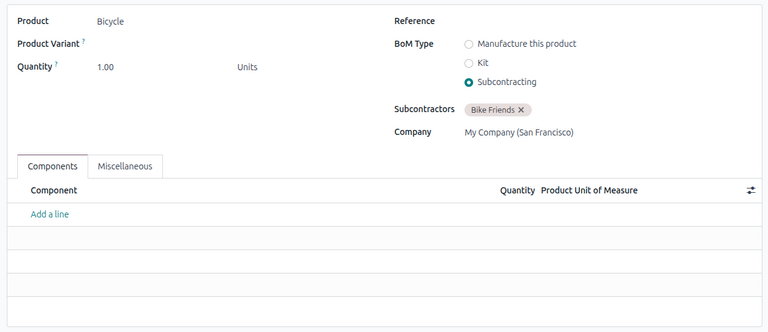
Selecteer in het veld Stuklijsttype de optie Uitbesteding. Voeg in het resulterende veld Onderaannemers een of meer onderaannemers toe.
Omdat zowel de onderdelen als de productie worden verzorgd door de onderaannemer, is het niet nodig om onderdelen te vermelden op het tabblad Onderdelen van de BoM.
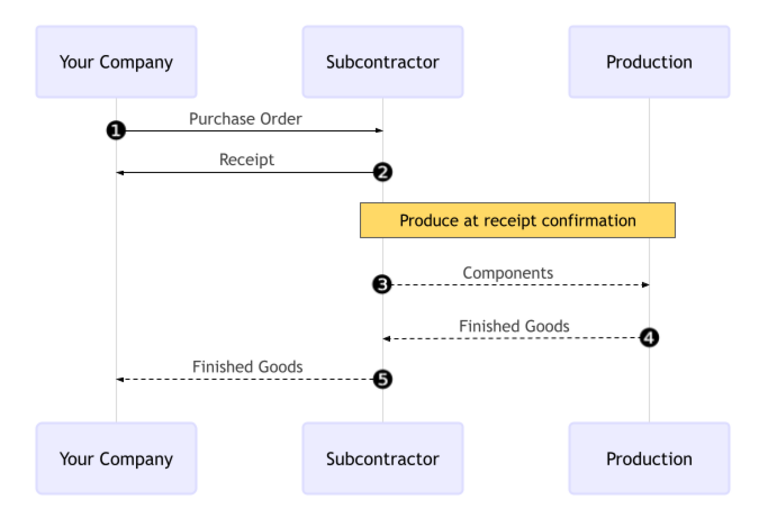
Basis uitbestedingsworkflow
De basale uitbestedingsworkflow begint met het aanmaken van een inkooporder om het product van de onderaannemer te kopen (1).
Het bedrijf bevestigt vervolgens de PO, waarmee een ontvangst wordt aangemaakt om het eindproduct te verplaatsen (2). De onderaannemer produceert het product en levert het terug aan het bedrijf zodra het klaar is.
Zodra het product is geproduceerd en ontvangen, valideert de opdrachtgever de ontvangst (5) om voorraadverplaatsingen van de onderaannemer naar de voorraad van het bedrijf te activeren (3, 4).
Inkooporder aanmaken en bevestigen
Ga naar om een PO voor het uitbestede product aan te maken en klik op Nieuw.
Begin met het invullen van de PO door een onderaannemer te selecteren in het vervolgkeuzemenu Leverancier. Klik in het tabblad Producten op Product toevoegen om een nieuwe productregel aan te maken. Selecteer het uitbestede product in het veld Product en voer de hoeveelheid in het veld Hoeveelheid in.
Na het toevoegen van het product wordt het veld Verwachte aankomst bijgewerkt met de verwachte leverdatum van het eindproduct, zoals eerder geconfigureerd met de Levertijd van de leverancier.
Klik ten slotte op Order bevestigen om de PO te bevestigen. Er wordt automatisch een ontvangst aangemaakt en een slimme knop Ontvangst verschijnt bovenaan het formulier.
Ontvangst verwerken
Nadat de order is bevestigd, produceert de onderaannemer het product en levert het voltooide product terug aan het bedrijf.
Klik op de knop Producten ontvangen op de PO of klik op de slimme knop Ontvangst bovenaan de pagina om het eindproduct van de onderaannemer te ontvangen. Klik vervolgens op Valideren om de inkomende zending in de voorraad in te voeren.
Notitie
Alsvoorraadstromen met meerdere stappenzijn ingeschakeld, moeten extra overboekingen worden gevalideerd om het inkomende product in voorraad op te nemen.
Volg voorraadmutaties
Na het valideren van de ontvangst genereert Odoo automatisch voorraadverplaatsingen om de beweging van uitbestede producten tussen locaties bij te houden. Navigeer naar om deze voorraadverplaatsingen te bekijken.
Om voorraadmutaties bij uitbesteding te volgen, verplaatst Odoo alle productonderdelen naar een speciale locatie met de naam Subcontracting. Een andere locatie met de naam Production verbruikt vervolgens de onderdelen en produceert het eindproduct. Zodra het gereed is, gaat het product terug naar de locatie Subcontracting voordat het uiteindelijk in de voorraad van het bedrijf terechtkomt wanneer de ontvangst wordt gevalideerd.

Notitie
Omdat er bij basisuitbesteding geen onderdelen worden verzonden, is er geen mutatie van de Uitbesteding Locatie naar de Productie locatie.