
AI in ondersteuningsworkflows
Het gebruik van Odoo’s AI-functies in de Helpdesk-app helpt ondersteuningsmedewerkers bij hun taken, in plaats van bestaande workflows te vervangen. Het doel is repetitieve taken te verminderen, ticketafhandeling te versnellen en consistentie te verbeteren door AI ticketinhoud te laten analyseren en automatisch acties te laten voorstellen of uitvoeren.
In plaats van elk verzoek handmatig te categoriseren, prioriteren en te beantwoorden, kunnen ondersteuningsteams vertrouwen op AI om inkomende informatie te interpreteren en voorlopige verwerking uit te voeren. Medewerkers behouden de controle over beslissingen en klantcommunicatie, terwijl AI repetitieve analyses en concepten afhandelt.
Hoe AI werkt in Helpdesk
AI-mogelijkheden in Helpdesk zijn gebouwd rond drie kernideeën:
AI-agenten die communiceren met gebruikers of medewerkers en reacties genereren op basis van kennisbronnen.
AI-automatiseringen die tickets automatisch bijwerken wanneer records worden aangemaakt of gewijzigd.
AI-ondersteunde velden die gestructureerde informatie, zoals samenvattingen, genereren uit ongestructureerde tekst.
AI-agents
Een AI-agent is een configureerbare assistent die werkt met prompts en contextuele kennis. De agent zelf bevat geen bedrijfslogica; in plaats daarvan volgt hij instructies die door gebruikers zijn gedefinieerd en vertrouwt hij op geleverde documentatie.
Wanneer een agent een verzoek ontvangt, combineert hij zijn systeem-prompt, de huidige recordcontext (zoals een ticket) en zijn kennis-bronnen.
Hierdoor kan de agent reacties geven die zijn gebaseerd op interne documentatie in plaats van generieke taalmodeloutput.
Agenten kunnen worden beperkt tot specifieke bronnen of toestemming krijgen om acties uit te voeren met behulp van onderwerpen. Dit zorgt ervoor dat ondersteuningsassistenten zich voorspelbaar gedragen en in lijn blijven met organisatorische regels.
AI-automatiseringen
Automatiseringsregels stellen AI in staat om te handelen tijdens recordlevenscyclusgebeurtenissen. In plaats van te wachten tot een medewerker tickets categoriseert of prioriteert, kan AI deze taken automatisch uitvoeren zodra een ticket is aangemaakt.
Het kernprincipe is dat AI Odoo-modellen niet direct begrijpt. Het ontvangt tekst die uit velden is geëxtraheerd en produceert een output op basis van promptinstructies. Gebruikers sturen AI-gedrag aan door middel van duidelijke prompts en zorgvuldig geselecteerde invoervelden.
AI-velden
AI-ondersteunde velden breiden standaard Odoo-velden uit door hun waarden automatisch te laten genereren via prompts.
Deze velden zijn handig wanneer grote hoeveelheden tekst moeten worden samengevat tot bruikbare informatie. Een lang klantbericht kan bijvoorbeeld automatisch worden samengevat tot een korte lijst met kernpunten, waardoor medewerkers problemen snel kunnen begrijpen zonder volledige beschrijvingen te lezen.
Configuratie
Een AI-agent configureren voor ondersteuning
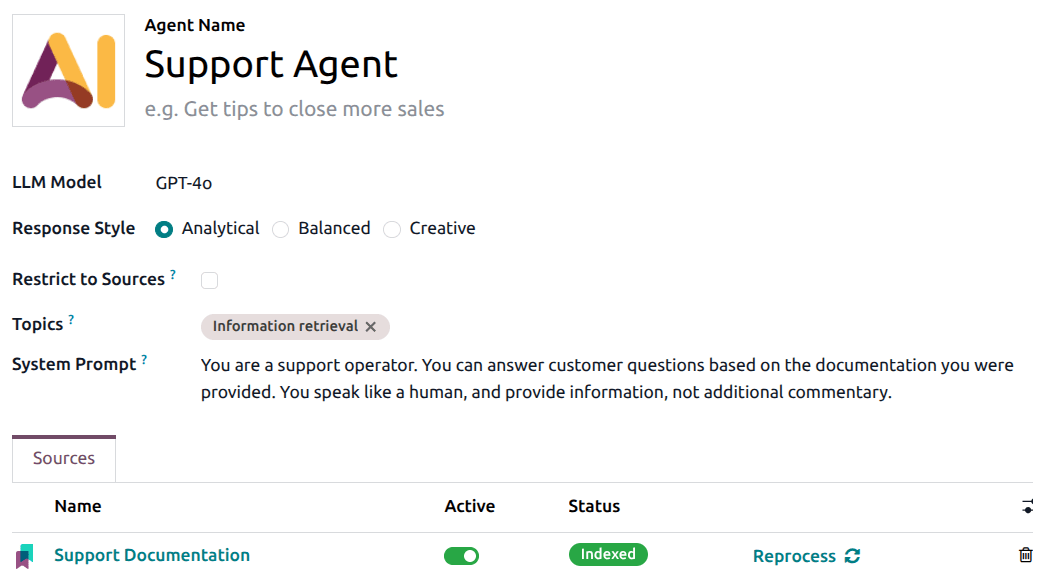
AI agents worden geconfigureerd in de AI-applicatie. Om een bestaande agent te configureren, navigeer je naar en klik je op het (verticale ellips)-icoon, klik vervolgens op Configuratie in het vervolgkeuzemenu.
De configuratie begint met het selecteren van een taalmodel en het definiëren van een systeemprompt die beschrijft hoe de agent zich moet gedragen. De prompt bepaalt de toon, reikwijdte en verantwoordelijkheid. Een supportgerichte agent kan worden geïnstrueerd om problemen te analyseren en beknopte technische antwoorden te geven.
De volgende stap is het definiëren van de bronnen van de agent. Deze bronnen vormen het geheugen van de agent en moeten betrouwbare documentatie bevatten zoals productgidsen of FAQ’s. De kwaliteit van deze bronnen heeft een directe impact op de kwaliteit van AI-antwoorden.
Tip
Selecteer Beperken tot bronnen om de agent te verplichten hun antwoorden alleen te baseren op de geleverde resources.
Gebruikers kunnen ook onderwerpen definiëren, die de agent toestemming geven om specifieke acties uit te voeren. Onderwerpen maken geavanceerde scenario’s mogelijk zoals het aanmaken van records of automatiseringstriggers.
Zodra een agent bestaat, kunnen standaardprompts worden gebruikt om een gesprek te starten.
Een standaardprompt bepaalt waar en wanneer de AI verschijnt in Odoo. In de Helpdesk-app betekent dit doorgaans dat de AI-knop kan verschijnen op ticketrecords. De standaardprompt specificeert het model waar deze beschikbaar is, welke agent wordt aangeroepen en aanvullende contextuele instructies.
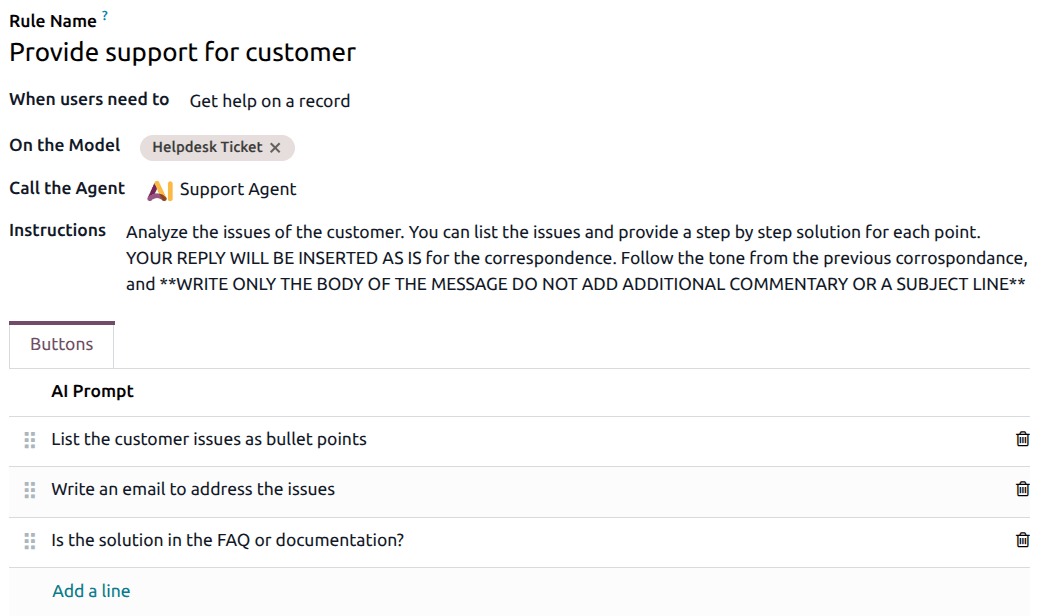
Deze instructies fungeren als een tweede laag bovenop de agentprompt en passen het gedrag van de agent aan voor Helpdesk-scenario’s.
AI-automatiseringen configureren
AI serveracties worden geconfigureerd met behulp van standaard geautomatiseerde acties, waarbij AI wordt gebruikt als updatemechanisme.
Bij het definiëren van een serveractie specificeren gebruikers wanneer de actie moet worden uitgevoerd, bijvoorbeeld wanneer een nieuw ticket wordt aangemaakt. De AI-prompt legt vervolgens uit hoe het ticket moet worden geïnterpreteerd en welk veld moet worden bijgewerkt.
Deze aanpak houdt automatisering voorspelbaar terwijl AI contextuele beslissingen kan nemen.
AI-velden configureren
AI velden worden geconfigureerd door de AI-optie in te schakelen op een aangepast of eigenschapveld en een prompt te geven die het verwachte resultaat beschrijft. Eenmaal geconfigureerd, wordt het veld automatisch bijgewerkt wanneer het record verandert, waardoor agents directe toegang krijgen tot gestructureerde informatie.
Waarschuwing
AI-velden kunnen worden toegevoegd aan een record via de Studio-app of een eigenschapveld. Studio installeren kan gevolgen hebben voor het huidige prijsplan van een databank.
Raadpleeg voor meer informatie Odoo’s prijzenpagina of neem contact op met je accountmanager.
Zie ook