
모델 및 제조업체
Odoo의차량 관리앱은 각 차량을제조사및모델(예: BMW, X2)별로 분류합니다. 차량을 Odoo 데이터베이스에 추가하려면 해당 차량의제조사및모델레코드가 이미 데이터베이스에 존재해야 합니다.
제조사
Odoo의차량 관리앱은 데이터베이스에 일반적으로 사용되는 67개의 자동차 및 자전거 제조사와 로고가 사전 구성되어 있습니다. 미리 로드된 제조사를 보려면로 이동하면제조사현황판이 로드됩니다.
기본 필터인모델 포함은 이미 차량 모델이 있는 제조업체만 표시합니다. 모든 제조업체를 보려면 기본 필터를 제거하십시오.
제조사는 알파벳순으로 나열되며, 각 카드에는 특정 제조사에 대해 구성된모델의 수가 표시됩니다.

제조업체 추가하기
데이터베이스에 새 제조사를 추가하려면제조사현황판의 왼쪽 상단에 있는신규를 클릭하면 빈 제조사 양식이 로드됩니다. 이름필드에 제조사 이름을 입력하고로고에 업로드할 이미지를 선택합니다.
모델
차량 관리에 차량을 추가할 때 차량 모델을 지정하여 차량 용량 및 부품 호환성과 같은 특정 세부 정보를 추적하는 업데이트된 레코드를 유지합니다.
제조업체와 달리 모델은 차량 관리 앱에 미리 구성되어 있지 않습니다. 새 차량 모델이 차량단에 합류하면 모델(및 필요한 경우 제조업체)을 반드시데이터베이스에 추가해야 합니다.
모델 추가
새 차량 모델을 추가하려면로 이동합니다. 왼쪽 상단의새로 만들기를 클릭하고 새 모델 양식에 다음 정보를 입력합니다.
참고
설치된현지화에 따라 일부 필드나 섹션이 표시되지 않을 수 있습니다.
모델명: 필드에 모델명을 입력합니다.
제조업체: 드롭다운 메뉴를 사용하여 제조업체를 선택합니다. 구성되어 있지 않으면제조업체를 추가합니다.
차량 유형: 드롭다운 메뉴를 사용하여 미리 구성된 두 가지 차량 유형 중 하나인자동차또는오토바이를 선택합니다.
범주: 드롭다운 메뉴를 사용하여 차량의범주를 선택하거나새로 만듭니다.
참고
Odoo의차량 관리앱에는 사전 구성된 범주가 없습니다. 모든 범주는 데이터베이스에 추가해야 합니다.

정보 탭
정보탭에서 차량 크기, 승객 용량 및 엔진 정보와 같은 차량 모델에 대한 세부 정보를 지정합니다.
모델
모델 연식: 차량 제조 연도를 입력합니다.
좌석 용량: 차량이 수용할 수 있는 승객 수를 입력합니다.
도어 수: 차량의 도어 수를 입력합니다.
색상: 차량의 색상을 입력합니다.
트레일러 히치: 차량에 트레일러 히치가 설치된 경우 이 체크박스를 선택합니다.
급여
급여섹션은 회사의 현지화 설정이 벨기에로 설정된 경우에만 나타납니다. 카탈로그 가격(VAT 포함)을 제외한 모든 비용 값은 *월별*입니다.
요청 가능: 차량이 임직원 계약의 일부인 경우 임직원이 이 모델 차량을 요청할 수 있으면 이 체크박스를 활성화합니다.
카탈로그 가격(부가세 포함): 차량 구매 또는 임대 시점의MSRP를 입력합니다.
C02 탄소세: 벨기에 정부에 납부하는 이산화탄소 배출 수수료입니다. 이 금액은 벨기에 법률 및 규정에 의거하여 자동으로 계산되며 수정할 수 없습니다. 이 금액은 차량 양식의 CO2 배출 필드 (정보 탭의 엔진 섹션)에 입력된 수치를 기준으로 합니다.
중요
CO2 배출량 필드를 수정하면 CO2 탄소세 필드 값이 조정됩니다.
비용(감가상각): 향후 직원의 급여를 설정할 때 표시될 월별 차량 비용을 입력합니다. 이 금액은 차량에 지정된 직원의 총급여와 순급여에 영향을 미칩니다. 현지 세법에 따라 시간이 지남에 따라 감가상각되는 금액입니다. :guilabel:`비용(감가상각)`은 차량 모델 에 자동으로 감가상각되지 않으며, 특정 차량과 연결된 계약 에 의거하여 감가상각됩니다.
총 비용 (감가상각): 이 값은비용 (감가상각)및C02 수수료필드의 조합입니다. 시간이 지남에 따라 감가상각됩니다.
엔진
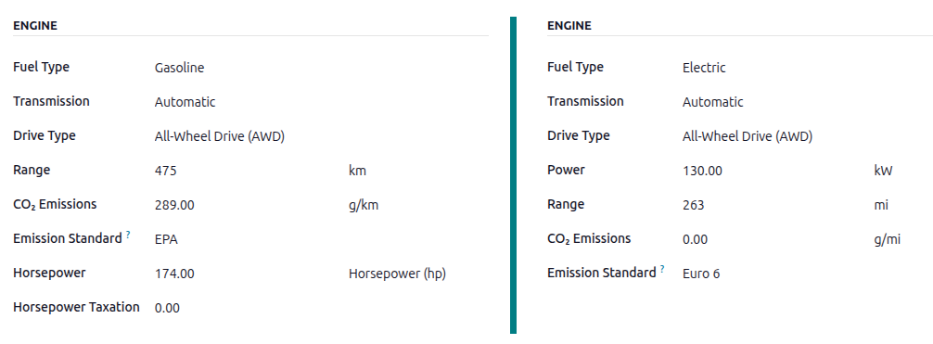
연료 유형: 드롭다운 메뉴를 사용하여 차량이 사용하는 연료 유형을 선택합니다. 기본 옵션은디젤,가솔린,풀 하이브리드,플러그인 하이브리드 디젤,플러그인 하이브리드 가솔린,CNG,LPG,수소또는전기입니다.
주행거리: 차량이 한 번의 주유 또는 한 번의 배터리 충전으로 주행할 수 있는 거리를 마일(mi) 또는 킬로미터(km)로 입력합니다. 거리 단위를 변경하려면km또는mi필드 옆의 드롭다운을 클릭하고 원하는 거리 단위를 선택합니다.
CO2 배출량: 차량이 생산하는 평균 이산화탄소 배출량을 킬로미터당 그램(g/km) 또는 마일당 그램(g/mi)으로 입력합니다. 이 정보는 자동차 제조사에서 제공합니다.
배출 기준: CO2 배출량을 결정하는 데 사용되는 규제 테스트 절차 또는 지침(예: EPA 또는 Euro 6)을 입력합니다.
변속기: 드롭다운 메뉴를 사용하여 변속기 유형을수동또는자동으로 선택합니다.
동력 단위: 드롭다운 메뉴를 사용하여 차량의 동력 측정 방식을 킬로와트 또는 마력 중에서 선택합니다.
동력: 차량이 전기 또는 하이브리드인 경우 차량이 사용하는 동력을 킬로와트 (kW)로 입력합니다. 이 필드는kW가동력필드에 선택된 경우에만 표시됩니다.
마력: 이 필드에 차량의 마력(hp)을 입력합니다. 이 필드는출력필드에마력이 선택된 경우에만 나타납니다.
마력세: 엔진 사양에 따라 발생하는 세금 금액을 입력합니다. 이 수치는 지역 세법에 따라 달라지므로 정확한 세금 금액을 입력하기 위해회계부서에 확인하는 것이 좋습니다. 이 필드는마력필드가동력필드로 설정된 경우에만 표시됩니다(이 경우범위필드로 변경됨).
세금 공제: 세금에서 공제할 수 있는 백분율은 현지화를 기준으로 자동 입력되며 수정할 수 없습니다. 이 필드는 특정 현지화에서만 표시됩니다.
공급업체 탭
이 탭에서 차량을 구매할 수 있는 공급업체를 지정합니다. 적절히 설정하면 Odoo의 매입 앱을 통해 차량에 대한견적 요청을 생성할 수 있습니다.
공급업체를 추가하려면공급업체탭에서공급업체 추가블록을 클릭합니다. 그러면 데이터베이스에 현재 있는 모든 공급업체 목록이 포함된추가: 공급업체팝업 창이 열립니다. 공급업체 이름 옆의 체크박스를 클릭하여 기존 공급업체를 추가한 다음선택을 클릭합니다. 이 목록에 추가할 수 있는 공급업체 수에는 제한이 없습니다.
공급업체가 데이터베이스에 없는 경우추가: 공급업체팝업 창의 왼쪽 하단에 있는신규를 클릭하여 새 공급업체를 추가합니다. 나타나는공급업체 생성양식에서필요한 정보를 입력한 다음저장 및 닫기를 클릭하여 공급업체를 추가하거나저장 및 신규를 클릭하여 현재 공급업체를 추가하고 다른 새 공급업체를 생성합니다.
팁
공급업체는 연락처 애플리케이션에 저장됩니다.

모델 카테고리
차량 관리 조직화를 돕기 위해 차량 모델을 특정 카테고리 아래에 배치하는 것이 좋습니다. 모델 카테고리는차량 모델 양식에서 설정됩니다.
Odoo는 사전 구성된 카테고리가 없습니다. 모든 카테고리는 반드시 추가해야 합니다.
데이터베이스에 현재 설정된 카테고리를 보려면로 이동합니다. 모든 카테고리가 목록 보기로 표시됩니다.
새 모델 카테고리 추가하기
새로 카테고리를 추가하려면 카테고리 현황판 왼쪽 상단에 있는 신규 버튼을 클릭합니다. 목록 하단에 새로 입력할 수 있는 줄이 나타납니다. 새 카테고리를 입력한 다음 저장 을 클릭하거나 화면에서 아무 곳이나 클릭하면 항목이 저장됩니다.
목록에서 카테고리가 표시되는 방식을 다시 지정하려면 원하는 카테고리 이름 왼쪽에 있는 (드래그 가능) 아이콘을 클릭하여 변경할 위치로 줄을 드래그합니다.
목록의 순서는 데이터베이스에 전혀 영향을 미치지 않습니다. 다만 차량 카테고리를 순서에 맞게 표시하는 것이 더 편리할 수 있으며, 예를 들어 탑승 인원 수 순으로 순서를 정할 수 있습니다.
참고
재고 관리 앱과 함께 사용할 경우, 최대 중량 및 최대 용량 필드로 차량의 용량을 추적합니다. 이를 통해 내부적으로 배송을 관리할 수 있도록 :doc:`품목 적재용 공간과 중량이 표시됩니다 <../../inventory_and_mrp/inventory/shipping_receiving/setup_configuration/dispatch>.