
AI 서버 액션
AI 서버 액션을 통해 Odoo의 자동화 프레임워크 범위를 확장할 수 있습니다. 업무 프로세스에서 필요한 다양한 의사결정에 인공지능을 활용할 수 있습니다.
이 기능은 주어진 조건만으로는 복잡한 로직을 모두 표현할 수 없는 상황에서도, 표준 서버 액션을 통해 실행 관리를 해야 하는 경우를 위해 제작되었습니다.
AI 서버 액션이 작동하는 방식
Odoo에서 AI 기반 워크플로우는 AI 서버 액션(또는 관리자)과 그 도구(또는 작업자) 간의 명확한 책임 분리를 전제로 구축되어 있습니다.
AI 서버 액션: 관리자
AI 서버 액션은 의사결정권자, 즉 관리자의 역할을 수행합니다. 레코드와 그 컨텍스트를 읽고 파악하며, AI 프롬프트를 해석하며, 어떤 도구를 호출하고 어떤 인수를 적용할지 판단합니다.
서버 액션에서는 비즈니스 규칙에 대한 강제 적용, 레코드에 대한 직접 수정 및 작업의 정확성이 보장되지 않습니다. 서버 액션은 의사결정을 하는 역할로만 한정되어 있습니다.
AI 도구: 작업자
도구는 표준 서버 액션의 하나로 사용 탭에서 AI에서 사용하기 옵션을 활성화하면 실행할 수 있습니다. 도구에는 모든 실행 로직이 포함되어 있으며 레코드 업데이트, 이동, 작성 작업을 수행합니다. 도구는 반드시 파이썬 코드를 통해 명시적으로 비즈니스 규칙을 구현하고 실행해야 합니다.
AI 서버 액션에서 도구를 호출할 경우, 코드 자체에서 실행이 제한되는 경우를 제외하고는 도구가 무조건 실행됩니다.
AI 서버 액션 워크플로우
AI 서버 액션은 다음과 같은 순서로 진행됩니다:
레코드에서 AI 서버 액션이 트리거됩니다.
AI 프롬프트에 대한 평가가 진행되며, 레코드가 컨텍스트가 됩니다.
AI 가 사용 가능한 도구 중 하나를 선택합니다.
AI 가 도구에 필요한 인수를 제공합니다.
선택된 도구가 파이썬 코드를 실행합니다.
중요
Odoo에서 이미 존재하는 기본 동작(예: 문서를 폴더로 이동하기)의 경우에는 로직을 사용자 지정하지 않고도 AI 서버 액션을 작동할 수 있습니다. 이 경우 AI 에서 매개변수를 선택하면 Odoo에서 액션이 실행됩니다.
단계별 사례 보기
받은 편지함 문서 자동 분류하기 예시를 통해 전체적인 AI 서버 액션의 패턴을 확인할 수 있습니다. 을 통해 서버 액션 메뉴로 이동합니다.
참고
서버 액션은 문서에 대한 콘텐츠를 검토하고 태그를 추가하도록 설계된 작업입니다. 서버 액션 자체로 문서를 이동하거나 태그를 추가하는 것이 아니며, 문서에 내용에 따라서 어떤 도구를 적용할지 결정하는 역할만을 수행합니다.
해당 액션에 대해 지정되어 있는 모델 은 문서 이며, 유형 은 AI 입니다.
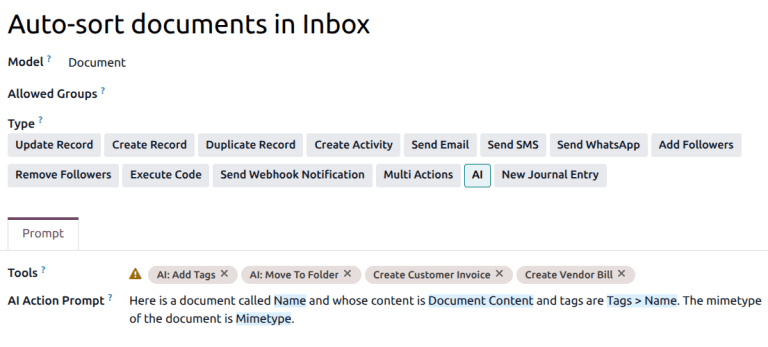
이 서버 액션의 프롬프트를 통해 문서의 컨텍스트는 물론, 액션의 목적을 확인할 수 있습니다.
도구 필드에 있는 여러 가지 액션을 통해 이와 같은 프롬프트를 수행할 수 있으며, 문서 이동, 태그 추가, 청구서나 고지서 생성 등 여러 가지 작업을 진행합니다.
참고
AI: 태그 추가하기, AI: 폴더로 이동하기 및 AI: 문서 이름 바꾸기 기능은 모두 코드 실행 서버 액션으로, 파이썬 코드를 트리거하는 작업입니다.
예를 들어, 서버 액션에서 문서 내용을 기반으로 가장 적절한 도구가 AI: 폴더로 이동하기 라고 판단할 경우, 파이썬 코드를 통해 다음과 같은 작업이 수행됩니다:
ai['result'] = record._ai_action_move_in_folder(folder_id)
이 코드는 호출 시 다른 조건 없이 즉시 실행되며 기존 매서드를 사용하여 문서를 이동합니다.
참고
AI는 Python 코드나 메서드 시그니처에서 인수를 추론하지 않습니다. 대신 도구에 전달되는 인수는 전적으로 도구의 구성에 의해 결정됩니다.
AI: 폴더로 이동 도구의 경우 Python 코드는 folder_id라는 변수를 예상합니다. AI는 구성에서 인수로 명시적으로 선언되어 있기 때문에 folder_id를 제공해야 한다는 것을 알고 있습니다. 이는 서버 작업의 사용법 탭에 있는AI 스키마필드에서 확인할 수 있습니다. AI 스키마 아래의이름열은 Python 코드에서 사용된 변수 이름과 정확히 일치해야 합니다.
AI는 인수 설명을 사용하여 매개변수가 무엇을 나타내는지, 어떤 유형의 값이 예상되는지, 언제 제공하는 것이 적절한지를 이해합니다.
사용법 탭에 인수가 정의되어 있지 않으면 Python 코드가 참조하더라도 AI는 이를 제공할 수 없습니다.

맞춤형 AI 도구 만들기
위의 받은 편지함의 문서 자동 정렬 예제와 동일한 패턴은 표준 Odoo 로직을 사용하여 구현할 수 있습니다. 예를 들어 작업 설명을 업데이트할 수 있는 작업을 만들려면 다음 코드로 코드 실행 작업을 만들 수 있습니다:
record.write({'description': content})
올바르게 작동하려면 content는 도구의 사용법 탭에서 인수로 정의되어 있어야 합니다.
더 보기:
일반적인 문제점
도구 필드가 비어 있는 이유는 무엇인가요?
최소한 하나의 서버 액션에서AI에서 사용이 활성화되어 있는지 확인하세요.
최소한 하나의 도구가 서버 액션과 동일한 모델모델에 할당되어 있는지 확인하세요.
도구가 실행되었지만 아무 일도 일어나지 않은 이유는 무엇인가요?
Python 코드가 변경 사항 없이 종료되었습니다.
필수 인수가 누락되었거나 비어 있었습니다.
비즈니스 조건이 도구 로직에 구현되지 않았습니다.
AI가 예상치 못한 도구를 선택한 이유는 무엇인가요?
프롬프트에 충분한 컨텍스트가 부족했습니다.
여러 도구가 동일한 의도와 일치했습니다.
도구 수준에서 제약 조건이 적용되지 않았습니다.