
평가 속성 요약표
중요
This documentation is for Odoo 19 or later. Discover why we changed.
비용 산정 방식
Odoo supports 3 costing methods configured in accounting’s settings and, optionally, the product’s category.
- 표준 원가: 고정 단가, 수동 업데이트
생산 관리
단가
보유 수량
델타값
재고 금액
$10
0
$0
8개 $10에 수령
$10
8
+8×$10
$80
4개 $16에 수령
$10
12
+4×$10
$120
10개 배송
$10
2
-10×$10$20
2개 $9에 수령
$10
4
+2×$10
$40
- 평균 원가: 모든 단위에 가중 평균 적용
생산 관리
단가
보유 수량
델타값
재고 금액
$0
0
$0
8개 $10에 수령
$10
8
+8×$10
$80
4개 $16에 수령
$12
12
+4×$16
$144
10개 배송
$12
2
-10×$12$24
2개 $6에 수령
$9
4
+2×$6
$36
- FIFO: 선입선출
생산 관리
단가
보유 수량
델타값
재고 금액
$0
0
$0
8개 $10에 수령
$10
8
+8×$10
$80
4개 $16에 수령
$12
12
+4×$16
$144
10개 배송
$16
2
-8×$10-2×$16$32
2개 $6에 수령
$11
4
+2×$6
$44
참고
Removal strategies also support LIFO and FEFO, but they only impact which product is first picked, not the valuation method. For example, you can pick using LIFO, but using average cost for valuation, as LIFO is not allowed by IFRS.
재고 관리와 회계 비교
The Inventory app keeps track of the inventory value in real time as you receive and deliver goods. The reporting menu lets you analyze inventory quantities and values by company, location, product, and more.
The Accounting app updates accounts when you receive invoices or bills. Even though receipts and invoices differ, it’s not practical for accountants to post journal entries for every inventory movement. So, they post a closing entry to account for the difference between what has been invoiced and received/delivered. This closing process happens usually once a year for SMEs, or once a month for larger companies.
회계 |
재고 관리 |
|
|---|---|---|
구매 주문 |
/ |
/ |
입고 |
/ |
✓ |
공급업체 청구서 |
✓ |
/ |
판매 주문 |
/ |
/ |
고객 청구서 |
✓ |
/ |
배송 |
/ |
✓ |
마감분개 |
✓ |
/ |
회계 방식
There are two accounting practices on how to maintain your accounts, defined in , under the Inventory Valuation section:
Periodic: Post vendor bills as expenses by nature, and update stock valuation in the closing entry by reducing expenses (stock variation). This is the best practice in Europe.
Perpetual: Post vendor bills as assets (stock valuation), report expenses when goods are sold (cost of goods sold). This is the best practice in countries that follow Anglo-Saxon accounting, like the USA and India.
품목 카테고리에 있는 재고 계정
재고 계정에 있는 재고 가치 평가
품목/카테고리의 비용/매출원가
Inventory Adjustment on the Inventory Loss location (optional, recommended for Anglo-Saxon accounting)
재고 계정 :darkblue:`비용`(영구 대륙식 회계에만 해당)
EU 단기채 |
EU 영구채 |
US 단기채 |
US 영구채 |
|
|---|---|---|---|---|
변경 사항 |
Stock |
Stock |
||
LOSS |
Shrinkage |
|||
청구 |
Expense |
Stock |
COGS |
Stock |
Payable |
Payable |
Payable |
Payable |
|
청구서 |
Expense |
COGS |
||
Stock |
Stock |
|||
Income |
Income |
Income |
Income |
|
Receivable |
Receivable |
Receivable |
Receivable |
|
종료 |
Stock |
Stock |
Stock |
Stock |
[1] |
Variation |
Expense |
Variation |
Variation |
[2] |
LOSS |
Shrinkage |
||
[3] |
Variation |
|||
Expense |
재고 가치 - 회계상의 가치 평가
Inventory valuation lost, only if an account is set on the loss location
회계 기말 가치 평가 - 기초 가치 평가
회계 항목
전표 항목 환경설정
보고
재고 관리
Open to view your current inventory level and valuation for each product, or to review historical data as of a previous date.

단가
To check a product’s existing unit price updates and their origins, click on the product’s Unit Cost. In AVCO this allows you to understand how the currently used value was calculated.
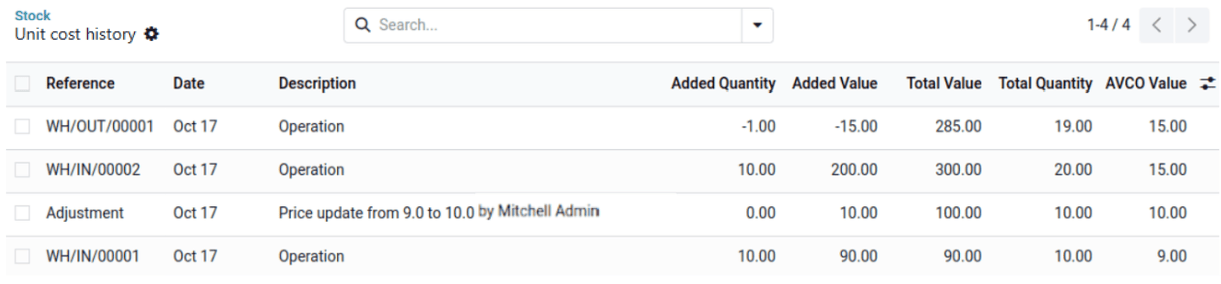
총 가치
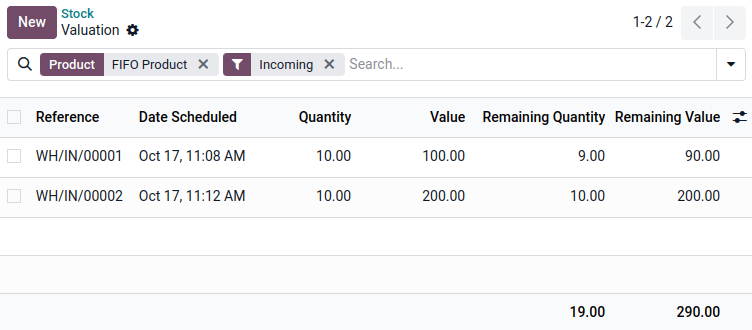
To see all incoming quantities for which you still have a remaining quantity and the value used for their valuation, click on a product’s Total Value.
In AVCO or standard cost, the used value is always the current average unit cost.
In FIFO, remaining units from each previous incoming move retain their own individual valuation.
In FIFO or AVCO, remaining quantities from a previous incoming move can have their value adjusted if necessary: Select the incoming moves to be adjusted, click Actions, and then click Adjust Valuation. Enter the new Value and, optionally, a Description.
회계 업무 시
To view the difference between the accounting stock value and the current inventory value recorded thanks to the incoming moves with a remaining quantity, go to .
To generate a new accounting entry to review and post, click Generate Entry.

To view a list of sales and purchase orders for which accrual entries should be encoded, go to and select the relevant menu item (Bill To Receive, Invoices To Be Issued, Billed Not Received and Invoiced Not Delivered). Select the desired lines and click Create Accrual Entries.
With Anglo-Saxon perpetual accounting, this will also help to distribute recorded inventory variations to accounts such as Bills to Receive/GRNI or COGS as shown in the Accounting Entries and Journal Entries Configuration sections.


Odoo 19 변경 사항
Before Odoo 19, the Perpetual accounting method was implemented by posting real-time accounting entries at each stock movement. That created a lot of journal items in accounting, which was an issue for performance, general ledger clarity and auditability.
Since Odoo 19, the Perpetual method impacts the stock valuation account at the invoice level. The closing entry is then used to manage bills to receive, invoices to issue, deferred revenues, prepaid expenses, and other gaps between inventory values and accounting ones.
Odoo 18 |
Odoo 19 |
|
|---|---|---|
단기 대륙 |
수동 마감 |
자동 마감 |
정기 영미식 |
지원되지 않음 |
전체 내용 지원 가능 |
영구 대륙식 |
수동 마감 |
✓ |
영구 영미식 |
수동 마감 |
✓ |
회계상의 가치 평가 |
재고 요청 |
회계 전용 |
영구 항목 |
청구서 + 모든 작업 |
청구서 + 1건 마감 |
청구서 발행 |
✗ |
✓ |
선지급 비용 |
✗ |
✓ |
지급받을 청구서 |
✗ |
✓ |
이연 수익 |
✗ |
✓ |
실적 |
Slower |
Faster |
총계정원장 |
전표 항목 더하기 |
전표 항목 줄이기 |