
AI로 텍스트 작성 및 개선
OdooAI는 데이터베이스 전체에서 텍스트 작성 및 개선을 지원합니다. 이를 통해 이메일 초안 작성, 기존 콘텐츠 개선, 토론이나 메모에서 주요 정보를 빠르게 추출하는 작업이 더 쉬워집니다.
AI작성 기능은 다음을 포함하여 Odoo의 대부분의 리치 텍스트 환경에서 사용할 수 있습니다:
레코드의 설명 및 메모 필드
이메일 작성기 및 이메일 템플릿
지식 센터 게시물
이러한 기능은 컨텍스트에 따라 텍스트 편집기와파워박스를 통해 액세스할 수 있습니다.
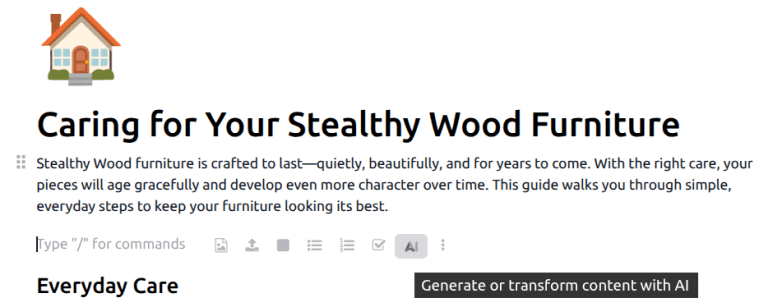
AI로 글쓰기
AI는 짧은 프롬프트나 부분 입력을 기반으로 새 텍스트를 생성할 수 있습니다. 이는 이메일, 작업 설명 또는 내부 메모와 같은 콘텐츠 초안 작성에 유용합니다.
텍스트를 생성하려면AI아이콘을 클릭하거나 /`를 입력하여 파워박스를 열고 드롭다운 메뉴에서:guilabel:`AI를 선택합니다. 두 옵션 모두 대화 창을 엽니다. 원하는 콘텐츠를 설명하는 짧은 프롬프트를 입력한 다음(종이 비행기)아이콘을 클릭합니다. 텍스트가 생성되면 응답 위로 마우스를 가져간 후Use this를 클릭하여 원하는 필드나 문서에 콘텐츠를 추가합니다. 또는(복사)아이콘을 클릭하여 텍스트를 클립보드에 복사합니다.
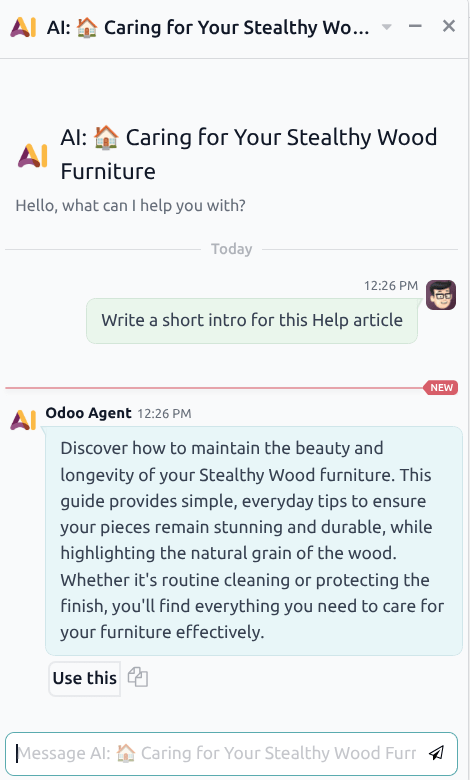
콘텐츠에 만족하지 않는 경우, 확장된 프롬프트나 제안된 변경 사항과 함께 에이전트에게 후속 메시지를 보내세요.
기존 텍스트 다듬기
AI는 기존 텍스트를 다시 작성하거나 개선하는 데에도 사용할 수 있습니다. 여기에는 다음이 포함됩니다:
텍스트를 더 명확하거나 간결하게 만들기
어조나 구조 조정
문법이나 표현 수정
개선할 텍스트를 선택한 다음AI아이콘을 클릭하여 대화 창을 엽니다.선택 항목 다시 작성프롬프트를 클릭합니다. 텍스트가 생성된 후 응답 위로 마우스를 가져가고사용을 클릭하여 원하는 필드나 문서에 콘텐츠를 추가합니다. 또는(복사)아이콘을 클릭하여 텍스트를 클립보드에 복사합니다.

팁
어조나 콘텐츠에 대한 제안과 같은 사용자 지정 지침을 프롬프트에 추가하려면 대화 창에 프롬프트를 직접 작성하세요. 예를 들어, `선택한 텍스트를 더 전문적인 어조로 다시 작성`과 같이 작성합니다.
AI기반 작성에 대한 모범 사례
AI을 사용하여 텍스트를 작성하거나 개선할 때 최상의 결과를 얻으려면:
프롬프트에 명확하고 구체적인 컨텍스트를 제공합니다
저장하거나 전송하기 전에 AI가 생성한 콘텐츠를 검토합니다
회사의 어조 및 커뮤니케이션 표준에 맞게 문구를 조정합니다
AI기반 작성은 생산성을 지원하도록 설계되었지만, 최종 검토 및 검증은 여전히 필수적입니다.