
الفلبين
التهيئة
تثبيت 🇵🇭 الفلبين حزمة الأقلمة المالية للحصول على جميع ميزات المحاسبة الافتراضية للأقلمة الفلبينية، مثل مخطط الحسابات والضرائب والتقارير. توفر هذه الميزات نموذجاً أساسياً للبدء في استخدام المحاسبة الفلبينية.
ملاحظة
When creating a new database and selecting the
Philippinesas a country, the fiscal localization module Philippines - Accounting is automatically installed.If the module is installed in an existing company, the chart of accounts and taxes will not be replaced if there are already posted journal entries.
Chart of accounts and taxes
A minimum configuration default chart of accounts is installed, and the following types of taxes are installed and linked to the relevant account:
ضريبة القيمة المضافة على المبيعات والمشتريات 12%
ضريبة القيمة المضافة على المبيعات والمشتريات معفاة
ضريبة القيمة المضافة على المبيعات والمشتريات بمعدل صفر
الاستقطاع على المبيعات والمشتريات
بالنسبة لضرائب الاستقطاع ()، يوجد حقل إضافي ATC الفلبين ضمن علامة تبويب الفلبين.
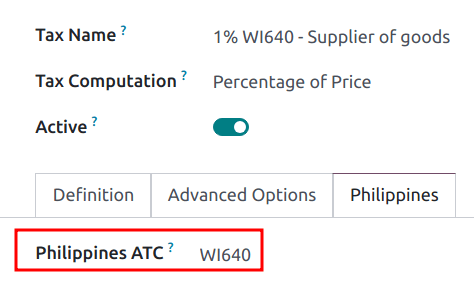
ملاحظة
تُستخدم رموز ATC الخاصة بالضرائب من أجل BIR 2307، و:ref:تقريري SAWT وQAP <localizations/philippines/report-QAP-SAWT>. في حال إنشاء ضريبة يدوياً، يجب إضافة رمز ATC الخاص بها.
جهات الاتصال
When a company or an individual (not belonging to a company) contact is located in the Philippines,
fill in the Tax ID field with their Taxpayer Identification Number (TIN).
For individuals not belonging to a company, identify them by using the following additional fields:
First Name
Middle Name
Last Name
ملاحظة
For both Company and Individual, the TIN should follow the
NNN-NNN-NNN-NNNNN format. The branch code should follow the last digits of the TIN, or else it
can be left as 00000.
التقارير
BIR 2307 report
يمكن إنشاء تقارير BIR 2307، المعروفة أيضاً باسم شهادة الضريبة المستقطعة القابلة للخصم من المصدر، لأوامر الشراء ومدفوعات الموردين مع ضرائب الاستقطاع المطبقة.
To generate a BIR 2307 report, select one or multiple vendor bills from the list view, and click .

نصيحة
The same action can be performed on a vendor bill from the form view.
في النافذة المنبثقة التي تفتح، راجع التحديد وانقر على إنشاء.

This generates the Form_2307.xls file that lists all the vendor bill lines with the applicable
withholding tax.
The process above can also be used for a single vendor payment if it is linked to one or more vendor bills with applied withholding taxes.
ملاحظة
If no withholding tax is applied, then the XLS file will not generate records for those vendor bill lines.
When grouping payments for multiple bills, Odoo splits the payments based on the contact. From a payment, clicking generates a report that only includes vendor bills related to that contact.
مهم
Odoo cannot generate the BIR 2307 PDF report or DAT files directly. The generated
Form_2307.xls file can be exported to an external tool to convert it to BIR DAT or PDF
format.
تقرير SLSP
للوصول إلى تقرير SLSP، اذهب إلى .
انقر على الأزرار الموجودة في الأعلى لعرض التقرير المطلوب:
- المبيعات لتقرير SLS.يتم عرض جميع فواتير العملاء مع ضرائب المبيعات المطبقة المرتبطة في هذا التقرير.
- الشراء لتقرير SLP.يتم عرض جميع فواتير الموردين مع ضرائب الشراء المطبقة المرتبطة في هذا التقرير.

بشكل افتراضي، يستثني كلا التقريرين قيود اليومية التي تحتوي على شركاء بدون رقم TIN محدد وتلك التي تحتوي على ضرائب الاستيراد المحددة. لعرضها أو إخفائها، انقر فوق خيارات: وحدد المرشح المطلوب:
تضمين الشركاء بدون TIN
تضمين الواردات
لتصدير تقرير SLSP، انقر فوق تصدير SLSP.
مهم
لا يمكن لـ Odoo إنشاء ملفات DAT مباشرة. تُستخدم أزرار تصدير SLSP و XLSX لتصدير ملف XLSX، والذي يمكن معالجته باستخدام أداة خارجية لتحويله إلى تنسيق DAT.
تقرير الضريبة 2550Q
يمكن الوصول إلى تقرير الضريبة من خلال الانتقال إلى . يستند النموذج إلى أحدث إصدار 2550Q (إقرار ضريبة القيمة المضافة ربع السنوي) كانون الثاني/يناير 2023.

نصيحة
يتم حساب معظم الأسطر في تقرير الضريبة تلقائيًا بناءً على الضرائب. لمزيد من الدقة في إعداد التقارير وتقديم تقرير الضريبة، يمكن أيضًا تعيين قيود اليومية اليدوية إلى تقرير الضريبة من خلال شبكات ضريبية محددة مسبقًا لكل سطر في تقرير الضريبة.
مهم
لا يمكن لـ Odoo إنشاء تقرير PDF بتنسيق 2550Q BIR مباشرة. يجب استخدامه كمرجع عند تقديم النموذج يدويًا أو عبر الإنترنت خارجيًا.
تقارير QAP و SAWT
للوصول إلى تقارير QAP و SAWT، انتقل إلى ، وانقر فوق زر تقرير:، وحدد SAWT و QAP (PH).
انقر على الأزرار الموجودة في الأعلى لعرض التقرير المطلوب:
- SAWT لتقرير SAWT.يتم عرض جميع فواتير العملاء مع ضرائب الاستقطاع على المبيعات المطبقة المرتبطة في هذا التقرير.
- QAP لتقرير QAP.تُعرض جميع فواتير الموردين مع ضرائب الاستقطاع على الشراء المطبقة المرتبطة بها في هذا التقرير.

لتصدير تقريري SAWT و:abbr:QAP (القائمة الأبجدية الفصلية للمستفيدين) بتنسيق XLSX، انقر على تصدير SAWT وQAP.
مهم
لا يمكن لـ Odoo إنشاء ملفات DAT مباشرة. يتم استخدام زري تصدير SAWT وQAP و:guilabel:XLSX لتصدير ملف XLSX، والذي يمكن معالجته باستخدام أداة خارجية لتحويله إلى تنسيق DAT.
طباعة الشيكات
يتبع تخطيط طباعة الشيكات الفلبيني أحدث تنسيق موحد لـ PCHC. لتفعيل طباعة الشيكات، انتقل إلى ، وفعّل الشيكات واضبط تخطيط الشيك على Print Check - PH.
تتم طباعة الشيكات باستخدام سير العمل القياسي.