
Skriv och förbättra text med AI
OdooAIkan hjälpa till med att skriva och förfina text i hela databasen. Detta gör det enklare att skapa utkast till e-postmeddelanden, förbättra befintligt innehåll och snabbt extrahera viktig information från diskussioner eller anteckningar.
AI-skrivfunktioner är tillgängliga i de flesta rich text-miljöer i Odoo, inklusive:
Fält för Beskrivning och Anteckningar på handlingar
E-postredigerare och e-postmallar
Kunskap-artiklar
Dessa funktioner är tillgängliga via textredigeraren ochpowerboxen, beroende på sammanhanget.
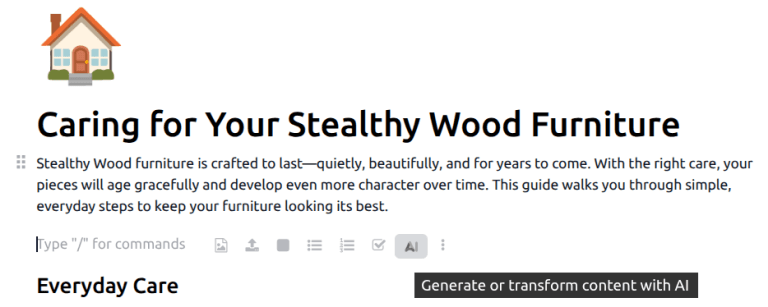
Skriva med AI
AIkan generera ny text baserat på en kort uppmaning eller delvis inmatning. Detta är användbart för att skapa utkast till innehåll såsom e-postmeddelanden, arbetsuppgiftsbeskrivningar eller interna anteckningar.
För att generera text, klicka antingen påAI-ikonen, eller skriv / för att öppna powerboxen, och väljAIfrån rullgardinsmenyn. Båda alternativen öppnar ett konversationsfönster. Ange en kort uppmaning som beskriver önskat innehåll och klicka sedan på(pappersplan)-ikonen. Efter att texten har genererats, hovra över svaret och klicka påAnvänd dettaför att lägga till innehållet i önskat fält eller dokument. Alternativt kan du klicka på(kopiera)-ikonen för att kopiera texten till urklipp.
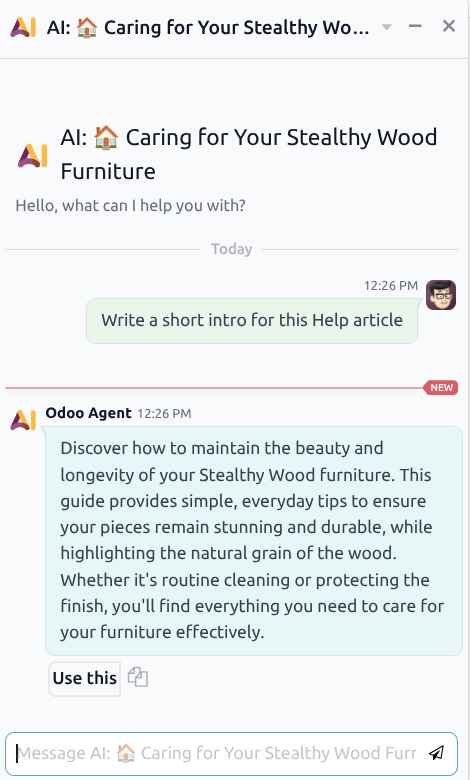
Om du är misnöjd med innehållet, skicka ett uppföljningsmeddelande till agenten med en utökad uppmaning eller föreslagna ändringar.
Förbättra befintlig text
AI kan också användas för att skriva om eller förbättra befintlig text. Detta inkluderar:
Göra text tydligare eller mer koncis
Justera ton eller struktur
Korrigera grammatik eller formulering
Välj texten som ska förbättras och klicka sedan på ikonen AI för att öppna ett konversationsfönster. Klicka på uppmaningen Skriv om markerad. Efter att texten har genererats, håll muspekaren över svaret och klicka på Använd denna för att lägga till innehållet i önskat fält eller dokument. Alternativt kan du klicka på ikonen (kopiera) för att kopiera texten till urklipp.

Tips
För att lägga till anpassade instruktioner till uppmaningen, såsom förslag om ton eller innehåll, skriv uppmaningen direkt i konversationsfönstret. Till exempel: Skriv om den valda texten i en mer professionell ton.
Bästa praxis för AI-assisterad skrivning
För bästa resultat när du använder AI för att skriva eller förbättra text:
Tillhandahåll tydligt och specifikt sammanhang i promptar
Granska AI-genererat innehåll innan du sparar eller skickar
Justera formuleringen så att den matchar företagets ton och betalningsreferensstandarder
AI-assisterad skrivning är utformad för att stödja produktiviteten, medan slutlig granskning och validering förblir väsentliga.