
Italien
Moduler
The following modules are installed automatically with the Italian localization:
Namn |
Tekniskt namn |
Beskrivning |
|---|---|---|
Italien - Redovisning |
|
Standard fiscal-lokaliseringspaket |
Italien - E-fakturering |
|
Implementering av e-faktura |
Italy - Declaration of Intent |
|
Support for the Declaration of Intent (Dichiarazione di Intento) |
Italy - Sale E-invoicing |
|
Sale modifications for E-invoicing |
Italy - Point of Sale |
|
Integration of Odoo PoS with the Italian fiscal printer |
Italien - Redovisningsrapporter |
|
Italian reports |
Italy - Bank Receipts (Ri.Ba.) |
|
Generation of Ri.Ba. files from batch payments in Odoo |
Italy - Stock DDT |
|
Transportdokument - Transportdokument (DDT) |
Observera
In some cases, such as when upgrading to a version with additional modules, it is possible that modules may not be installed automatically. Any missing modules can be manually installed.
Företag
To use all the features of this fiscal localization, the following fields are required on the company record:
Företagets namn
Address: the address of the company
VAT: VAT of the company
Codice Fiscale: the fiscal code of the company
Tax System: the tax system under which the company falls

Konfiguration av skatter
Många av funktionerna för e-fakturering implementeras med hjälp av Odoos skattesystem. Därför måste skatterna vara korrekt konfigurerade för att generera fakturor korrekt och hantera andra användningsfall för fakturering.
Den italienska lokaliseringen innehåller fördefinierade exempel på skatter för olika ändamål.
Skattebefrielse
Användningen av försäljningsskatter som uppgår till noll procent (0%) krävs av italienska myndigheter för att hålla reda på den exakta Tax Exemption Kind (Natura) och Law Reference som motiverar undantaget som används på en fakturarad.
Example
Exportskatten i EU kan användas som referens (0% EU, fakturaetikett 00eu). Den finns under . Export är undantagen från moms, och därför måste Exoneration kind och Law Reference fyllas i.

Se även
Det finns många Skattebefrielse Kind (Natura) och Law Reference koder. Se till att du kontrollerar den senaste tillgängliga versionen för att få den senaste informationen om:
Dokumentation från italienska myndigheter <https://www.agenziaentrate.gov.it/portale/web/guest/aree-tematiche/fatturazione-elettronica>`_
Observera
If you need to use a different kind of exoneration, go to , select a similar tax, then click on the cog icon and select Duplicate. In the Advanced Options tab, add the Exoneration and Law Reference. To confirm click Save.
Tips
Namnge dina skatter i fältet Name enligt deras Exoneration för att enkelt skilja dem åt.
Omvänd laddning
The reverse charge mechanism is a VAT rule that shifts the liability to pay VAT from the supplier to the customer. The customers pay the VAT themselves to the AdE instead. There are different types:
- Intern omvänd skattskyldighet (för inhemsk försäljning)Momsansvaret flyttas till köparen för vissa kategorier av produkter och tjänster.
- Extern omvänd skattskyldighet (för försäljning inom EU)Moms ska betalas i det land där leveransen sker eller i det land där tjänsten utförs. När köparen själv är ett italienskt företag erbjuder EU en mekanism som gör det möjligt för säljaren att överföra sitt ansvar till köparen.
Fakturor
Reverse-charged customer invoices show no VAT amount, but the AdE requires the seller to specify the Tax Exemption reason and the Law Reference that enable the reverse-charge mechanism. Odoo provides a set of special 0% taxes that can be assigned to each reverse-charged invoice lines, representing the most commonly used configurations.
Vendor bills
Italian companies subject to reverse charge must send bill details to the AdE.
Observera
Self-reported VAT XML files must be issued and sent to the AdE for reverse charged bills.
När du skapar en leverantörsfaktura finns omvända avgifter tillgängliga för att läggas till i fältet Skatter. Du kan kontrollera vilka skatter som är tillgängliga genom att gå till , där du kan se att bland annat 10% varuskatt och 22% tjänsteskatt är aktiverade. På grund av den automatiska konfigurationen av den italienska skattepositionen aktiveras dessa automatiskt i skattelistan.
Tax grids
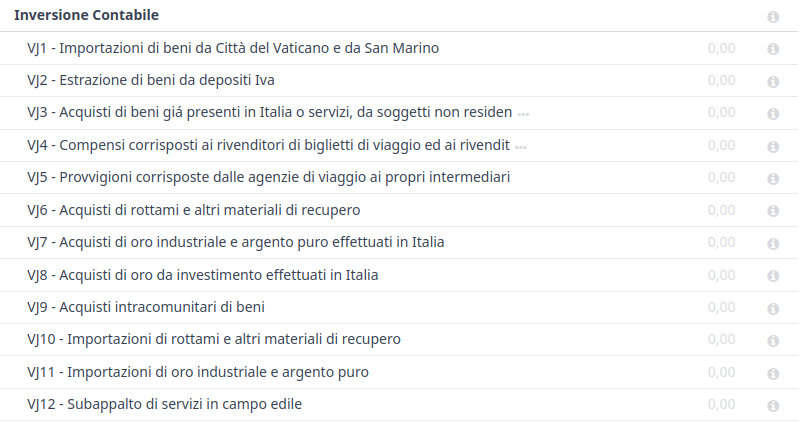
The Italian localization has a specific tax grid section for reverse charge taxes. These tax grids are identifiable by the VJ tag, and can be found by going to .
E-fakturering
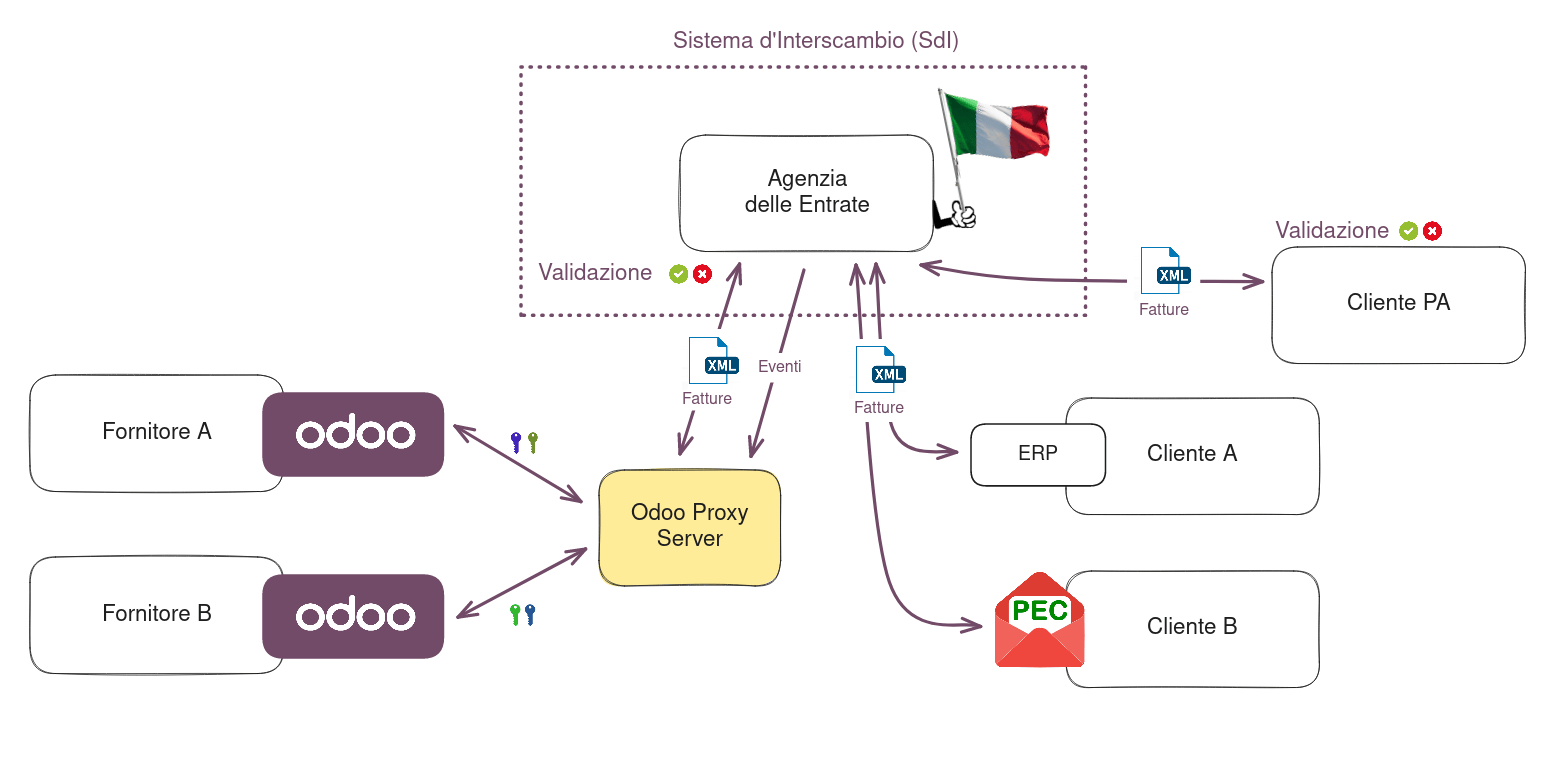
The SdI is the electronic invoicing system used in Italy. It enables the sending and receiving of electronic invoices to and from customers. The documents must be in an XML EDI format called FatturaPA and formally validated by the system before being delivered.
To be able to receive invoices and notifications, the SdI service must be notified that the user’s files need to be sent to Odoo and processed on their behalf. To do so, you must set up Odoo’s Destination Code on the AdE portal.
Go to the Italian authorities portal and authenticate.
Go to the Fatture e Corrispettivi section.
Set the user as Legal Party for the VAT number you wish to configure the electronic address.
I , sätt in Odoo’s Destination Code
K95IV18, och bekräfta.
Demo and production modes
Observera
Demo mode is enabled by default and remains active until the option By checking this box, I authorize Odoo to send and receive my invoices through the Sistema di Interscambio (SDI) is enabled in the Fattura Electronica (FatturaPA) section. Once this option is activated, production mode is enabled and cannot be disabled.
Demo mode simulates an environment in which invoices are sent to the government. In this mode, invoices must be manually downloaded as XML files and uploaded to the AdE’s website.
Since files are transmitted through Odoo’s server before being sent to the SdI or received by your database, authorization is required for Odoo to process them. To activate production mode and enable transmission to the SdI, follow these steps:
Make sure the Codice Fiscale field is completed in the Company information.
Go to and scroll to the Italian Electronic Invoicing section.
In the Fattura Electronica (FatturaPA) section, enable the option By checking this box, I authorize Odoo to send and receive my invoices through the Sistema di Interscambio (SDI).
Klicka på Spara.
Process
The submission of invoices to the SdI for Italy is an electronic process used for the mandatory transmission of tax documents in XML format between companies and the AdE to reduce errors and verify the correctness of operations.
Observera
Du kan kontrollera den aktuella statusen för en faktura genom fältet SdI State. XML-filen bifogas till fakturan.
XML documents creation
Odoo generates the required XML files as attachments to invoices in the FatturaPA format required
by the AdE. Once the invoices needed are selected, click the
Send button.
När popup-fönstret öppnas finns det ett urval av åtgärder som kan vidtas. Generate XML File genererar bilagorna.
Både XML-filen och PDF-filen finns bifogade till fakturan.

After choosing the desired actions, click Send.
Inlämning till SDI
The Send to Tax Agency option in the Send and Print dialog sends the attachment to the Proxy Server, which gathers all requests and then forwards them via a WebServices channel to the SdI. Check the sending status of the invoice through the Check Sending button at the top of the invoice’s view.
Bearbetning av SDI
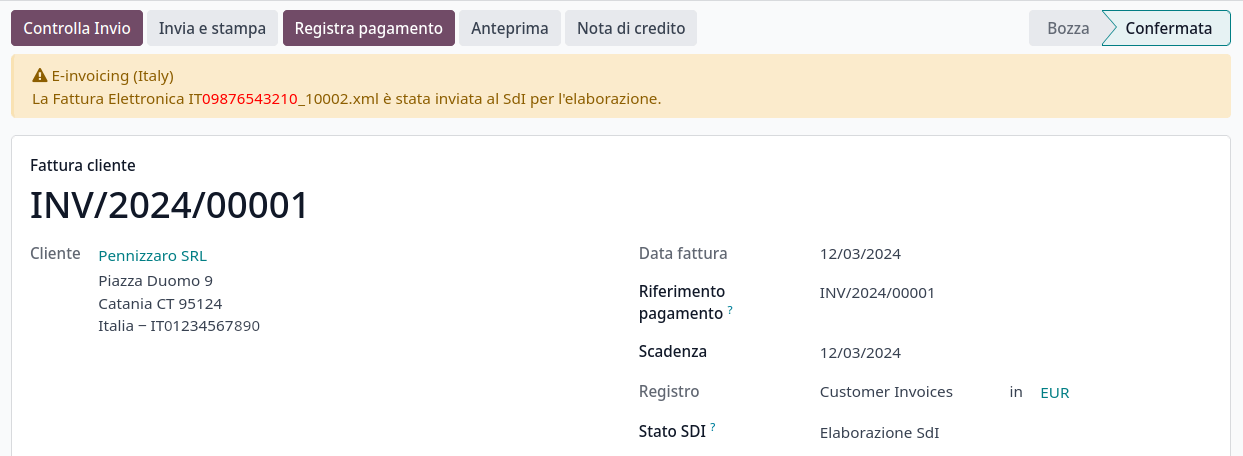
The SdI receives the document and verifies for any errors. At this stage, the invoice is in the SdI Processing state, as shown on the invoice. The invoice also gets assigned a FatturaPA Transaction number that is shown in the Electronic Invoicing tab. The checks may take variable time, ranging from a few seconds up to a day, depending on the queue of invoices sent throughout Italy.
Acceptans
If the document is valid, it is recorded and considered fiscally valid by the AdE, which will proceed with archiving in Substitute Storage (Conservazione Sostitutiva) if explicitly requested on the Agency’s portal.
Varning
Odoo does not offer the Conservazione Sostitutiva requirements. Other providers and AdE supply free and certified storage to meet the specifications requested by law.
The SdI Destination Code attempts to forward the invoice to the customer at the
provided address, whether it is a PEC email address or a SdI Destination Code for
their ERP’s WebServices channels. A maximum of 6 attempts are made every 12 hours, so even if
unsuccessful, this process can take up to three days. The invoice status is Accepted by
SDI, Forwarding to Partner.
Possible rejection
The SdI may find inaccuracies in the compilation, possibly even formal ones. In this case, the invoice is in the SDI Rejected state. The SdI’s observations are inserted at the top of the Invoice tab. To resolve the issue, it is sufficient to delete the attachments of the invoice, return the invoice to Draft, and fix the errors. Once the invoice is ready, it can be resent.
Observera
För att återskapa XML-filen måste både XML-bilagan och PDF-rapporten raderas, så att de sedan återskapas tillsammans. Detta säkerställer att båda alltid innehåller samma data.

Forwarding completed
Fakturan har levererats till kunden, men du kan fortfarande skicka en kopia till kunden i PDF-format via e-post eller post. Dess status är Accepted by SDI, Delivered to Partner.
If the SdI cannot contact your customer, they may not be registered on the AdE portal. In this case, just make sure to send the invoice in PDF via email or by mail. The invoice is then in the Accepted by SDI, Partner Delivery Failed state.
Tax integration
When you receive a vendor bill, either from SdI, from paper or from an imported XML file, the Tax Agency might request that you send some tax information integration back to the SdI. It happens when a transaction that was tax exempt becomes taxable for any reason.
Example
Här är en icke uttömmande lista:
- Som köpare måste du betala skatt på det du köper och integrera skatteinformation. Reverse Charge skatter.
- As a PA business buyer, you have to pay taxes and integrate tax information. Be sure that you replace the 0% Sale Taxes on the vendor bill you received with the correct Split Payment taxes.
- SjälvkonsumtionNär du som företagare i stället använder en tillgång som du köpt för affärsändamål för personliga ändamål måste du betala den skatt som du ursprungligen drog av som en kostnad för affärsändamål.
Odoo may detect that your vendor bill can be interpreted as a document of a type that needs tax integration, as detailed in the Dokumenttyper section.
Viktigt
Be sure that you replace the 0% Sale Taxes on the vendor bill you received with the ones you’re supposed to pay to the AdE. A button then appears on the top of the single vendor bill form to send them.
När du klickar på knappen Send Tax Integration genereras en XML-fil av lämplig Document Type som bifogas fakturan och skickas på samma sätt som för fakturor.

Dokumenttyper
The SdI requires businesses to send customer invoices and other documents through the EDI.
Följande Document Type-koder identifierar alla tekniskt sett olika användningsområden för verksamheten.
TD01 - invoices
This represents the standard domestic scenario for all invoices exchanged through the SdI. Any
invoice that doesn’t fall into one of the specific special cases is categorized as a regular
invoice, identified by the Document Type TD01.
TD02 - down payments
Down payment-fakturor importeras/exporteras med en annan Document Type-kod TDO2 än vanliga fakturor. Vid import av fakturan skapas en vanlig leverantörsfaktura.
Odoo exporterar transaktioner som TD02 om följande villkor är uppfyllda:
It is an invoice.
Alla fakturarader är relaterade till rader för försäljningsorder med förskottsbetalning.
TD04 - credit notes
It is the standard scenario for all credit notes issued to domestic clients, when we need to
formally acknowledge that the seller is reducing or cancelling a previously issued invoice, for
example, in case of overbilling, incorrect items, or overpayment. Just like invoices, they must be
sent to the SdI, their Document Type TD04
TD07, TD08, TD09 - simplified invoicing
Förenklade fakturor (TD07), kreditnotor (TD08) och debetnotor (TD09) kan användas för att attestera inhemska transaktioner under 400 EUR (inklusive moms). Dess status är densamma som för en vanlig faktura, men med färre informationskrav.
För att en förenklad faktura ska kunna upprättas måste den innehålla följande:
Customer Invoice reference: unique numbering sequence with no gaps.
Invoice Date: issue date of the invoice.
Company Info: the seller’s full credentials (VAT/TIN number, name, full address).
VAT: the buyer’s VAT/TIN number (on the partner form).
Total: det totala beloppet (inklusive moms) på fakturan.
I EDI exporterar Odoo fakturor som förenklade if:
It is a domestic transaction (i.e., the partner is from Italy).
Your company’s required fields (VAT Number or Codice Fiscale, Fiscal Regime, and full address) are provided.
The partner’s address is not fully specified (i.e., it misses the City or the ZipCode).
Det totala beloppet inklusive moms är mindre än 400 EUR.
Observera
Tröskeln på 400 EUR definierades i ”dekretet av den 10 maj 2019 i Gazzetta Ufficiale <https://www.gazzettaufficiale.it/eli/id/2019/05/24/19A03271/sg>`_. Vi råder dig att kontrollera det aktuella officiella värdet.
TD16 - internal reverse charge
Internal reverse charge transactions (see Skattebefrielse and
Omvänd laddning) are exported as TD16 if the following conditions are
met:
It is a vendor bill.
It has at least one tax on the invoice lines that targets one of these tax grids:
VJ6,VJ7,VJ8,VJ12,VJ13,VJ14,VJ15,VJ16,VJ17
TD17 - buying services from abroad
Vid köp av tjänster från EU- och icke-EU-länder fakturerar den utländska säljaren en tjänst med ett pris som är exklusive moms, eftersom den inte är skattepliktig i Italien. Momsen betalas av köparen i Italien.
Within the EU: the buyer integrates the invoice received with the VAT information due in Italy (i.e., vendor bill tax integration).
Icke-EU: köparen skickar en faktura till sig själv (dvs. självfakturering).
Odoo exporterar en transaktion som TD17 om följande villkor är uppfyllda:
It is a vendor bill.
It has at least one tax on the invoice lines that targets the tax grid VJ3.
Alla fakturarader har antingen Tjänster som produkter eller en skatt med Tjänster som skatteomfattning.
TD18 - buying goods from EU
Fakturor som utfärdas inom EU följer ett standardformat, och därför krävs endast en integration av den befintliga fakturan.
Odoo exporterar en transaktion som TD18 om följande villkor är uppfyllda:
It is a vendor bill.
The partner is from an EU country.
It has at least one tax on the invoice lines that targets the tax grid VJ9.
Alla fakturarader har antingen Consumable som produkter, eller en skatt med Goods som skatteomfattning.
TD19 - buying goods from VAT deposit
Köper varor från en utländsk säljare, men varorna befinner sig redan i Italien i en VAT-deposition.
From the EU: the buyer integrates the invoice received with the VAT information due in Italy (i.e., vendor bill tax integration).
Icke-EU: köparen skickar en faktura till sig själv (d.v.s. självfakturering).
Odoo exporterar en transaktion som en TD19 om följande villkor är uppfyllda:
It is a vendor bill.
It has at least one tax on the invoice lines that targets the tax grid VJ3.
Alla fakturarader har antingen Consumables som produkter eller en skatt med Goods som tax scope.
TD24 - deferred invoices
En fördröjd faktura är en faktura som utställs vid en senare tidpunkt än försäljningen av varor eller tillhandahållandet av tjänster. En fördröjd faktura måste utfärdas senast den 15:e dagen i den månad som följer på den leverans som omfattas av dokumentet.
Det är vanligtvis en sammanfattningsfaktura som innehåller en lista över flera försäljningar av varor eller tjänster som genomförts under månaden. Företaget får gruppera försäljningarna i en faktura, som vanligtvis utfärdas i slutet av månaden för bokföringsändamål. Uppskjutna fakturor är standard för grossister som har återkommande kunder.
Om varorna transporteras av en transportör har varje leverans ett tillhörande Documento di Transporto (DDT), eller Transportdokument. Den fördröjda fakturan måste innehålla uppgifter om alla DDT för bättre spårning.
Observera
E-invoicing of deferred invoices requires the l10n_it_stock_ddt module. In this case, a dedicated Document Type TD24 is
used in the e-invoice.
Odoo exporterar transaktioner som TD24 om följande villkor är uppfyllda:
It is an invoice.
Den är kopplad till leveranser vars DDT har ett annat datum än fakturans utställningsdatum.
TD28 - San Marino
Fakturor
San Marino och Italien har särskilda avtal om e-fakturering. Som sådana följer fakturor de vanliga reglerna för omvänd debitering. Du kan använda rätt Document Type beroende på fakturatyp: TD01, TD04, TD05, TD24, TD25. Ytterligare krav verkställs inte av Odoo. Användaren uppmanas dock av State att:
Select a tax with the Tax Exemption Kind set to
N3.3.Use the generic SdI Destination Code
2R4GTO8.
Fakturan vidarebefordras sedan av ett särskilt kontor i San Marino till rätt företag.
Vendor bills
When a paper bill is received from San Marino, any Italian company must submit that invoice
to the AdE by indicating the e-invoice’s Document Type field with the special value
TD28.
Odoo exporterar en transaktion som TD28 om följande villkor är uppfyllda:
It is a vendor bill.
It has at least one tax on the invoice lines that targets the tax grids VJ.
Partnerns land är San Marino.
Public administration businesses (B2G)
PA businesses are subjected to more control than private businesses as they handle public money coming from taxpayers. The EDI process adds some steps to the regular one, as PA businesses can accept or refuse invoices.
Observera
PA businesses have a 6-digit long Destination Code, also called CUU, that is mandatory, PEC address cannot be used in this case.
CIG, CUP, inköpsorderdata
För att säkerställa en effektiv spårbarhet av betalningar från offentliga förvaltningar måste elektroniska fakturor som utfärdas till offentliga förvaltningar innehålla följande:
The CIG, except in cases of exclusion from traceability obligations provided by law n. 136 of August 13, 2010.
Den CUP, när det gäller fakturor relaterade till offentliga arbeten.
If the XML file requires it, the AdE can only proceed payments of electronic invoices when the XML file contains a CIG and CUP.
Observera
CUP och CIG måste ingå i någon av XML-taggarna PurchaseOrderData, ContractData, ConventionData, ReceiptDate eller InvoiceData.
Dessa motsvarar elementen med namnen CodiceCUP och CodiceCIG i XML-filen för elektroniska fakturor, vars tabell finns på regeringens webbplats <http://www.fatturapa.gov.it/>`_.
Split payment
The Split Payment mechanism behaves much like Omvänd laddning.
Example
When an Italian company bills a PA business - for example, cleaning services for a public building - the PA business self-reports the VAT to the Tax Agency themselves, and the vendor just has to select the appropriate tax with the right Tax Exemption for their invoice lines.
The specific Scissione dei Pagamenti fiscal position is available to deal with partners belonging to the PA.
Process
Qualified electronic signature
Invoices and bills intended for the PA must include a qualified electronic signature when submitted through the SdI. This signature is automatically applied in the XAdES format when the invoice’s partner has a 6-digit long Destination Code (which indicates a PA business).
Observera
When such an invoice is transmitted to the Tax Agency, the generated .xml file is signed on the
Odoo servers, returned to the database, and attached to the invoice automatically.
Acceptance or refusal
After receiving the invoice through the SdI, the PA business has 15 days to accept the invoice. If it does, then the process ends here. If the PA business refuses the invoice, it is still considered valid once it is accepted by the SdI. You then have to issue a credit note to compensate and send it to the SdI.
Expired terms
If the PA business doesn’t reply within 15 days, you need to contact the PA business directly, sending them both the invoice and the received deadline notification by email. You can make an arrangement with them and manually set the correct SdI State on your invoice.
Point of sale fiscal printers
Varning
Fiscal printers are distinct from ePOS printers. The IP address for a fiscal printer should not be entered in the ePOS IP address settings.
Fiscal regulations mandate using certified RT devices, such as RT printers or RT servers, to ensure compliant sales receipts and secure communication with the Tax Authority. These devices automatically transmit fiscal data daily. RT printers, designed for individual POS terminals, handle transactions, print receipts, and report to the authorities, ensuring data integrity and compliance.
Simuleringsläge
Varning
Since the simulation mode sends data to the authorities, it should only be enabled at the very start of the printer’s configuration process. Once the printer is switched to the production mode, it cannot be reverted to the simulation mode.
To test the fiscal printer setup with Odoo, configure the fiscal printer in the simulation mode as follows:
Make sure the fiscal printer is set to its default state: printer on, start-up cycle complete, and no transaction in progress.
Type
3333.Press Chiave. The screen displays Scelta Funzione.
Type
14. The screen displays Apprendimento.Type
62. The screen displays Simulazione.To turn the no into a si, press X.
To confirm, press Contante.
Press Chiave.
To configure the printer for production, repeat the steps above.
Observera
To test the printer configuration, the physical device must first be obtained and registered with the relevant authorities.
Setting up the printer to work with Odoo
Fiscal printers are meant to work only in the local network. This means the printer and the device running Odoo Point of Sale must be connected to the same network.
Fiscal printers are typically configured to use HTTP by default. To ensure compatibility with Odoo, the settings must be updated to enable HTTPS support on the printer. This can be done using either the EpsonFPWizard configuration software or the keyboard connected to the printer.
To set up the fiscal printer using the keyboard, follow these steps:
Make sure the fiscal printer is set to its default state: printer on, start-up cycle complete, and no transaction in progress.
Type
3333.Press Chiave. The screen displays Scelta Funzione.
Type
34. The screen displays Web Server.Press Contante 3 times until the screen displays Web Server: SSL.
To turn the value
0into a1, press X.To confirm, press Contante 3 times.
Press Chiave.
Then, log in to the printer with the device that runs Odoo Point of Sale so it recognizes the printer’s certificate.
To approve and install the printer’s certificate, follow these steps:
Access the printer by opening a web browser and entering
https://<ip-of-your-printer>in the address bar. A Warning: Potential Security Risk Ahead security message appears.Click Advanced to show the certificate approval options.
Click Proceed to validate the certificate.
Then, to ensure Odoo Point of Sale is configured with the fiscal printer, go to . In the Connected Devices section, add the IP address in the Italian Fiscal Printer IP address and enable Use HTTPS.
Ri.Ba. (Ricevuta Bancaria)
Ri.Ba. is a payment method widely used in Italy where vendors request payments through their bank, which forwards the request to the customer’s own bank and takes responsibility for the collection. This enables payment automation and reduces risks for the vendor.
The vendor generally uploads a fixed-format text file with the list of payments to the bank’s web portal.
Observera
Ri.Ba. are exclusively for domestic payments in Italy. For recurring international payments, please use SEPA Direct Debt (SDD)
Konfiguration
Check that the
l10n_it_ribamodule is installed.Go to and select the company that will use Ri.Ba..
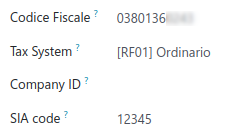
Fill out the required SIA Code.
Observera
The SIA Code identifies businesses within the Italian banking network and is used to receive money through specific payment methods. It consists of one letter and four digits (e.g., T1234) and can usually be found on the bank’s portal or obtained by contacting the bank.
Ensure the Company’s bank account has an Italian IBAN.
Se även
How to configure Bank Accounts
Accept Ri.Ba. for your invoices
Payments of type Ri.Ba. can be registered from the Invoices ().
Viktigt
Make sure that your invoice involves a Partner that has a bank account with an Italian IBAN.
Then, all Payments must be grouped in a Batch Payment.
Se även
Once you press the Validate button for the Batch Payment, the Ri.Ba. file is generated and attached to the Batch Payment, so you can download it and upload it through your bank’s web portal.
