
スキルの進化
Odooの評価アプリでは、スキルの進化レポート(評価スキルレポートとも呼ばれます)で、従業員のスキルが時間の経過とともにどのように進歩しているかを表示できます。
マネージャーはこれを使用して、評価で設定されたさまざまなスキル目標を達成している人、スキルの期限を守っている人、スキル開発の観点で最もパフォーマンスが高い人などを確認できます。
スキルの進化レポートでは、特定のスキルを持つ従業員を特定のレベルで検索する機能も提供されており、特定のスキルが必要なシナリオで役立ちます。
スキルの進化レポート
このスキルの進化レポートにアクセスするには、に移動します。
Doing so reveals the Appraisal Skills Report page, which displays a report of all skills, grouped by employee, in alphabetical order, by default.
注釈
Skill levels are only updated after an appraisal is marked as done. Any skill level changes from ongoing appraisals that have not been finalized are not included in this report.
All the Employee lines are expanded, with all the various skill types nested below. Each individual skill type is collapsed, by default. To view the individual skills contained within a skill type, click anywhere on the skill type line to expand the data.
Each skill has the following information listed:
従業員: 従業員の名前。
スキルタイプ: スキルが属するカテゴリ。
スキル:具体的な個別のスキル。
Previous Skill Level: the level the employee had previously achieved for the skill.
Previous Skill Progress: the previous percentage of competency achieved for the skill (based on the Skill Level).
Current Skill Level: the current level the employee has achieved for the skill.
Current Skill Progress: the current percentage of competency achieved for the skill.
正当化:スキルに入力されたメモで、進捗を説明するもの。
スキルテキストの色は、前回の評価からの変更を示します。前回の評価以降にレベルが上がったスキルは、*向上*として緑色で表示されます。**変更されていない**スキルレベルは、*変更なし*として黒色で表示されます。後退したスキルは、*後退*として赤色で表示されます。
このレポートは、上部の検索バーで設定されている:ref:`フィルター <search/filters>`と:ref:`グループ化 <search/group>`を調整することで、特定の情報を見つけるように変更できます。

使用例:特定のスキルを持つ従業員を特定する
Since the Appraisal Skills Report organizes all skills by employee, it can be difficult to find employees with a specific skill at a specific level. To find these employees, a custom filter must be used.
この例では、エキスパートレベルのJavascriptの知識を持つ従業員を表示するようにレポートを変更します。それらの従業員のみを表示するには、まず検索バーのすべてのアクティブなフィルターを削除します。
Next, click the (down arrow) icon in the search bar, then click Add Custom Filter beneath the Filters column to load an Add Custom Filter pop-up window.
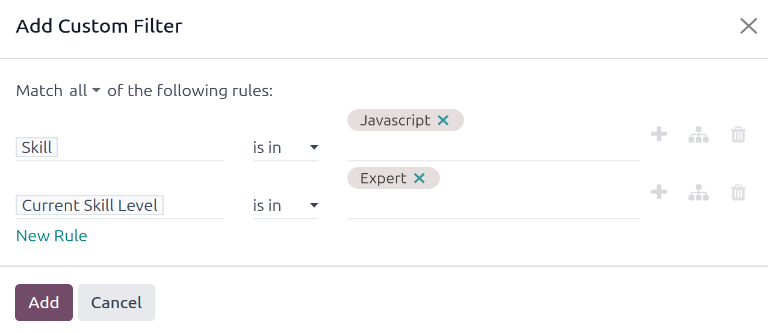
Using the drop-down menu in the first field, select Skill. Then, keep the second field as-is, and select Javascript from the third drop-down menu in the third field.
Next, click New Rule, and another line appears. In this second line, select Current Skill Level for the first drop-down field, leave the second field as-is, then select Expert for the third drop-down field.
After the New Rule button is clicked, the word "any" in the sentence Match any of the following rules:, changes from plain text into a drop-down menu. Click the (down arrow) icon after the word any, and select all.
最後に、:guilabel:`追加`ボタンをクリックします。
これで、:guilabel:`Javascript`のスキルで:guilabel:`エキスパート`レベルを持つ従業員のみが表示されます。この例では、:guilabel:`Marc Demo`のみがこれらの基準を満たしています。
