
予測リードスコアリングによるリードの割当
The Odoo CRM app can automatically assign leads/opportunities to sales teams and salespeople. A standard practice is to assign leads based on the probability of winning each lead. Companies can prioritize the leads that are more likely to result in successful deals by quickly assigning them to the appropriate salespeople.
Odooは 予測リードスコアリング と呼ばれる方法で、各リードの成約確度を自動的に計算します。
予測リードスコアリング
Predictive lead scoring is a machine-learning model that uses historical data from Odoo CRM to score open leads/opportunities.
企業がCRMパイプラインを通して案件を処理する際、Odooは案件の成約と失注に関するデータを収集します。予測リードスコアリングはこのデータを使って、各新規リードや案件の成約確度を予測します。
CRMパイプラインに送られる案件が多ければ多いほど、Odooはより多くのデータを収集し、より正確な確率を得ることができます。
具体的には、Odooの予測リードスコアリングは 単純ベイズ 確度モデルを使用しています:
Breaking down the equation:
P(A|B) = The probability of a successful lead in this case
P(A) = The overall probability of a lead being successful regardless of the conditions
P(B|A) = The probability of this being the case given a lead is successful
P(B) = The probability of this being the case
The term in this case refers to the variables that can affect a lead being successful in Odoo. This can include variables such as the assigned Salesperson, the source of the lead, the language of the lead, and other historical and demographic data.
Which variables are considered in this calculation can be configured to tailor the calculation to each business's needs.
各案件の成約確度は、案件フォームに表示され、案件がCRMパイプラインを進むにつれて自動的に更新されます。

案件が次のステージに進むと、その成約確度は予測リードスコアリングアルゴリズムに従って自動的に上昇します。
設定
Predictive lead scoring is always active in Odoo CRM. However, the variables used to calculate the probability of success can be customized in the settings.
予測リードスコアリングで使用する変数をカスタマイズするには、 に進みます。guilabel:予測リードスコアリング の下にある、確度を更新 ボタンをクリックします。
Then, click on the drop-down menu to choose which variables the predictive lead scoring feature takes into account.

以下の変数はいくつでも有効にできます:
州・都道府県: 案件が発生した地理的な州・都道府県。
国: 案件が発生した地理的な国。
電話品質: 案件に電話番号が記載されているかどうか。
Eメール品質: 案件にEメールアドレスが記載されているかどうか。
ソース: 案件の発生源(検索エンジンやソーシャルメディアなど)。
言語: 案件で指定された対話言語
タグ: 案件に付けられたタグ
注釈
変数 ステージ と チーム は常に有効です。 Stage は、案件が CRM のパイプラインステージにあることを意味します。`チーム`は、案件に割当てられた販売チームを意味します。予測リードスコアリングは、どのオプション変数が選択されているかに関わらず、常にこの2つの変数を考慮します。
Next, click on the date field next to the option Consider leads created as of the: to select the date from which predictive lead scoring begins its calculations.
最後に 確認 をクリックして変更を保存します。
手動で確度を変更します
案件の成功確度は、案件フォームで手動で変更できます。確度の数字をクリックして編集します。
重要
Manually changing the probability removes the automatic probability updates for that opportunity. The probability no longer automatically updates as the opportunity moves through each stage of the pipeline.
自動確度を再び有効にするには、確率のパーセンテージの隣にある歯車のアイコンをクリックします。

確度に基づいてリードを割当てる
Odoo CRM can assign leads/opportunities to sales teams and salespeople based on specified rules. Create assignment rules based on the leads' probability of success to prioritize those that are more likely to result in leads and opportunities.
ルールに基づいた割当を設定する
ルールに基づいた割当 を有効にするには、 を有効にします。
The rule-based assignment feature can be set to run Manually, meaning an Odoo user must manually trigger the assignment, or Repeatedly, meaning Odoo automatically triggers the assignment according to the chosen time period.
To configure automatic lead assignment, select Repeatedly for the Running section. The frequency of this automatic assignment is customized within the Repeat every section. Enter a specific number and select a corresponding time period to establish the desired interval. Time periods range from Minutes to Weeks.
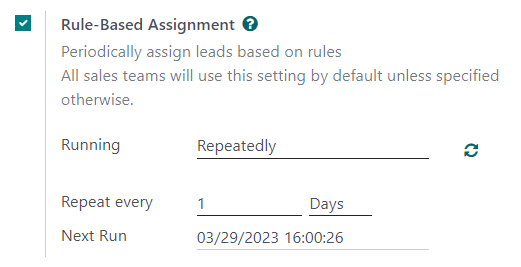
If rule-based assignment is set to run Repeatedly, the assignment can still be triggered manually using the circular arrow icon in the Rule-Based Assignment settings, or using the Assign Leads button on the sales team configuration page. Once a lead has been assigned to a salesperson via this rule, the leads are automatically converted into an opportunity by the system.
割当てルールを設定する
Next, configure the assignment rules for each sales team or salesperson. These rules determine which leads Odoo assigns to which people. To get started, navigate to , and select a sales team.
販売チーム設定フォームの 割当ルール の下にある ドメインの編集 をクリックして、この営業チームのリード割当てを決定するためにOdooが使用するルールを設定します。ルールはこの会社やチームに関連するものであれば何でも設定でき、いくつでも追加できます。
Click Add Filter to start creating assignment rules. Click on the sign on the right of the assignment rule to add another line. Click on the x symbol to remove the line.
案件の成功確率に基づいて割当ルールを作成するには、割当ルール行の左端のドロップダウンメニューをクリックし、:guilabel:`確度`を選択します。
真ん中のドロップダウンメニューから、必要な方程式の記号を選択します。ほとんどの場合、が次より大きい、が次より小さい、が次以上、または*が次以下*の記号です。
右端のスペースに、希望する確度の数値を入力します。最後に 保存 をクリックして変更を保存します。
Example
販売チームが成約確度20%以上のリードを受け取るように割当ルールを設定するには、 ドメイン`行を作成して下さい:`確度 >= 20
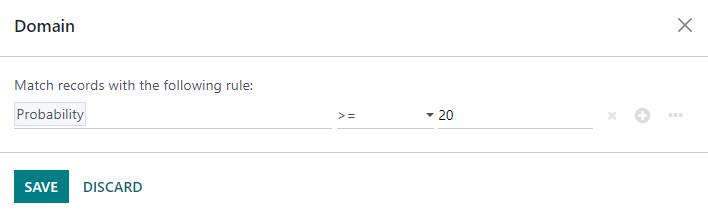
個々のチームメンバに対して個別の割当ルールを設定することもできます。販売チームの設定ページから、 メンバ タブでチームメンバをクリックし、 ドメイン セクションを編集します。guilabel:保存 をクリックして変更を保存します。
設定でリードの自動割当が設定されている場合、販売チームと個々のチームメンバの両方に 自動割当をスキップする オプションがあります。このボックスにチェックを入れると、Odooのルールに基づいた割当機能により、特定の販売チームまたは販売担当者にリードが自動割当されなくなります。自動割当をスキップ が有効になっている場合でも、販売チームまたは販売担当者は手動でリードを割当られます。
To manually assign leads to this sales team, click on the Assign Leads button at the top of the sales team configuration page. This assigns any leads that are currently unassigned and match this team's specified domain.