
Team performance reporting
採用アプリの*チームパフォーマンス*レポートは、各採用担当者が何人の応募者を管理しているかを示します。
この情報は、各応募者フォームの採用担当者フィールドに入力されている個人によって決定されます。
レポートを開く
*チームパフォーマンス*レポートにアクセスするには、に移動します。
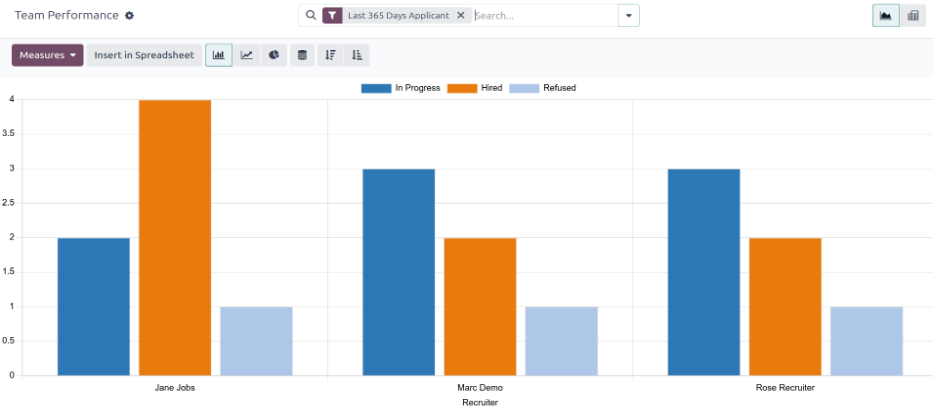
The number of In Progress, Hired, and Refused applicants for each recruiter is displayed in the (Graph) view.
表示される情報は、検索バーに表示されるデフォルトフィルター直近365日間の応募者のものです。
任意の列にカーソルを合わせると、その列の具体的な詳細を表示するポップオーバーウィンドウが表示されます。
ピボットテーブルビュー
チームパフォーマンスレポートの情報をより詳細に表示するには、右上隅の(ピボット)アイコンをクリックします。すべての情報がピボットテーブルに表示されます。
In this view, the job positions are displayed in the rows, while the columns display the total number of applicants. The applicants are further organized by # Applicant (in process), # Hired, and # Refused.
表示される情報は、必要に応じて変更できます。
In this example, there are 19 total applicants. Out of those 19, eight have been hired, and three refused.
From the data presented, the Experienced Developer job position is the most successful. This job position has the highest number of total applicants, as well as the most hires. In addition, the Experienced Developer has the least amount of refused applicants.
This pivot table also shows that the Chief Executive Officer position is the hardest to fill, as it has the fewest total applicants.

使用例:リクルーターのパフォーマンスの時系列推移
このレポートを変更する方法の1つは、リクルーターのパフォーマンスを時系列で表示することです。この情報を表示するには、チームパフォーマンスレポートを(ピボット)ビューで開きます。
Next, click the (down arrow) in the search bar, revealing a drop-down menu. Click Add Custom Group at the bottom of the Group By column, then click Recruiter. Click away from the drop-down menu to close it. Now, each row on the table represents a recruiter.

To compare the team's performance over different time periods, click the (down arrow) in the search bar. Click Start Date in the Filters column, revealing various time periods to select.
In this example, the desired data is the comparison between the team's performance in the third quarter (June - August) and the second quarter (April - July). To do so, click Q3. Once clicked, the current year is also ticked. In this example, it is 2024.
この選択を行うと、比較列が表示されます。開始日:前期間をクリックして、第3四半期と第2四半期をさまざまなリクルーターごとに比較します。
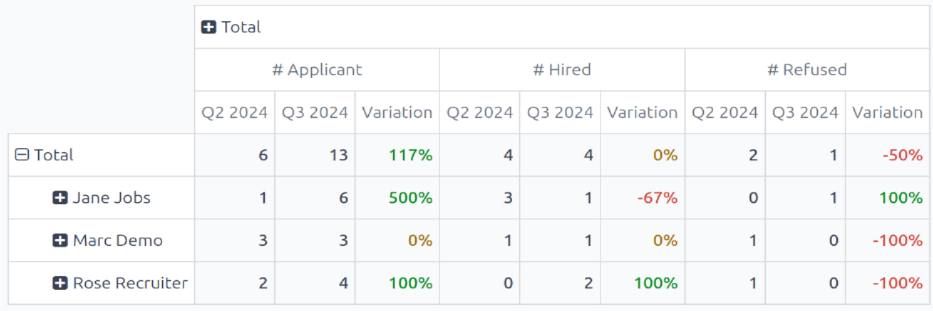
From this report, several things can be extrapolated: the total number of applicants increased, the number of hired applicants remained the same, while the number of refused applicants decreased.
Additionally, Jane Jobs had the highest increase in number of applicants during the third quarter, but her number of hired applicants went down 67%. The recruiter with the best overall numbers was Rose Recruiter, who had both their active applicants and hired applicants, increase in the third quarter, while their refused applicants went down.