
Evoluzione delle competenze
Nell’applicazione Valutazione dipendenti di Odoo, è possibile visualizzare le competenze dei dipendenti mentre progrediscono nel tempo nel report Evoluzione delle competenze, noto anche come Report sulle competenze di valutazione.
I manager possono utilizzarlo per vedere chi sta raggiungendo i vari obiettivi di competenza stabiliti nelle proprie valutazioni, chi sta rispettando le scadenze delle competenze, chi ha le prestazioni più alte in termini di sviluppo delle competenze e altro ancora.
Il report Evoluzione delle competenze offre anche la possibilità di cercare dipendenti con competenze specifiche a determinati livelli, il che può essere utile per scenari in cui sono richieste competenze specifiche.
Report evoluzione competenze
Per accedere a questo report Evoluzione competenze, vai a .
Doing so reveals the Appraisal Skills Report page, which displays a report of all skills, grouped by employee, in alphabetical order, by default.
Nota
Skill levels are only updated after an appraisal is marked as done. Any skill level changes from ongoing appraisals that have not been finalized are not included in this report.
All the Employee lines are expanded, with all the various skill types nested below. Each individual skill type is collapsed, by default. To view the individual skills contained within a skill type, click anywhere on the skill type line to expand the data.
Each skill has the following information listed:
Dipendente: il nome del dipendente.
Tipo di competenza: la categoria a cui appartiene la competenza.
Competenza: la competenza specifica e individuale.
Previous Skill Level: the level the employee had previously achieved for the skill.
Previous Skill Progress: the previous percentage of competency achieved for the skill (based on the Skill Level).
Current Skill Level: the current level the employee has achieved for the skill.
Current Skill Progress: the current percentage of competency achieved for the skill.
Giustificazione: eventuali note inserite sulla competenza, che spiegano il progresso.
Il colore del testo della competenza indica eventuali modifiche rispetto alla valutazione precedente. I livelli di competenza aumentati dall’ultima valutazione appaiono in verde, come Miglioramento. I livelli di competenza che non sono cambiati appaiono in nero, come Nessuna modifica. Le competenze regredite appaiono in rosso, come Regressione.
Questo report può essere modificato per trovare informazioni specifiche regolando i filtri e i raggruppamenti impostati nella barra di ricerca in alto.

Caso d’uso: identificare i dipendenti con competenze specifiche
Since the Appraisal Skills Report organizes all skills by employee, it can be difficult to find employees with a specific skill at a specific level. To find these employees, a custom filter must be used.
In questo esempio, il report viene modificato per mostrare i dipendenti con un livello esperto di conoscenza Javascript. Per visualizzare solo questi dipendenti, rimuovi prima tutti i filtri attivi nella barra di ricerca.
Next, click the (down arrow) icon in the search bar, then click Add Custom Filter beneath the Filters column to load an Add Custom Filter pop-up window.
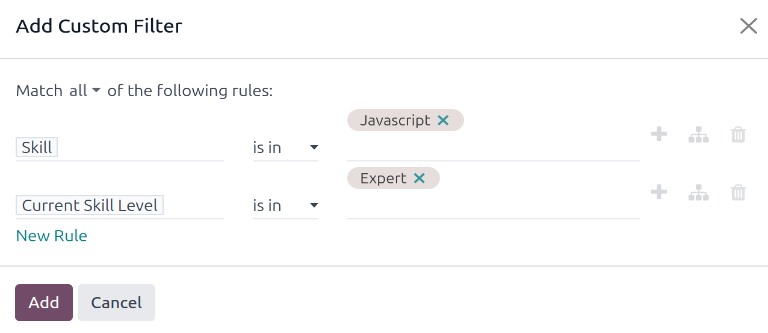
Using the drop-down menu in the first field, select Skill. Then, keep the second field as-is, and select Javascript from the third drop-down menu in the third field.
Next, click New Rule, and another line appears. In this second line, select Current Skill Level for the first drop-down field, leave the second field as-is, then select Expert for the third drop-down field.
After the New Rule button is clicked, the word «any» in the sentence Match any of the following rules:, changes from plain text into a drop-down menu. Click the (down arrow) icon after the word any, and select all.
Infine, fare clic sul pulsante Aggiungi.
Ora vengono visualizzati solo i dipendenti che hanno un livello Esperto per la competenza Javascript. In questo esempio, solo Marc Demo soddisfa questi criteri.
