
ألمانيا¶
التطبيقات¶
The following modules are installed automatically with the German localization:
الاسم |
الاسم التقني |
الوصف |
|---|---|---|
Germany - Accounting |
|
German fiscal localization package. By default, the audit trail is enabled to ensure compliance with GoBD. |
ألمانيا - تقارير المحاسبة |
|
يوفر تقارير محاسبية ألمانية ويضيف خيارات تصدير DATEV إلى دفتر الأستاذ العام. |
ألمانيا - شهادة نقطة البيع |
|
يتضمن تطبيق نظام الأمان التقني، باستخدام حل قائم على السحابة من Fiskaly. |
ألمانيا - شهادة نقطة البيع من نوع مطعم |
|
يضيف المتطلبات التنظيمية الجديدة المتعلقة تحديداً بقطاع المطاعم في ألمانيا. |
بالإضافة إلى ذلك، يجب تثبيت الوحدات التالية يدويًا:
الاسم |
الاسم التقني |
الوصف |
|---|---|---|
ألمانيا - تقديم الضرائب عبر Elster |
|
التقديم الإلكتروني لإقرار UStVA الألماني (الإقرار الضريبي المسبق) إلى مصلحة الضرائب Finanzamt عبر نظام Elster. |
ملاحظة
في بعض الحالات، مثل الترقية إلى إصدار يحتوي على وحدات إضافية، من الممكن ألا يتم تثبيت الوحدات تلقائيًا. يمكن تثبيت أي وحدات مفقودة يدويًا.
Localization overview¶
تضمن حزمة التوطين الألمانية الامتثال للوائح الضريبية والمحاسبية الألمانية. تتضمن أدوات لإدارة الضرائب وFiscal positions والتقارير، بالإضافة إلى مخطط حسابات محدد مسبقاً مصمم وفقاً لمعايير ألمانيا.
توفر حزمة التوطين الألمانية الميزات الرئيسية التالية لضمان الامتثال للوائح الضريبية والمحاسبية المحلية:
الأوضاع المالية (الضريبة وتخطيط الحساب): automated tax adjustments based on customer or supplier registration status
Taxes: pre-configured tax rates, including standard VAT, zero-rated, and exempt options
شجرة الحسابات¶
يدعم Odoo كلاً من مخططي الحسابات SKR03 وSKR04. عند إنشاء قاعدة بيانات جديدة على Odoo Online، يتم تثبيت SKR03 افتراضياً.
للتحقق من المخطط المثبّت، اذهب إلى وتحقق من حقل الحزمة ضمن قسم التوطين المالي.
تحذير
لا يمكن اختيار حزمة أخرى إلا إذا لم يتم إنشاء أي قيود محاسبية. في حال ترحيل قيد ما، يجب إعداد شركة أو قاعدة بيانات جديدة لاختيار حزمة أخرى. بالإضافة إلى ذلك، سيتعين إنشاء جميع قيود اليومية من جديد.
التقارير¶
تتوفر التقارير التالية الخاصة بألمانيا:
الميزانية العمومية
الربح والخسارة.
Tax return (Umsatzsteuervoranmeldung) with Elster integration
قائمة مبيعات EC
نظام الإحصاءات البيئية الأوروبية
Tax return with Elster integration¶
ملاحظة
Make sure to install the Germany - Elster Tax Submission (
l10n_de_reports_elster) module.To submit UStVA (VAT advance returns) to Elster, the VAT ID and tax number (St.-Nr.) are required on the company record.
Once the module is installed and the VAT ID and tax number have been entered, data is sent to Elster upon submission of the tax return.
وضع الاختبار
To set the test mode and use the Elster integration without sending real data, follow these steps:
Enable developer mode.
Open the Settings app and go to .
Click New to add the
l10n_de_reports_elster.elster_proxy_modekey and set its value totest.انقر فوق حفظ.
نصيحة
Once the submission is complete, the generated CPA005 TXT file is displayed in the tax return's chatter for download and bank import, along with the XML file for manual upload via Elster.de and the tax reports.
المحاسبة¶
Taxable supply date¶
Set the Taxable Supply Date on invoices to reflect the actual delivery date for goods or services provided before invoice creation (e.g., service delivered in May, invoice created in June). Completing this field automatically aligns the invoice's accounting date, ensuring that the journal entry and the associated VAT are recognized in the correct period.
مهم
If the previous period is closed and locked (via Lock dates), postings for that period are not allowed. Consequently, the journal entry will automatically be posted in the current open period.
ملاحظة
The Taxable Supply Date field is intended for accounting purposes and is not displayed on printed reports. When using the DIN 5008 layout, ensure the Delivery Date field is filled to display the date on the generated PDF invoice.
Exporting entries from Odoo to DATEV¶
Provided that one of the German fiscal localization packages is installed, accounting entries from Odoo can be exported to DATEV from the general ledger.
Two types of exports are needed: first the DATEV ATCH export, then the DATEV DATA export.
ملاحظة
Both are needed at different stages to transfer the data correctly to DATEV, as DATEV works with two interfaces, one for clients (DUO - DATEV Unternehmen Online) and one for tax advisors (DATEV Rechnungswesen).
DATEV DATA¶
Go to , click the (Actions) button, and select Datev DATA (zip).
Transfer the downloaded ZIP file to your tax advisor. They should import the ZIP file into DATEV Rechnungswesen.
Check with your tax advisor how often they need these files.
DATEV ATCH ZIP file
The ZIP file contains three CSV files:
the
EXTF_customer_accounts.csvfile containing all information related to your customers,the
EXTF_vendor_accounts.csvfile containing all information related to your vendors, andthe
EXTF_accounting_entries.csvcontaining all journal items for the period defined on the general ledger, as well as the unique IDs (GUID) so that the journal items can be linked to the files inside the DATEV ATCH ZIP file.
DATEV ATCH¶
Go to , click the (Actions) button, and select Datev ATCH (zip).
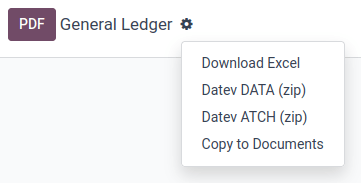
قم برفع ملف ZIP المنزّل عبر برنامج DATEV Belegtransfer.
ملاحظة
إذا لم يكن برنامج DATEV Belegtransfer مثبتًا على جهازك، اطلب من مستشارك الضريبي مساعدتك في ذلك.
تحذير
يتضمن ملف DATEV ATCH ZIP الملفات (التقارير) المرتبطة بفاتورة أو فاتورة مورد في Odoo. بالنسبة لفواتير العملاء، يجب أن يكون الملف قد تم إنشاؤه باستخدام زر إرسال. بالنسبة لفواتير الموردين، يجب أن يكون الملف قد تم استلامه عبر بريد إلكتروني مستعار أو تم تحميله باستخدام زر رفع.
DATEV ATCH ZIP file
The ZIP file contains two types of files:
the individual invoice/bill files (PDF, JPEG, etc.) for the selected period on the general ledger, and
a
document.xmlfile used to generate a unique ID (GUID) for each file.
These unique IDs are essential as they allow DATEV to automatically link the files to the individual journal items, which will be imported with the DATEV DATA file in the next step.
GoBD compliance¶
GoBD stands for Grundsätze zur ordnungsmäßigen Führung und Aufbewahrung von Büchern, Aufzeichnungen und Unterlagen in elektronischer Form sowie zum Datenzugriff. In short, it is a guideline for the proper management and storage of books, records, and documents in electronic form, as well as for data access, that is relevant for the German tax authority, tax declaration, and balance sheet.
These principles have been written and published by the Federal Ministry of Finance (BMF) in November 2014. Since January 2015, they have become the norm and have replaced previously accepted practices linked to computer-based accounting. Several changes have been made by the BMF in 2019 and January 2020 to specify some of the content due to the development of digital solutions (cloud hosting, paperless companies, etc.).
مهم
Odoo is certified GoBD-compliant.
Understanding GoBD in relation to accounting software¶
The GoBD is binding for companies that have to present accounts, which includes SMEs, freelancers, and entrepreneurs, to the financial authorities. As such, the taxpayer himself is the sole responsible for the complete and exhaustive keeping of fiscal-relevant data (above-mentioned financial and related data).
Apart from software requirements, the user is required to ensure internal control systems (in accordance with sec. 146 of the Fiscal Code):
access rights control;
segregation of duties, functional separating;
entry controls (error notifications, plausibility checks);
reconciliation checks at data entry;
processing controls; and
measures to prevent intentional or unintentional manipulation of software, data, or documents.
The user must distribute tasks within their organization to the relevant positions (control) and verify that the tasks are properly and completely performed (supervision). The result of these controls must be recorded (documentation), and should errors be found during these controls, appropriate measures to correct the situation should be put into place (prevention).
Data security¶
The taxpayer must secure the system against any data loss due to deletion, removal, or theft of any data. If the entries are not sufficiently secured, the bookkeeping will be regarded as not in accordance with the GoBD guidelines.
Once bookings have been finally posted, they can no longer be changed or deleted via the application.
If Odoo is used in the cloud, regular backups are part of the Odoo Online service. In addition, regular backups can be downloaded and backed up on external systems.
If the server is operated locally, the user is responsible for creating the necessary backup infrastructure.
مهم
In some cases, data has to be kept for ten years or more, so always have backups saved. It is even more important if you decide to change software provider.
Responsibility of the software editor¶
Considering GoBD applies only to the taxpayer, the software editor can by no means be held responsible for the accurate and compliant documentation of their users' financial transactional data. It can merely provide the necessary tools for the user to respect the software-related guidelines described in the GoBD.
Ensuring compliance through Odoo¶
The keywords, when it comes to GoBD are: traceable, verifiable, true, clear, and continuous. In short, you need to have audit-proof archiving in place, and Odoo provides you with the means to achieve all of these objectives:
- Traceability and verifiabilityEach record in Odoo is stamped with the creator of the document, the creation date, the modification date, and who modified it. In addition, relevant fields are tracked. Thus, it can be seen which value was changed by whom in the chatter of the relevant object.
- CompletenessAll financial data must be recorded in the system, and there can be no gaps. Odoo ensures that there is no gap in the numbering of the financial transactions. It is the responsibility of the user to encode all financial data in the system. As most financial data in Odoo is generated automatically, it remains the responsibility of the user to encode all vendor bills and miscellaneous operations completely.
- AccuracyOdoo ensures that, with the correct configuration, the correct accounts are used. In addition, the control mechanisms between purchase orders and sales orders and their respective invoices reflect the reality of the business. It is the responsibility of the user to scan and attach the paper-based vendor bill to the respective record in Odoo. Odoo Documents helps you automate this task.
- Timely booking and record-keepingAs most financial data in Odoo is generated by the transactional objects (for example, the invoice is booked at confirmation), Odoo ensures out-of-the-box timely record-keeping. It is the responsibility of the user to encode all incoming vendor bills in a timely manner, as well as the miscellaneous operations.
- OrderFinancial data stored in Odoo is, per definition, ordered and can be reordered according to most fields present in the model. A specific ordering is not enforced by the GoBD, but the system must ensure that a given financial transaction can be quickly found by a third-party expert. Odoo ensures this out-of-the-box.
- InalterabilityWith the German Odoo localization, Odoo is in standard configured in such a way that the inalterability clause can be adhered to without any further customization.
GoBD export¶
In the case of fiscal control, the fiscal authority can request three levels of access to the accounting system (Z1, Z2, Z3). These levels vary from direct access to the interface to the handover of the financial data on a storage device.
In the case of a handover of financial data to a storage device, the GoBD does not enforce the format. It can be, for example, in XLS, CSV, XML, Lotus 123, SAP-format, AS/400-format, or else. Odoo supports the CSV and XLS export of financial data out of the box. The GoBD recommends the export in a specific XML-based GoBD format (see "Ergänzende Informationen zur Datenträgerüberlassung" §3), but it is not binding.
Non-compliance¶
In the event of an infringement, you can expect a fine and a court order demanding the implementation of specific measures.
Point of sale¶
Technical security system¶
The Kassensicherungsverordnung (The Act on Protection against Manipulation of Digital Records) requires that electronic record-keeping systems - including the point of sale systems - must be equipped with a technical security system (also called TSS or TSE).
Odoo offers a service that is compliant with the help of fiskaly, a cloud-based solution.
مهم
Since this solution is cloud-based, a working internet connection is required.
ملاحظة
The only VAT rates allowed are given by fiskaly. You can check these rates by consulting fiskaly DSFinV-K API: VAT Definition.
التهيئة¶
Install the Germany - Certification for Point of Sale
(l10n_de_pos_cert) and Germany - Certification for Point of Sale of type restaurant
(l10n_de_pos_res_cert) modules.
نصيحة
If these modules are not listed, update the app list.
Company registration at the financial authority¶
To register your company, open the Settings app, click Update Info under the Companies section, and fill in the following fields:
Company Name
Address
VAT
St.-Nr. (Steuernummer) this number is assigned by the tax office to every taxable natural or legal person (e.g.,
2893081508152).W-IdNr. (Wirtschafts-Identifikationsnummer) this number is used as a permanent identification number for economically active persons.
You can then register your company through fiskaly by opening the Fiskaly tab and clicking the Fiskaly Registration button.
نصيحة
If you do not see the Fiskaly Registration button, make sure that you saved your company details and are not in editing mode anymore.
Once the registration has been finalized, new fields appear:
Fiskaly Organization ID refers to the ID of your company on fiskaly's side.
Fiskaly API Key and Fiskaly API Secret are the credentials the system uses to access the services offered by fiskaly.

ملاحظة
It is possible to request new credentials if there is any issue with the current ones by clicking the New keys button.
Create a technical security system and link it to a POS¶
To use a point of sale in Germany, first create a TSS by going to , selecting the Point of Sale to edit, then checking the Create TSS box under the Fiskaly API section.
Once the creation of the TSS is successful, you can find the:
TSS ID, which refers to the ID of your TSS on fiskaly's side, and
Fiskaly Client ID, which refers to your POS on fiskaly's side.

DSFinV-K export¶
عند إغلاق سجل نقاط البيع، يتم إرسال تفاصيل الطلبات إلى خدمة الواجهة الرقمية لإدارة الضرائب لأنظمة السجلات النقدية الخاصة بـ fiskaly.
In case of an audit, you can export the data sent to DSFinV-K by going to .

These fields are mandatory:
Start Datetime: export data with dates larger than or equal to the given start date
End Datetime: export data with dates smaller than or equal to the given end date
Leave the Point of Sale field blank to export the data of all your points of sale; specify one if you want to export data for this specific POS only.

When an export is successfully triggered and is being processed, the State field should mention Pending. Click Refresh State to check if it is ready.