
Advanced topics
This section covers advanced features of Odoo.sh related to containers, Git submodules, and scheduled actions.
الحاويات
Each build is isolated in its own container (Linux namespace container). The base is an Ubuntu-based system on which all of Odoo's required dependencies, as well as common, useful packages, are installed.
If your project requires additional Python dependencies or more
recent releases, you can define a requirements.txt file at the root of your branches that
lists them. The platform will ensure these dependencies are installed in your containers.
انظر أيضًا
For a concrete example, check out the Odoo Community requirements.txt file.
ملاحظة
The requirements.txt files of submodules are also
taken into account. The platform looks for such files in the parent folder of each folder
containing an Odoo module.
بنية الدليل
As the containers are Ubuntu-based, their directory structure follows the Filesystem Hierarchy Standard.
انظر أيضًا
The directories relevant to Odoo.sh are the following:
.
├── home
│    └── odoo
│         ├── backup.daily
│         ├── data
│         │    ├── filestore           Database attachments, as well as the files of binary fields
│         │    └── sessions            Visitors and users sessions
│         ├── logs
│         │    ├── install.log         Database installation logs
│         │    ├── odoo.log            Running server logs
│         │    ├── update.log          Database updates logs
│         │    └── pip.log             Python packages installation logs
│         └── src
│              ├── odoo                Odoo Community source code
│              │    └── odoo-bin       Odoo server executable
│              ├── enterprise          Odoo Enterprise source code
│              ├── themes              Odoo Themes source code
│              └── user                Your repository branch source code
└── usr
     ├── lib
     │    └── pythonX.XX
     │         └── dist-packages       Python X.XX standard libraries
     ├── local
     │    └── lib
     │         └── pythonX.XX
     │              └── dist-packages  Python X.XX third-party libraries
     └── usr
          └── bin
               └── pythonX.X           Python X.XX executable
shell قاعدة البيانات
While accessing a container with the shell, you can access the database using the psql command.
odoo@odoo-master-1.odoo.sh:~$ psql
psql (16.9)
Type "help" for help.

odoo-master-1=>
تحذير
Always use transactions (e.g.,
BEGIN (...) COMMIT / ROLLBACK) when an SQL statement leads to changes (e.g., UPDATE,
DELETE, ALTER, etc.) , especially for your production database. The transaction mechanism is
your safety net in case of a mistake. You simply have to rollback your changes to revert your
database to its previous state.
Do not forget to commit or roll back transactions. Open transactions may lock records in your tables, and a running database may wait for them to be released, causing a server to hang indefinitely.
In addition, use your staging databases to test your statements first. It gives you an extra safety net.
Example
You forgot to set your WHERE condition. In such a case, you can rollback to revert the
unwanted change:
odoo-master-1=> BEGIN;
BEGIN
odoo-master-1=> UPDATE res_users SET password = '***';
UPDATE 457
odoo-master-1=> ROLLBACK;
ROLLBACK
Then, rewrite the statement and commit the change:
odoo-master-1=> BEGIN;
BEGIN
odoo-master-1=> UPDATE res_users SET password = '***' WHERE id = 1;
UPDATE 1
odoo-master-1=> COMMIT;
COMMIT
تشغيل خادم أودو
You can start an Odoo server instance from a container shell. You won't be able to access it from the outside world with a web browser, but you can, for example:
Use the Odoo shell:
odoo-bin shell
>>> partner = env['res.partner'].search([('email', '=', 'asusteK@yourcompany.example.com')], limit=1)
>>> partner.name
'ASUSTeK'
>>> partner.name = 'Odoo'
>>> env['res.partner'].search([('email', '=', 'asusteK@yourcompany.example.com')], limit=1).name
'Odoo'
Install a module:
odoo-bin -i sale --without-demo=all --stop-after-initنصيحة
The argument
--without-demo=allprevents demo data from being loaded for all modules.The argument
--stop-after-initimmediately shutdowns the server instance after the operation is completed.
Update a module:
odoo-bin -u sale --stop-after-init
Run the tests for a module:
odoo-bin -i sale --test-enable --log-level=test --stop-after-init
انظر أيضًا
To find the addons path used by Odoo.sh to run your server, look for "odoo: addons paths" in the
logs (~/logs/odoo.log).
2025-02-19 10:51:39,267 4 INFO ? odoo: Odoo version 18.0
2025-02-19 10:51:39,268 4 INFO ? odoo: Using configuration file at /home/odoo/.config/odoo/odoo.conf
2025-02-19 10:51:39,268 4 INFO ? odoo: addons paths: ['/home/odoo/data/addons/18.0', '/home/odoo/src/user', '/home/odoo/src/enterprise', '/home/odoo/src/themes', '/home/odoo/src/odoo/addons', '/home/odoo/src/odoo/odoo/addons']
تحذير
Operations you perform on an Odoo server instance are not isolated; changes will be reflected in the database. Remember to always carry out tests in your staging databases.
تصحيح الأخطاء في Odoo.sh
ملاحظة
Debugging an Odoo.sh build is not really different from debugging another Python app. As such, the goal of this section is to cover the specificities and limitations of the Odoo.sh platform, and assumes that you already know how to use a debugger.
You can use pdb, pudb, or ipdb to debug code on Odoo.sh. Since the server runs outside a
shell, you cannot launch the debugger directly from your Odoo backend, as it requires a shell to
operate.
pdb مثبت في كل حاوية.
نصيحة
To use pudb or ipdb, it is necessary to install them either:
permanently by adding
pudboripdbto your project'srequirements.txtfile, ortemporarily (only in the current build) by running the relevant command:
pip install pudb --user
pip install ipdb --user
To trigger the debugger, add this to the code you want to debug:
import sys
if sys.__stdin__.isatty():
    import pdb; pdb.set_trace()
ملاحظة
The condition
sys.__stdin__.isatty()is a workaround for detecting whether you are running Odoo from a shell.Next, save the file and run the Odoo shell:
odoo-bin shell
Use the Odoo shell to trigger the code you want to debug.

التطبيقات الفرعية
Git submodules let you link external repositories directly into your project without copy-pasting code, streamlining deployment by cloning dependencies alongside your main codebase. You maintain precise version control by choosing exact branches and pinning specific commit revisions to update whenever you choose.
على أودو.شل (Odoo.sh)، يكتشف النظام الأساسي الوحدات الفرعية تلقائيًا ويضيفها إلى مسار الوحدات لديك من أجل تثبيت قاعدة البيانات، شريطة أن تقوم بـ تكوين مفتاح نشر في إعدادات المشروع والمستودع عند دمج مستودعات خاصة.
إضافة تطبيق فرعي
ملاحظة
في الوقت الحالي، لا يمكن إضافة مستودعات خاصة باستخدام Odoo.sh. مع ذلك، يمكنك القيام بذلك باستخدام Git.
من عرض الفروع في مشروع Odoo.sh الخاص بك، اختر الفرع الذي تريد إضافة وحدة فرعية إليه.
في الزاوية العلوية اليمنى، انقر على وحدة فرعية، ثم تشغيل على Odoo.sh.
في مربع الحوار، أدخل المعلومات التالية:
رابط المستودع: رابط SSH الخاص بالمستودع
نصيحة
على GitHub، انقر على استنساخ، اختر SSH، وانسخ الرابط.
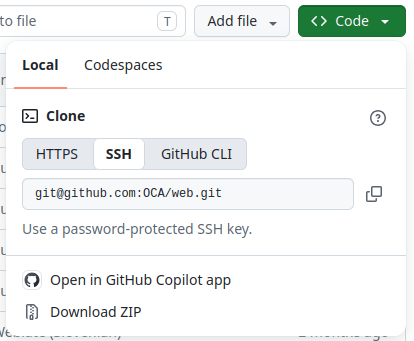
الفرع: الفرع المحدد الذي يجب استخدامه
المسار: المجلد الذي يجب إضافة الوحدة الفرعية إليه في فرعك

في الأداة الطرفية، في المجلد الذي تم استنساخ مستودع Git الخاص بك فيه، قم بالتحقق من الفرع الذي ترغب في إضافة تطبيق فرعي إليه:
git checkout <branch>
أضف الوحدة الفرعية:
git submodule add -b <branch> <git@yourprovider.com>:<username/repository.git> <path>
<git@yourprovider.com>:<username/repository.git>: رابط SSH الخاص بالمستودع الذي تريد إضافته كوحدة فرعية
<branch>: الفرع الذي تريد استخدامه في المستودع أعلاه
<path>: المجلد الذي تريد إضافة هذه الوحدة الفرعية إليه
قم بتنفيذ (commit) ودفع (push) التغييرات:
git commit -a && git push -u <remote> <branch><remote>: المستودع الذي تريد دفع تغييراتك إليه. في إعداد Git قياسي، يكون هذا هو origin.
<branch>: الفرع الذي تريد دفع تغييراتك إليه. على الأرجح، هو الفرع الذي قمت بسحبه (checkout) في الخطوة الأولى.
نصيحة
عند إضافة مستودع يحتوي على العديد من الوحدات، قد ترغب في تجاهل بعضها إذا تم تثبيت أي منها تلقائيًا. للقيام بذلك، أضف بادئة . إلى مجلد الوحدة الفرعية (مثال: .folder). سيتجاهل النظام الأساسي هذا المجلد، ويمكنك اختيار الوحدات يدويًا عن طريق إنشاء روابط رمزية إليها من مجلد آخر.
الإجراءات المجدولة
على منصة Odoo.sh، يتم تنفيذ الإجراءات المجدولة بشكل مختلف قليلاً عن خادم Odoo العادي، ويتم تشغيلها على أساس بذل أقصى جهد ممكن. ويرجع ذلك إلى إمكانية وجود عدة عملاء على نفس الخادم، حيث يُضمن لكل عميل حصة عادلة من موارد الخادم. لذلك، لا يمكن ضمان وقت تشغيل دقيق للإجراءات المجدولة.
مهم
لا تتوقع تشغيل أي إجراء مجدول أكثر من مرة كل خمس دقائق.
نظرًا لمحدودية وقت تنفيذ الإجراءات المجدولة، يُنصح بالتأكد من أن إجراءاتك المجدولة:
تعمل على دفعات صغيرة من السجلات.
تُثبّت عملها بعد معالجة كل دفعة، بحيث إذا انقطعت بسبب تجاوز الوقت المحدد، لا تحتاج إلى البدء من جديد.
تكون متكافئة الأثر، أي أنها يجب ألا تسبب آثارًا جانبية إذا تم تشغيلها أكثر من المتوقع.
IP address change
** يقوم Odoo.sh بإخطار مسؤولي المشروع بالتغيرات التي تطرأ على عنوان IP.** إضافةً إلى ذلك، عندما يتغير عنوان IP لمثيل لقاعدة بيانات الإنتاج، يتم إرسال طلب HTTP `GET إلى المسار `/_odoo.sh/ip-change مع تضمين عنوان IP الجديد كمعامل لسلسلة الاستعلام (جديد)، إلى جانب عنوان IP السابق كمعامل إضافي (قديم).
This mechanism allows custom actions to be triggered in response to the IP address change (e.g., sending an email, contacting a firewall API, configuring database objects, etc.)
لأسباب أمنية، يمكن الوصول إلى مسار /_odoo.sh/ip-change داخلياً فقط من خلال المنصة نفسها، وينتج عنه رد 403 إذا تم الوصول إليه بأي طريقة أخرى.
فيما يلي مثال تنفيذ زائف:
class IPChangeController(http.Controller):

    @http.route('/_odoo.sh/ip-change', auth='public')
    def ip_change(self, old=None, new=None):
        _logger.info("IP address changed from %s to %s", old, new)
        # Then perform whatever action is required for your use case, e.g., update an
        # ir.config_parameter, send an email, contact an external firewall service's API, ...
        return 'ok'