
Continuous production
Continuous production lets manufacturers process work orders in partial quantities. When enabled on a bill of materials, registering production on a work order automatically unblocks the next work order, making the next dependent work order ready before the full quantity of the previous is finished.
If the manufacturing order (MO) is closed before the full demand is produced, Odoo’s normal backorder flow handles the remaining quantity.
The standard MO flow is sequential, meaning each work order waits for the previous work order to finish the full quantity before the next work order can start. That works for simple cases, but it can create unnecessary idle time when manufactured goods move through an assembly line from one machine or work station to the next. In those environments, products are often produced in batches, waves, or a steady line, rather than as one single finished block.
Continuous production changes that behavior by letting a completed partial quantity advance to the next operation before the full MO is done. For example, if the first operation has finished 20 units out of 100, those 20 units can start the next operation while the first work center continues producing the remaining 80.
The quantities produced enter stock after the MO is complete.
Enable settings
Navigate to . In the Operations section, select the Work Orders checkbox.

Set up BOM
Next:
Enable continuous production
Continuous production for a product is set up through its Bill of Materials.
To set up continuous production for a product, navigate to , then open the Bill of Materials.
Note
Alternatively, navigate to and open a manufacturing order. Then, click the (Internal link) icon next to the Bill of Material field.
If using this method, save the changes, then update the Bill of Materials in the MO.
In the Miscellaneous tab of the Bill of Materials, select the Continuous Production checkbox. This setting ensures that when production is registered on a work order, the next work order is unblocked to allow production to continue on what is produced.

Continuous production on MOs
After enabling continuous production on a Bill of Materials, work orders can proceed as components become available, allowing work centers to remain active while components are unavailable.
First, navigate to . Then, create a manufacturing order for a product under continuous production.
Continuous production can be registered from a work order, ideally from the Shop Floor module.
Shop Floor can be opened one of two ways:
From the MO: Navigate to , and open or create an MO. In the MO form, click the Shop Floor smart button. The Overview opens, displaying the first work order of the MO.
From the main Odoo dashboard: From the main Odoo dashboard, open the module. The Overview opens, displaying work orders for all MOs.
Registering partial production
To process a work order where only a partial quantity is produced, click the (vertical ellipsis) icon on the work order card. Then, click Register Quantity / Lot button to open the Register Production window.
In the Quantity Produced field, enter the quantity produced, then click Validate.

The registered units can move on to the next work order.
Example
A company produces 20 fl. oz Soda using three work orders:
Mixing
Bottling and sealing
Pasteurization
Four components make up each completed soda:
16.7fluid ouncesofCarbonated Water(consumed during the mixing stage)3.3fluid ouncesofSoda Syrup(consumed during the mixing stage)1unitofSoda Bottle(consumed during the bottling and sealing stage)1unitofSoda Bottle Cap(consumed during the bottling and sealing work order)
The production facility aims to make 20,000 bottles of soda per day.
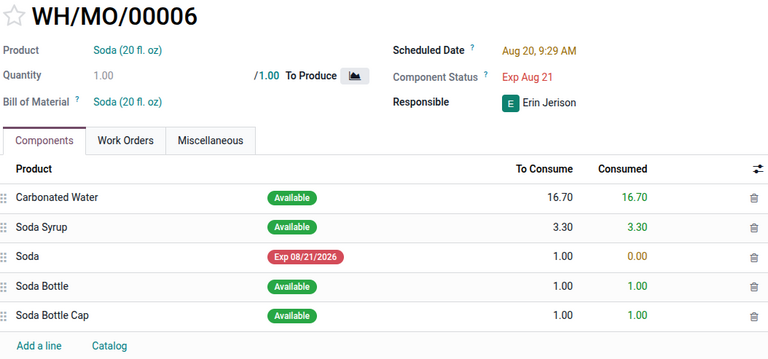
The company’s five soda mixing machines can only contain 200 liters of water and syrup. They are producing close to 12,000 liters per day. They need to be able to continuously produce soda to meet the daily quota, so they have enabled continuous production on their soda Bill of Materials to allow soda to be bottled and sealed as soon as it’s mixed, then pasteurized.
Arthur is responsible for the first work order, mixing. He oversees the addition of the proper amounts of carbonated water and soda syrup to each of the mixing machines. After five minutes, mixing is complete, and Arthur registers production of each 200-liter batch in Shop Floor, using a conversion from liters to fluid ounces.
He sends the mixed soda to the bottling machines. Marvin monitors the filling machine to ensure sodas are bottled safely and accurately. Soda is pumped into bottles, which are then immediately capped tightly as the sodas leave the machine. Marvin uses Shop Floor to register production for every 250 bottles made.
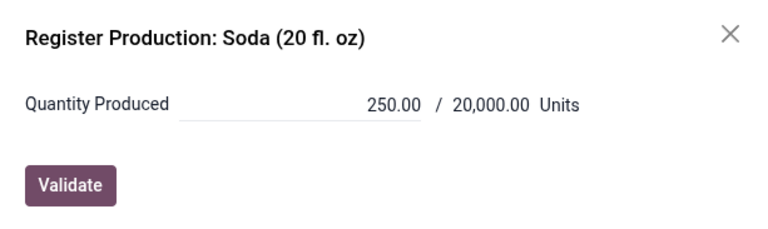
The sodas leave via conveyor belt to enter the tunnel pasteurization machine. The bottles are slowly heated to pasteurization temperature, then gradually cooled as they work their way through the machine. Using Shop Floor, Bart registers production for every 250 bottles as they exit the machine.
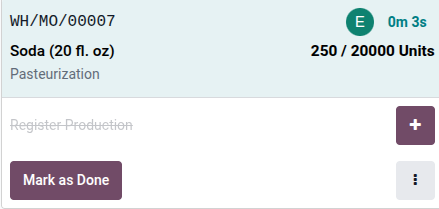
From there, the bottles can move on to packaging and then shipment.