
Leads toewijzen met voorspellende leadscoring
The Odoo CRM app can automatically assign leads/opportunities to sales teams and salespeople. A standard practice is to assign leads based on the probability of winning each lead. Companies can prioritize the leads that are more likely to result in successful deals by quickly assigning them to the appropriate salespeople.
Odoo automatically calculates the probability of winning each lead using a method called predictive lead scoring.
Voorspellend scoren van leads
Predictive lead scoring is a machine-learning model that uses historical data from Odoo CRM to score open leads/opportunities.
Terwijl een bedrijf opportunities door de CRM-pijplijn verwerkt, verzamelt Odoo gegevens over welke opportunities worden gewonnen en verloren. Predictive lead scoring gebruikt deze gegevens om de kans te voorspellen dat elke nieuwe lead of kans wordt gewonnen.
Hoe meer kansen er door de CRM-pijplijn worden gestuurd, hoe meer gegevens Odoo verzamelt, wat resulteert in nauwkeurigere waarschijnlijkheden.
Specifically, Odoo’s predictive lead scoring uses the naive Bayes probability model:
De vergelijking openbreken:
P(A|B) = De kans op een succesvolle voorsprong in dit geval
P(A) = de totale kans dat een lead succesvol is, ongeacht de omstandigheden
P(B|A) = The probability of this being the case given a lead is successful
P(B) = The probability of this being the case
De term in dit geval verwijst naar de variabelen die van invloed kunnen zijn op het succes van een lead in Odoo. Dit kunnen variabelen zijn zoals de toegewezen verkoper, de bron van de lead, de taal van de lead en andere historische en demografische gegevens.
Welke variabelen worden meegenomen in deze berekening kan worden geconfigureerd om de berekening aan te passen aan de behoeften van elk bedrijf.
De kans op succes van elke opportunity wordt weergegeven op het opportunityformulier en wordt automatisch bijgewerkt naarmate de opportunity vordert in de CRM-pijplijn.
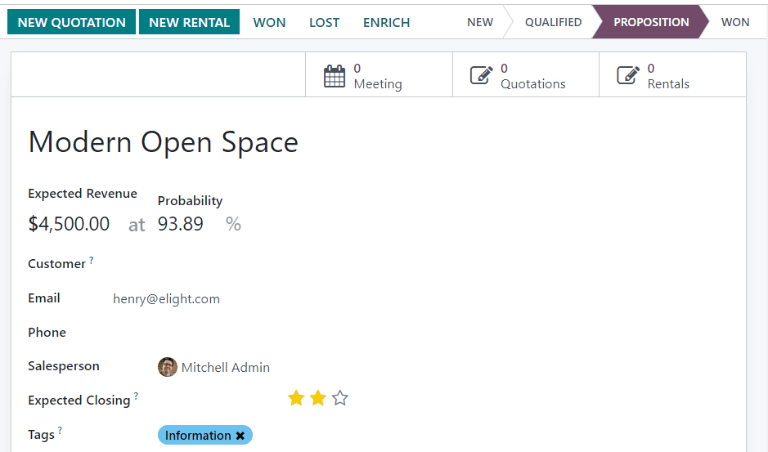
Wanneer een kans naar de volgende fase gaat, neemt de kans op succes automatisch toe volgens het voorspellende lead scoring algoritme.
Configuratie
Predictive lead scoring is always active in Odoo CRM. However, the variables used to calculate the probability of success can be customized in the settings.
Om de variabelen aan te passen die door predictive lead scoring worden gebruikt, ga je naar . Klik onder Predictive Lead Scoring op de knop Update Probabilities.
Then, click on the drop-down menu to choose which variables the predictive lead scoring feature takes into account.
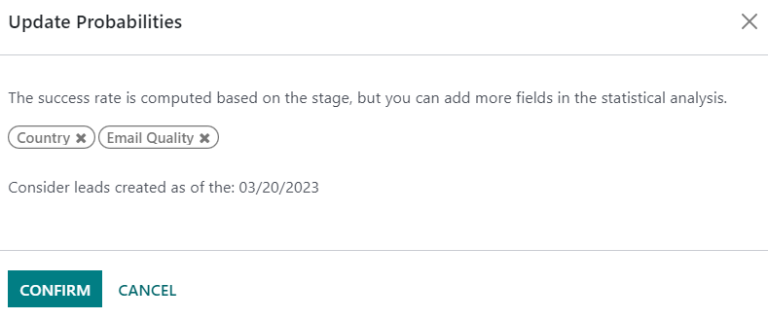
Elk aantal van de volgende variabelen kan worden geactiveerd:
State: de geografische staat waar de kans vandaan komt
Country: the geographical country from which the opportunity originates
Phone Quality: whether or not a phone number is listed for the opportunity
Email Quality: of er al dan niet een e-mailadres wordt vermeld voor de gelegenheid
Source: the source of an opportunity (e.g. search engine, social media)
Language: the spoken language specified on the opportunity
Tags: the tags placed on the opportunity
Notitie
De variabelen Stage en Team zijn altijd van kracht. Stage verwijst naar het CRM-pijplijnstadium waarin een opportunity zich bevindt. team` verwijst naar het verkoopteam dat is toegewezen aan een opportunity. Predictive lead scoring houdt altijd rekening met deze twee variabelen, ongeacht welke optionele variabelen zijn geselecteerd.
Next, click on the date field next to the option Consider leads created as of the: to select the date from which predictive lead scoring begins its calculations.
Klik ten slotte op Confirm om de wijzigingen op te slaan.
Change the probability manually
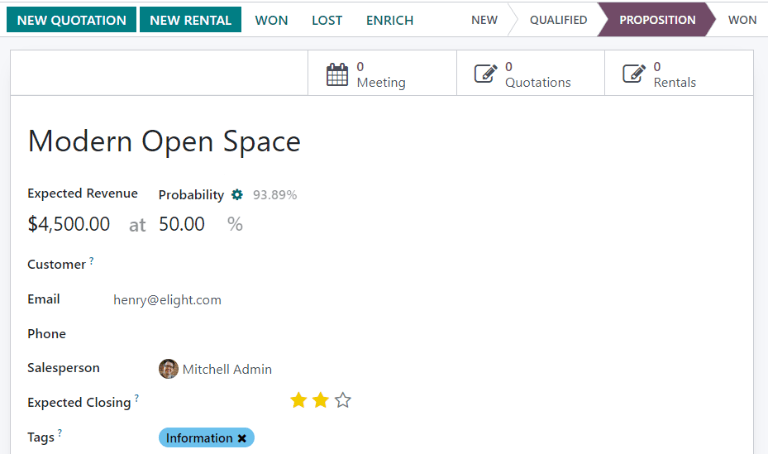
De kans op succes van een opportunity kan handmatig worden gewijzigd op het opportunityformulier. Klik op het kansnummer om het te bewerken.
Belangrijk
Manually changing the probability removes the automatic probability updates for that opportunity. The probability no longer automatically updates as the opportunity moves through each stage of the pipeline.
Om de automatische waarschijnlijkheid weer in te schakelen, klik je op het tandwiel naast het waarschijnlijkheidspercentage.
Leads toewijzen op basis van waarschijnlijkheid
Odoo CRM can assign leads/opportunities to sales teams and salespeople based on specified rules. Create assignment rules based on the leads’ probability of success to prioritize those that are more likely to result in leads and opportunities.
Op regels gebaseerde toewijzing configureren
Om regelgebaseerde toewijzing te activeren, navigeer je naar :menuselectie:`CRM --> Configuratie --> Instellingen`, en activeer je Regelgebaseerde toewijzing.
The rule-based assignment feature can be set to run Manually, meaning an Odoo user must manually trigger the assignment, or Repeatedly, meaning Odoo automatically triggers the assignment according to the chosen time period.
To configure automatic lead assignment, select Repeatedly for the Running section. The frequency of this automatic assignment is customized within the Repeat every section. Enter a specific number and select a corresponding time period to establish the desired interval. Time periods range from Minutes to Weeks.
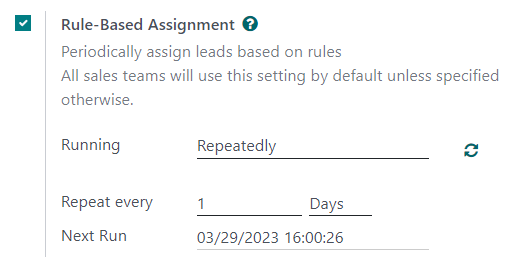
If rule-based assignment is set to run Repeatedly, the assignment can still be triggered manually using the circular arrow icon in the Rule-Based Assignment settings, or using the Assign Leads button on the sales team configuration page. Once a lead has been assigned to a salesperson via this rule, the leads are automatically converted into an opportunity by the system.
Toewijzingsregels configureren
Next, configure the assignment rules for each sales team or salesperson. These rules determine which leads Odoo assigns to which people. To get started, navigate to , and select a sales team.
Op het configuratieformulier van het verkoopteam klik je onder Toewijzingsregels op Domein bewerken om de regels te configureren die Odoo gebruikt om de leadtoewijzing voor dit verkoopteam te bepalen. De regels kunnen alles bevatten wat relevant kan zijn voor dit bedrijf of team en er kan een willekeurig aantal regels worden toegevoegd.
Click Add Filter to start creating assignment rules. Click on the sign on the right of the assignment rule to add another line. Click on the x symbol to remove the line.
To create an assignment rule based on an opportunity’s probability of success, click on the far left drop-down menu of an assignment rule line, and select Probability.
Selecteer in het middelste uitklapmenu het gewenste vergelijkingssymbool - waarschijnlijk het symbool voor groter dan, minder dan, groter dan of gelijk aan, of minder dan of gelijk aan.
Voer in de uiterst rechtse ruimte de gewenste getalswaarde van de waarschijnlijkheid in. Klik ten slotte op Opslaan om de wijzigingen op te slaan.
Example
To configure an assignment rule such that a sales team receives leads that have a probability of
success of 20% or greater, create a Domain line that reads: Probability >= 20.
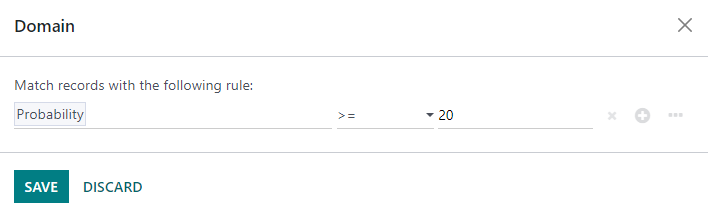
Er kunnen ook aparte toewijzingsregels worden geconfigureerd voor individuele teamleden. Klik op de configuratiepagina van het verkoopteam op een teamlid op het tabblad Leden en bewerk vervolgens de sectie Domein. Klik op Opslaan om de wijzigingen op te slaan.
If automatic lead assignment is configured in the settings, both the sales team and individual team members have the option to Skip auto assignment. Check this box to omit a particular sales team or salesperson from being assigned leads automatically by Odoo’s rule-based assignment feature. If Skip auto assignment is activated, the sales team or salesperson can still be assigned leads manually.
To manually assign leads to this sales team, click on the Assign Leads button at the top of the sales team configuration page. This assigns any leads that are currently unassigned and match this team’s specified domain.