
Members analysis
The Members Analysis report provides a detailed overview of all memberships sold and managed within the Members application.
To access the Memberships Analysis report, navigate to .
Navigate the report
Het standaardrapport Ledenanalyse geeft een staafdiagram weer, waarin het :guilabel:`aantal lidmaatschappen wordt afgezet tegen de hoeveelheid :guilabel:`inkomsten. De gegevens worden gegroepeerd op de toegewezen verkoper en vervolgens op de maand waarin het lidmaatschap begint.
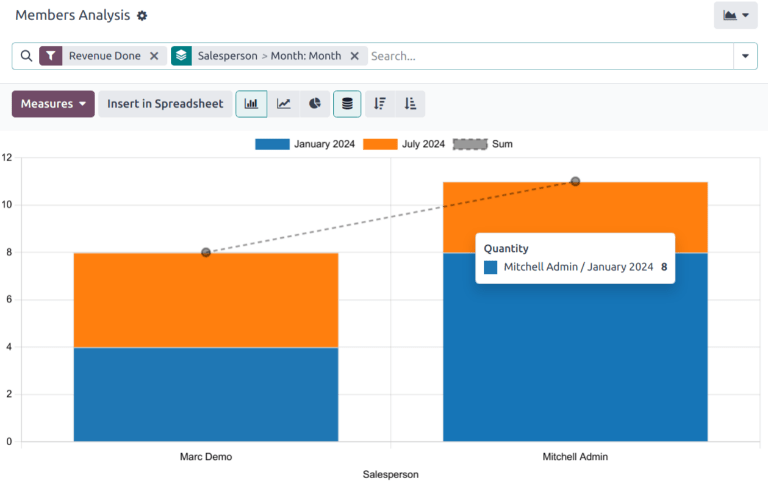
Additional Group By options include the following:
Salesperson: the internal user in charge of the contact. This information is managed in the Salesperson field on the Sales & Purchase tab on the contact’s record.
Associated Partner: the contact listed as the Associated Member on the Membership tab on the contact’s record.
Membership Product: the type of membership assigned to a contact. This includes both purchased memberships and free memberships.
Current Membership State: the status of the membership.
Company: the company the membership is purchased through. This option only appears in multi-company databases.
Month: the month the membership began.
View results
Klik op het (grafiek) pictogram om naar de grafiekweergave te gaan. Klik vervolgens op het bijbehorende pictogram boven aan het rapport om over te schakelen naar een (staafdiagram), (lijndiagram), of (taartdiagram).
Click the (pivot) icon to change to the pivot view.
Tip
De pivotweergave kan worden gebruikt om gegevens diepgaander te bekijken en te analyseren. Er kunnen meerdere maatregelen worden geselecteerd en de gegevens kunnen per maand en per opportuniteitsstadium worden bekeken.
Zie ook