
การเริ่มต้นใช้งาน
ส่วนประกอบหลัก
เมื่อทำงานกับ Odoo.sh สิ่งสำคัญคือต้องเข้าใจส่วนประกอบหลักที่เกี่ยวข้อง:
แม้ว่าทั้งหมดนี้จะเชื่อมโยงกัน แต่แต่ละส่วนก็มีบทบาทที่แตกต่างกันในการพัฒนาและการนำแอปพลิเคชัน Odoo ไปใช้งาน เมื่อรวมกันแล้วจะกลายเป็นไปป์ไลน์ที่เชื่อมโยงกัน ตั้งแต่การพัฒนาโค้ดไปจนถึงการใช้งานจริงทางธุรกิจ
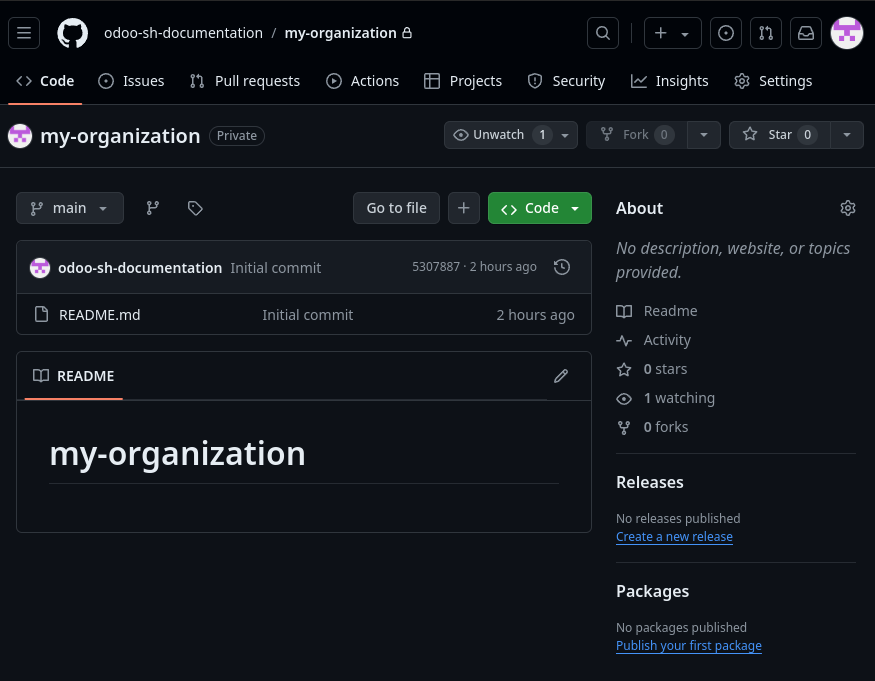
GitHub repository
GitHub repository เปรียบเสมือนโฟลเดอร์บนคอมพิวเตอร์ของคุณที่มีไฟล์และโฟลเดอร์ทั้งหมดสำหรับโปรเจกต์หนึ่ง ๆ ความแตกต่างคือมันถูกจัดเก็บไว้บน GitHub และสามารถเข้าถึงและแก้ไขได้โดยผู้คนหลายคนบนคอมพิวเตอร์ที่แตกต่างกัน
กล่าวอีกนัยหนึ่ง GitHub repository คือสถานที่ที่คุณสามารถจัดเก็บไฟล์ของโปรเจกต์และแบ่งปันให้ผู้อื่นได้ เพื่อให้พวกเขาสามารถทำงานร่วมกับคุณ แก้ไข และมีส่วนร่วมในโปรเจกต์ของคุณ นอกจากนี้ยังติดตามการเปลี่ยนแปลงทั้งหมดของโปรเจกต์ตลอดเวลา ทำให้คุณสามารถย้อนกลับไปยังเวอร์ชั่นก่อนหน้าได้อย่างง่ายดายหากจำเป็น
นอกจากนี้ GitHub ยังมีฟีเจอร์มากมายที่ช่วยให้คุณจัดการโปรเจกต์ของคุณได้ เช่น การติดตามปัญหา (issue tracking) คำขอดึงข้อมูล (pull requests) และการตรวจสอบโค้ด (code reviews) เป็นเครื่องมือที่ทรงพลังสำหรับการจัดการและทำงานร่วมกันในโปรเจกต์ซอฟต์แวร์ และถูกใช้งานอย่างแพร่หลายโดยนักพัฒนาทั่วโลก เป็นพื้นที่ที่มีการควบคุมเวอร์ชั่นซึ่งเก็บซอร์สโค้ดของแอปพลิเคชัน Odoo ไว้ โดยจะติดตามการเปลี่ยนแปลงทุกครั้ง รองรับการทำงานร่วมกัน และสามารถเป็นแบบสาธารณะหรือส่วนตัวก็ได้
โปรเจกต์ Odoo.sh
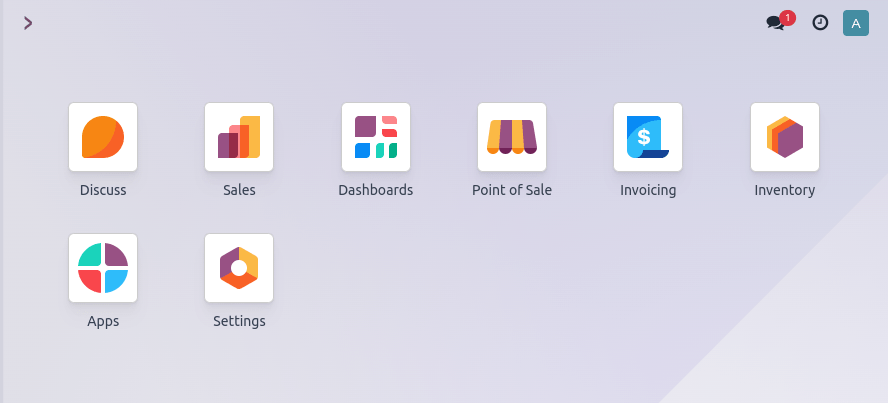
โปรเจกต์ Odoo.sh คือ Platform as a Service (PaaS) ที่เชื่อมต่อกับ GitHub และช่วยให้การพัฒนา ทดสอบ และนำแอปพลิเคชัน Odoo ไปใช้งานเป็นไปอย่างราบรื่น โดยมีเครื่องมือต่าง ๆ เช่น การสำรองข้อมูลอัตโนมัติ สภาพแวดล้อมสำหรับทดสอบ (staging) และไปป์ไลน์การรวมโค้ดอย่างต่อเนื่อง (continuous integration)

ฐานข้อมูล Odoo
ฐานข้อมูล Odoo จัดเก็บข้อมูลการดำเนินงานทั้งหมดที่แอปพลิเคชัน Odoo ใช้และสร้างขึ้น เช่น ข้อมูลทางธุรกิจ การกำหนดค่าต่าง ๆ และข้อมูลผู้ใช้
ประเภทผู้ใช้
Odoo.sh เกี่ยวข้องกับผู้ใช้หลายประเภท โดยแต่ละคนมีบทบาทเฉพาะในวงจรชีวิตของโปรเจกต์:
ผู้ใช้ GitHub: นักพัฒนาที่มีสิทธิ์เข้าถึง GitHub repository ที่เชื่อมโยงกับโปรเจกต์ Odoo.sh การมีสิทธิ์เข้าถึง repository ไม่ได้ทำให้บุคคลนั้นกลายเป็นผู้ทำงานร่วม (collaborator) ในโปรเจกต์ Odoo.sh โดยอัตโนมัติ
ผู้ทำงานร่วมใน Odoo.sh: บุคคลที่จัดการโปรเจกต์ Odoo.sh ผู้ทำงานร่วมแต่ละคนต้องเชื่อมโยงกับผู้ใช้ GitHub อย่างไรก็ตาม ผู้ทำงานร่วมไม่ใช่สิ่งเดียวกันกับผู้ใช้ฐานข้อมูล
ผู้ใช้ฐานข้อมูล: ผู้ใช้งานปลายทางของฐานข้อมูล Odoo ที่นำไปใช้งานจริง พวกเขาโต้ตอบกับระบบที่ใช้งานจริง แต่ไม่ได้มีส่วนเกี่ยวข้องกับการพัฒนาหรือการจัดการโปรเจกต์
แนวคิดทางเทคนิค
เมื่อทำงานกับ Odoo.sh สิ่งสำคัญคือต้องเข้าใจแนวคิดทางเทคนิคหลายประการด้วยเช่นกัน:
การฟอร์กที่เก็บข้อมูล
การฟอร์กที่เก็บข้อมูลบน GitHub คือการที่คุณสร้างสำเนาที่เก็บข้อมูลของผู้อื่นไว้ในบัญชีของคุณเอง ซึ่งช่วยให้คุณสามารถเปลี่ยนแปลงที่เก็บข้อมูลได้โดยไม่กระทบต่อเวอร์ชั่นต้นฉบับ
เมื่อคุณฟอร์กที่เก็บข้อมูล คุณจะสร้างสำเนาของที่เก็บข้อมูลนั้นเป็นของคุณเอง โดยมีไฟล์และโฟลเดอร์ทั้งหมดเหมือนในที่เก็บข้อมูลต้นฉบับ จากนั้นคุณสามารถทำการเปลี่ยนแปลงไฟล์ในสำเนาที่เก็บข้อมูลของคุณและคอมมิตได้ เช่นเดียวกับที่คุณทำกับที่เก็บข้อมูลอื่นๆ
ประโยชน์ของการฟอร์กที่เก็บข้อมูลคือคุณสามารถทำการเปลี่ยนแปลงโค้ดได้โดยไม่กระทบต่อเวอร์ชั่นต้นฉบับ ซึ่งมีประโยชน์เมื่อคุณต้องการทดลองฟีเจอร์ใหม่ๆ หรือแก้ไขบักในโค้ดของผู้อื่น คุณยังสามารถใช้ที่เก็บข้อมูลที่ฟอร์กมานี้เป็นจุดเริ่มต้นสำหรับโปรเจกต์ของคุณ และทำการเปลี่ยนแปลงตามความจำเป็นได้อีกด้วย
เมื่อคุณทำการเปลี่ยนแปลงที่เก็บข้อมูลที่ฟอร์กแล้ว คุณสามารถส่งพูลรีเควสต์ไปยังเจ้าของที่เก็บข้อมูลต้นฉบับ เพื่อขอให้พวกเขารวมการเปลี่ยนแปลงของคุณกลับเข้าไปในที่เก็บข้อมูลของตน นี่เป็นแนวทางทั่วไปสำหรับโปรเจกต์โอเพนซอร์สในการยอมรับการมีส่วนร่วมจากนักพัฒนารายอื่น และอาจเป็นวิธีที่ดีในการมีส่วนร่วมในชุมชนและพัฒนาทักษะการเขียนโค้ดของคุณ
การพุชคอมมิต
เมื่อคุณทำการเปลี่ยนแปลงไฟล์หรือหลายไฟล์ในที่เก็บข้อมูล Git บนคอมพิวเตอร์ของคุณ การเปลี่ยนแปลงเหล่านั้นจะถือว่า*ยังไม่ได้คอมมิต* กล่าวอีกนัยหนึ่งคือ Git ทราบว่ามีการเปลี่ยนแปลงเกิดขึ้นแล้ว แต่ยังไม่ได้รับการบันทึกหรือบันทึกไว้อย่างเป็นทางการ
ในการบันทึกการเปลี่ยนแปลงเหล่านั้นและเพิ่มลงในที่เก็บข้อมูล Git คุณจำเป็นต้องสร้าง คอมมิต คอมมิตคือภาพรวม (snapshot) ของการเปลี่ยนแปลงที่คุณทำกับไฟล์ ณ จุดใดจุดหนึ่งของเวลา โดยจะบันทึกว่ามีการเปลี่ยนแปลงอะไร เกิดขึ้นโดยใคร และเมื่อใด
เมื่อคุณสร้างคอมมิตแล้ว คุณก็สามารถ พุช คอมมิตนั้นไปยังที่เก็บข้อมูลระยะไกลได้ เช่น ที่เก็บข้อมูลที่โฮสต์อยู่บน GitHub การพุชคอมมิตหมายถึงการส่งการเปลี่ยนแปลงที่คุณได้ทำในคอมมิตจากที่เก็บข้อมูลในเครื่องของคุณไปยังที่เก็บข้อมูลระยะไกล เพื่อให้ผู้อื่นสามารถมองเห็นและนำไปใช้ได้
โดยสรุปแล้ว การพุชคอมมิตหมายถึงการส่งการเปลี่ยนแปลงที่คุณทำกับไฟล์ในที่เก็บข้อมูล Git จากคอมพิวเตอร์ของคุณไปยังที่เก็บข้อมูลระยะไกล ซึ่งเป็นวิธีหนึ่งในการแบ่งปันการเปลี่ยนแปลงของคุณกับผู้อื่นและทำงานร่วมกันในโปรเจกต์
การรวมแบรนช์
การรวมแบรนช์เข้าสู่อีกแบรนช์หนึ่งคือกระบวนการรวมการเปลี่ยนแปลงที่ทำในแบรนช์หนึ่งเข้ากับอีกแบรนช์หนึ่ง ตัวอย่างเช่น สมมติว่าคุณสร้างแบรนช์ใหม่ชื่อ feature-branch เพื่อทำงานเกี่ยวกับฟีเจอร์ใหม่สำหรับโปรเจกต์ของคุณ เมื่อคุณทำการเปลี่ยนแปลงในแบรนช์นี้เสร็จเรียบร้อยแล้ว คุณสามารถรวมการเปลี่ยนแปลงเหล่านั้นกลับเข้าไปในแบรนช์หลัก (ซึ่งมักเรียกว่าแบรนช์ master หรือ main)
เมื่อคุณรวมแบรนช์ Git จะตรวจสอบการเปลี่ยนแปลงในทั้งสองแบรนช์และพยายามรวมเข้าด้วยกัน หากมีข้อขัดแย้งใดๆ ระหว่างการเปลี่ยนแปลงที่ทำในทั้งสองแบรนช์ Git จะพร้อมท์ให้คุณแก้ไขข้อขัดแย้งเหล่านั้นก่อนที่จะเสร็จสิ้นการรวม (ในแง่ของโค้ด)