
การดำเนินการตามกำหนดเวลา
การดำเนินการตามกำหนดเวลา คือกระบวนการที่กำหนดค่าไว้ล่วงหน้า ซึ่งช่วยให้ผู้ใช้สามารถทำงานบางอย่างในฐานข้อมูลให้เป็นไปโดยอัตโนมัติตามกำหนดเวลาหรือจำนวนครั้งที่กำหนด งานเหล่านี้อาจรวมถึงการส่งอีเมล การสร้างใบแจ้งหนี้ การจัดการข้อมูล และอื่นๆ อีกมากมาย
In Odoo, some scheduled actions are active, by default, to ensure that certain functions are triggered automatically, however there are also many scheduled action options that appear in the database that are not activated by default.
In Odoo Subscriptions, there are two scheduled actions that initiate the billing process for active recurring subscriptions, as well as when billing should stop due to subscription expiration.
They are turned on, by default and can be deactivated at any time in order to manage subscriptions manually.
เข้าถึงการดำเนินการตามกำหนดเวลา
Important
เพื่อเข้าถึงการดำเนินการตามกำหนดเวลา จะต้อง เปิดใช้งาน โหมดนักพัฒนา
เมื่อเปิดใช้งานโหมดนักพัฒนาแล้ว ไปที่
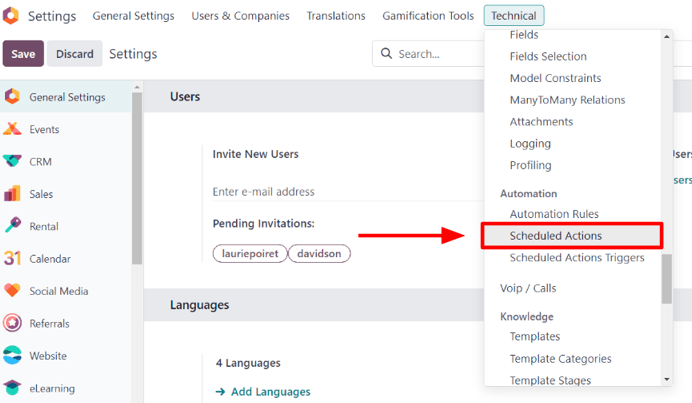
การทำเช่นนี้จะแสดงแดชบอร์ด การดำเนินการตามกำหนดเวลา โดยเฉพาะ บนหน้านี้จะมีรายการการดำเนินการตามกำหนดเวลาทั้งหมดสำหรับฐานข้อมูลทั้งหมด
From here, enter Subscription in the search bar. Doing so provides three subscription-specific
results. The following documentation focuses on the last two results in the list:
การสมัครสมาชิกการขาย: สร้างใบแจ้งหนี้และการชำระเงินแบบเกิดซ้ำ
การสมัครสมาชิกการขาย: การหมดอายุของการสมัครสมาชิก

Determine if a scheduled action is active by looking under the Active column, in the it's corresponding row on the Scheduled Actions dashboard, for a ticked checkbox; if the checkbox is green with a check mark, the scheduled action is active.
If a scheduled action needs to be activated, click into the desired scheduled action from the list.

Then, from the scheduled action form, toggle the switch in the Active field to the
right. Doing so turns the switch green, indicating that the scheduled action is now Active.
The ability to set up how often the scheduled action runs is also available on the scheduled action form, in the Execute Every field.
Important
การดำเนินการตามกำหนดเวลาจะ**ไม่**ทำงานอย่างถูกต้องหากเวลาในการดำเนินการน้อยกว่าห้านาที นี่เป็นกฎทั่วไปสำหรับการดำเนินการตามกำหนดเวลาทั้งหมด
สร้างใบแจ้งหนี้และการชำระเงินแบบเกิดซ้ำ
เพื่อให้การดำเนินการตามกำหนดเวลา การสมัครสมาชิกการขาย: สร้างใบแจ้งหนี้และการชำระเงินแบบเกิดซ้ำ สร้างใบแจ้งหนี้และการชำระเงินแบบเกิดซ้ำสำหรับการสมัครสมาชิกได้อย่างถูกต้อง **จะต้อง**ตั้งค่าบัญชี ค่าใช้จ่ายรอตัดบัญชี และ รายได้รอตัดบัญชี เพื่อให้ Odoo สามารถประมวลผลใบแจ้งหนี้และการชำระเงินต่างๆ ที่เกี่ยวข้องกับการสมัครสมาชิก
ในการตั้งค่าบัญชี ค่าใช้จ่ายรอตัดบัญชี และ รายได้รอตัดบัญชี ไปที่ สามารถกำหนดค่าบัญชีทั้งสองได้ในส่วน บัญชีเริ่มต้น

เมื่อป้อนบัญชีที่ถูกต้องในฟิลด์เมนูแบบเลื่อนลง ค่าใช้จ่ายรอตัดบัญชี และ รายได้รอตัดบัญชี แล้ว ให้คลิก บันทึก ที่มุมซ้ายบน
สร้างใบแจ้งหนี้
องค์ประกอบที่เกี่ยวข้องกับการดำเนินการตามกำหนด Sale Subscription: generate recurring invoices and payments สามารถพบได้ในคำสั่งขายการสมัครสมาชิกที่ได้รับการยืนยันแล้ว
หากต้องการตรวจสอบองค์ประกอบเหล่านี้ ให้เปิดคำสั่งขายที่ได้รับการยืนยันแล้วในแอปพลิเคชัน การสมัครสมาชิก เพื่อแสดงแบบฟอร์มคำสั่งขายการสมัครสมาชิก
On a confirmed subscription sales order form, focus on the Recurring Plan and Date of Next Invoice fields.

The scheduled action creates an invoice when today's date is the same date as the Date of Next Invoice.
Odoo ใช้ข้อมูลในฟิลด์ Recurring Plan เพื่ออัปเดตวันที่ออกใบแจ้งหนี้ถัดไปตามนั้น
Warning
หากนโยบายการออกใบแจ้งหนี้ของสินค้าถูกตั้งค่าเป็น ตามจำนวนที่ส่งมอบ (ด้วยตนเอง) และจำนวนที่ส่งมอบคือ 0 Odoo จะ**ไม่**สร้างใบแจ้งหนี้ และลูกค้าจะไม่ถูกเรียกเก็บเงิน
การสมัครสมาชิกนั้นจะได้รับการประมวลผลเป็นผลิตภัณฑ์แบบฟรีที่เกิดขึ้นซ้ำ และจะแสดงอยู่ใน ช่องแชท ของใบสั่งขายการสมัครสมาชิก
เมื่อเกิดสถานการณ์นี้ ข้อความต่อไปนี้จะปรากฏขึ้น: Automatic renewal succeeded. Free subscription. Next invoice:[date]. No email sent.
เมื่อสร้างใบแจ้งหนี้สำหรับคำสั่งขายการสมัครสมาชิกแล้ว สามารถดูใบแจ้งหนี้ได้โดยคลิกปุ่มอัจฉริยะ Invoices ที่ปรากฏที่ด้านบนของคำสั่งขายการสมัครสมาชิก
อีเมลจะถูกส่งไปยังลูกค้าเพื่อแจ้งให้ทราบเกี่ยวกับค่าธรรมเนียมการสมัครสมาชิกแบบเรียกเก็บเป็นงวด *หาก*มี Payment Token ในบัญชี
To check if there is a Payment Token, open the Other Info tab, and look at the Payment Token field, under the Subscription section.

If there is no Payment Token, the invoice is created, and sent to the customer. The payment must be registered manually in this case.
การปิดใบแจ้งหนี้
การดำเนินการตามกำหนด Sale Subscription: generate recurring invoices and payments ยังมีความสามารถในการปิดการสมัครสมาชิก หากเงื่อนไขต่อไปนี้เป็นจริง:
หากการสมัครสมาชิกไม่มี Payment Token ให้สร้างและบันทึกใบแจ้งหนี้
หากการสมัครสมาชิกมี Payment Token ให้ลองเรียกเก็บเงิน
หากการเรียกเก็บเงินสำเร็จ ให้สร้างและบันทึกใบแจ้งหนี้
หากการเรียกเก็บเงินล้มเหลว ให้ส่งการเตือนเป็นระยะ
ปิดการสมัครสมาชิกหากยังคงล้มเหลวเป็นเวลามากกว่าสิบสี่วัน
การหมดอายุของการสมัครสมาชิก
การดำเนินการตามกำหนด Sale Subscription: subscriptions expiration จะตรวจสอบเงื่อนไขอื่นๆ ทั้งหมดที่อาจทำให้การสมัครสมาชิกปิดโดยอัตโนมัติ หากเงื่อนไขบางอย่างเป็นจริง การดำเนินการตามกำหนดจะปิดการสมัครสมาชิกนั้น
ขั้นแรก การดำเนินการตามกำหนด Sale Subscription: subscriptions expiration จะตรวจสอบว่าวันที่สิ้นสุดผ่านไปแล้วหรือไม่ ซึ่งถูกกำหนดค่าไว้ในคำสั่งขายการสมัครสมาชิก

จากนั้น การดำเนินการตามกำหนดเวลา การสมัครสมาชิกการขาย: การหมดอายุการสมัครสมาชิก จะตรวจสอบว่าใบแจ้งหนี้ยังไม่ได้รับการชำระเงินภายในกำหนดเวลาตามเงื่อนไขการชำระเงินหรือไม่
To access the invoices attached to a subscription, access the sales order for the subscription product, and click the Invoices smart button. Then, look at the Invoice Date column.
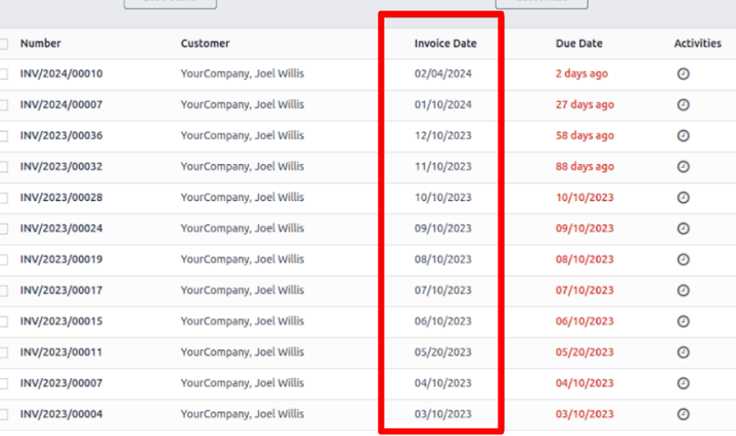
Unpaid subscriptions with an Invoice Date that are past the determined number of days in the Automatic Closing field of a Recurring Plan are automatically closed by the Sale Subscription: subscriptions expiration scheduled action.

For example, if the next invoice date is July 1st, and the Automatic Closing is set to '30 Days', the scheduled action would close the subscription on August 1st.
ดูเพิ่มเติม