
IoT box
เพื่อเริ่มใช้งาน IoT box:
ตรวจสอบให้แน่ใจว่าคุณมี การสมัครสมาชิก IoT box ที่ถูกต้อง นอกเหนือจากการสมัครสมาชิก Odoo ของคุณ
เชื่อมต่อ อุปกรณ์ ของคุณกับ IoT box
Note
อุปกรณ์สามารถเชื่อมต่อได้หลังจากเพิ่ม IoT box เข้ากับเครือข่ายและ/หรือเชื่อมต่อกับฐานข้อมูลแล้ว อย่างไรก็ตาม อาจจำเป็นต้องรีบูต IoT box
Important
ห้ามทำให้กล่อง IoT เข้าถึงได้จากอินเทอร์เน็ตสาธารณะ ระบบ IoT ได้รับการออกแบบมาเพื่อให้ฐานข้อมูลของคุณเข้าถึงอุปกรณ์ในเครือข่ายภายในของคุณได้ การเปิดเผยต่ออินเทอร์เน็ตสาธารณะจะสร้าง**ความเสี่ยงด้านความปลอดภัย**
การเชื่อมต่อเครือข่าย
สามารถเชื่อมต่อ IoT box เข้ากับเครือข่ายผ่าน Ethernet หรือ Wi-Fi
Important
อุปกรณ์**ทั้งหมด**ต้องเชื่อมต่อกับเครือข่าย**เดียวกัน**: IoT box อุปกรณ์ที่เชื่อมต่อกับ IoT box และคอมพิวเตอร์ที่เชื่อมต่อกับ Odoo
อีเธอร์เน็ต
เสียบสาย Ethernet เข้ากับพอร์ต Ethernet ของ IoT box และพอร์ตที่ว่างบนเราเตอร์ของคุณ จากนั้นเชื่อมต่อ IoT box เข้ากับแหล่งจ่ายไฟ
Wi-Fi
ตรวจสอบให้แน่ใจว่าไม่มีสาย Ethernet เชื่อมต่อกับ IoT box และทำตามขั้นตอนเหล่านี้:
เชื่อมต่อ IoT box เข้ากับแหล่งจ่ายไฟและรอสักครู่เพื่อให้เปิดเครื่อง
เข้าถึงการตั้งค่า Wi-Fi ของคอมพิวเตอร์และเลือกเครือข่ายของ IoT box ชื่อเครือข่ายจะอยู่ในรูปแบบ
IoTBox-xxxxxxxxxxxx(โดยที่xxxxxxxxxxxxเป็นตัวระบุเฉพาะ)เชื่อมต่อกับเครือข่าย Wi-Fi ของ IoT box และการเซ็นเข้าสู่ระบบ เบราว์เซอร์ของคุณควรเปิดโดยอัตโนมัติและเปลี่ยนเส้นทางไปยัง หน้าแรกของ IoT box
Note
Depending on your operating system, the browser might not open and redirect to the IoT box's homepage. In this case, open your browser manually and navigate to
http://10.11.12.1.บนหน้าแรกของ IoT box คลิก กำหนดค่า ถัดจากส่วน สถานะอินเทอร์เน็ต
รอสักครู่เพื่อให้สแกนเครือข่ายที่มีอยู่ เลือกเครือข่าย ป้อนรหัสผ่าน Wi-Fi และคลิก เชื่อมต่อ
Note
เมื่อเชื่อมต่อกับเครือข่าย Wi-Fi แล้ว IoT box จะหยุดส่งสัญญาณ Wi-Fi และคอมพิวเตอร์ควรเชื่อมต่อกลับไปยังเครือข่ายเดิมโดยอัตโนมัติ หากไม่เชื่อมต่อ ให้เชื่อมต่อด้วยตนเอง
หน้าแรกของ IoT box
หากต้องการเข้าถึงหน้าแรกของ IoT box ให้เปิดเว็บเบราว์เซอร์ บนเครือข่ายเดียวกับ IoT box และไปที่ที่อยู่ IP ของ IoT box

สามารถดึงข้อมูลที่อยู่ IP ของ IoT box ได้โดย:
เชื่อมต่อ IoT box กับจอภาพภายนอก: ที่อยู่ IP จะแสดงบนหน้าจอ
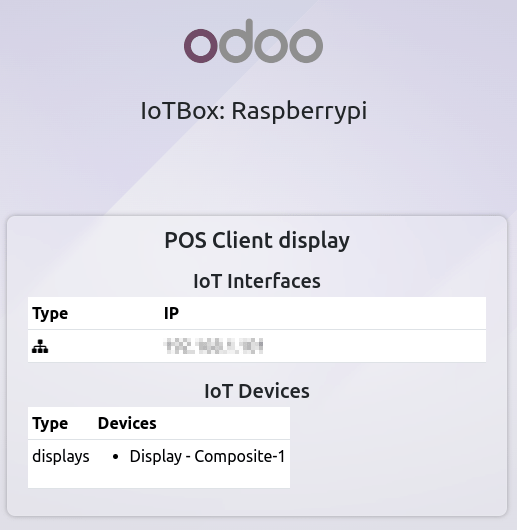
connecting the IoT box to a printer: the IP address is automatically printed.
เข้าถึงส่วนติดต่อผู้ดูแลระบบของเราเตอร์ที่ IoT box เชื่อมต่ออยู่ หรือใช้ซอฟต์แวร์ของบุคคลที่สามเพื่อสแกนเครือข่าย
เมื่อ IoT box เชื่อมต่อกับฐานข้อมูล Odoo แล้ว สามารถเข้าถึงหน้าแรกได้จาก Odoo โดยเปิดแอป IoT และคลิกที่ URL ที่แสดงบนการ์ดของ IoT box