
Flutterwave
Flutterwave is een online betaalprovider gevestigd in Nigeria en dekt verschillende Afrikaanse landen en betaalmethoden.
Configuratie op Flutterwave Dashboard
Log in op het Flutterwave Dashboard en ga naar . Kopieer de waarden van de velden Openbare sleutel en Geheime sleutel en bewaar deze voor later.
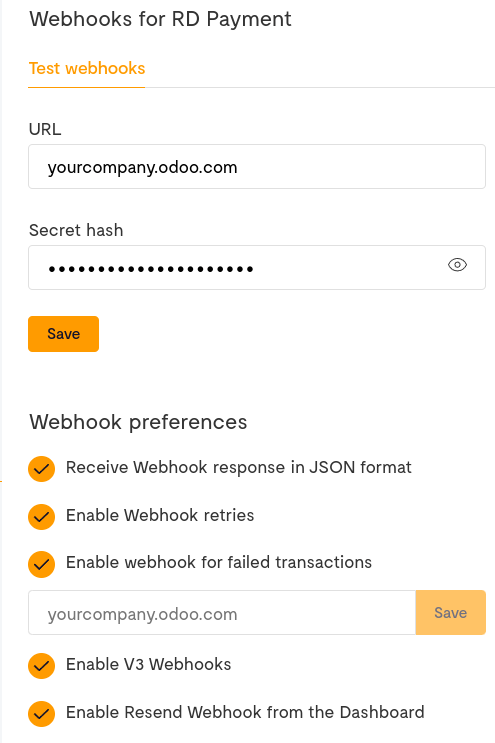
- Ga naar en voer je Odoo-database-URL in gevolgd door
/payment/flutterwave/webhookin het tekstveld URL.Bijvoorbeeld:https://yourcompany.odoo.com/payment/flutterwave/webhook. Vul de Secret hash in met een wachtwoord dat je genereert en bewaar de waarde voor later.
Zorg ervoor dat alle resterende selectievakjes zijn aangevinkt.
Klik op Opslaan om de configuratie te voltooien.
Configuratie op Odoo
Navigeer naar de betaalprovider Flutterwave en wijzig de status naar Ingeschakeld.
Vul in het tabblad Credentials de Openbare sleutel, Secret Key en Webhook Secret in met de waarden die je hebt opgeslagen bij stap Configuratie op Flutterwave Dashboard.
Configureer de overige opties naar wens.
Belangrijk
Als je ervoor kiest om het opslaan van betaalmethoden toe te staan, wordt aanbevolen om alleen kaartbetalingen in te schakelen vanuit het Flutterwave-dashboard, omdat alleen kaarten kunnen worden opgeslagen als betaaltokens. Ga hiervoor naar je Flutterwave-dashboard en vervolgens naar .
Zie ook