Analiza źródła
Raportowanie jest kluczowym narzędziem używanym przez działy rekrutacyjne do uzyskania wglądu w cały proces rekrutacji.
Określenie, skąd pochodzą kandydaci, może dostarczyć informacji o tym, które źródła przynoszą najlepsze rezultaty. Informacje te są określane przez raport Analiza źródeł. Dzięki tym danym zespoły rekrutacyjne mogą lepiej dostosować swoje strategie rekrutacyjne, aby pozyskać lepszych kandydatów, zarówno pod względem ilości, jak i jakości.
Otwórz raport
Aby uzyskać dostęp do raportu Analiza źródeł, przejdź do .
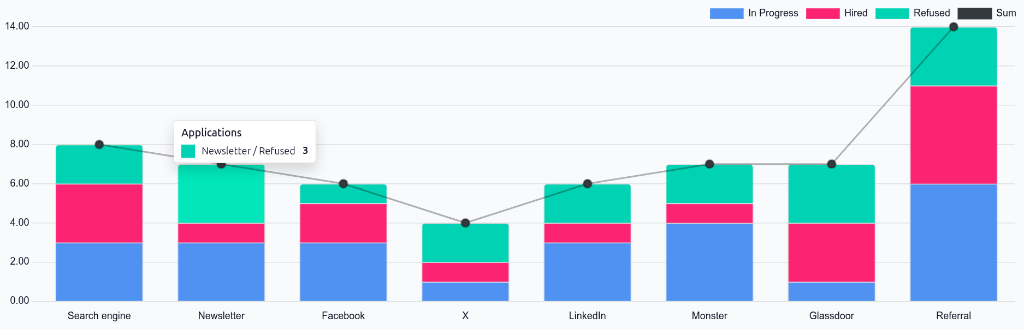
Przedstawia to dane z ostatnich 365 dni w domyślnym widoku (Skumulowany) (Wykres słupkowy). Pokazuje liczbę kandydatów według źródła z podziałem na statusy (W toku, Zatrudniony i Odrzucony),
Najedź kursorem na dowolną oznaczoną kolorem sekcję kolumny, aby wyświetlić dokładne wartości dla kolumny danego statusu.
Raport efektywności źródeł
Aby sprawdzić, które źródła (np. portale pracy, media społecznościowe, polecenia pracowników, strona firmowa) przynoszą najwięcej zatrudnień, widok tabeli przestawnej raportu Analiza źródeł można skonfigurować tak, aby wyświetlał dodatkowe szczegóły.
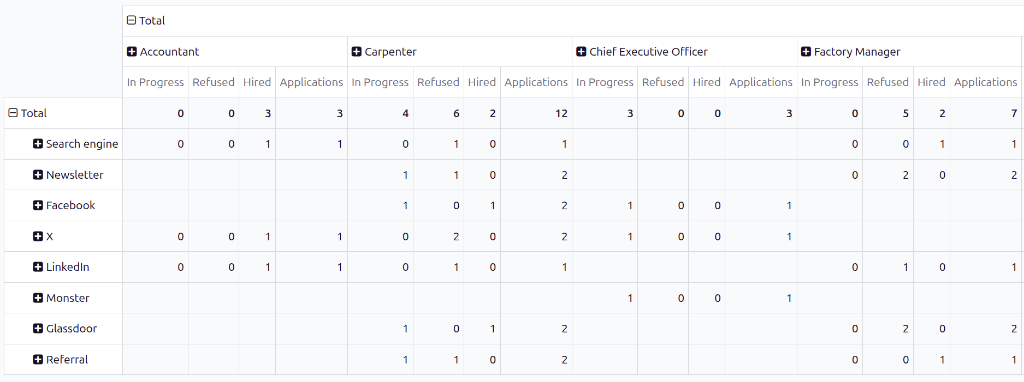
Aby wyświetlić raport Analiza źródeł w tabeli przestawnej, kliknij ikonę (Tabela przestawna) w rogu. Dane zostaną przedstawione w tabeli przestawnej, gdzie wiersze będą zawierać źródła, a kolumny – etapy.
Aby rozwinąć ten wykres i sprawdzić, na jakie konkretne stanowiska aplikowali kandydaci z poszczególnych źródeł, kliknij pole Razem nad kolumnami, aby otworzyć menu rozwijane, a następnie kliknij Stanowisko.
Każda kolumna jest następnie grupowana według stanowiska, takiego jak Księgowy lub Stolarz. Dla każdego stanowiska wyświetlana jest osobna liczba aplikacji W toku, Odrzucony lub Zatrudniony, a także kolumna Aplikacje, która wyświetla łączną liczbę wszystkich statusów.
Medium
Wyświetlanie medium dla kandydatów może być korzystne, aby zobaczyć, które konkretne medium jest bardziej skuteczne.
Nośniki to konkretne metody, za pomocą których kandydat znalazł stanowisko, a następnie na nie zaaplikował, takie jak wyszukiwarka, reklama w mediach społecznościowych, e-mail, baner itp.
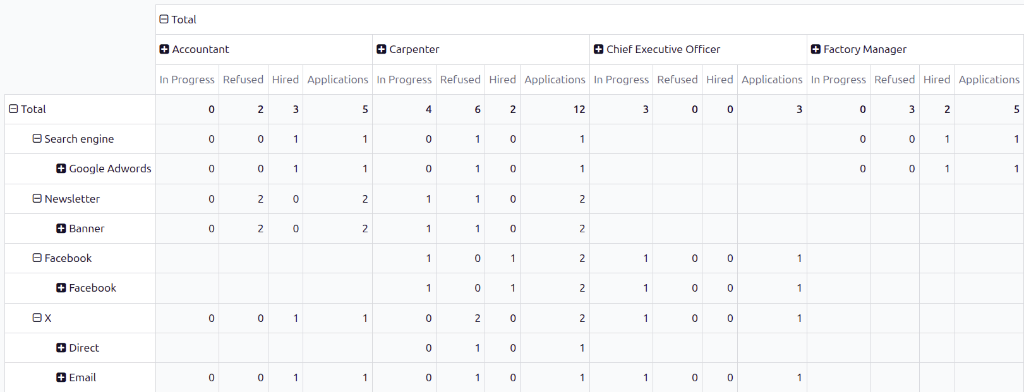
Aby dodatkowo pogrupować wyniki według nośnika, kliknij jeden z wierszy (Źródło), a następnie kliknij Nośnik w wyświetlonym menu rozwijanym. Wiersz pokaże poszczególne nośniki powiązane z tym konkretnym źródłem.
Gdy Medium zostanie wybrane dla jednego źródła, kliknięcie w inny wiersz automatycznie ujawnia konkretne metryki dla mediów dla tego źródła.
Informacja
Jedyne media, które pojawiają się dla źródła, to media, które zostały ustawione na formularzu kandydata. Jeśli medium nie zostało ustawione dla żadnego z kandydatów, medium nie pojawia się w wierszach rozwijanych poniżej źródła.
Na przykład, jeśli żaden kandydat nie aplikował za pomocą medium Google Adwords, to medium nie pojawia się poniżej wiersza źródła Wyszukiwarka.