
Members analysis
The Members Analysis report provides a detailed overview of all memberships sold and managed within the Members application.
To access the Memberships Analysis report, navigate to .
Điều hướng báo cáo
The default Members Analysis report displays a bar chart, measuring the Quantity of memberships against the amount of Revenue Done. The data is grouped by the assigned salesperson, then by the month the membership begins.
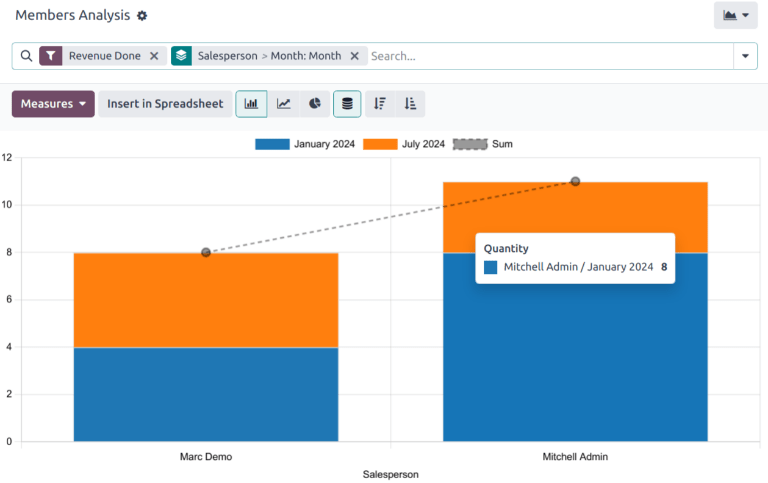
Additional Group By options include the following:
Salesperson: the internal user in charge of the contact. This information is managed in the Salesperson field on the Sales & Purchase tab on the contact's record.
Associated Partner: the contact listed as the Associated Member on the Membership tab on the contact's record.
Membership Product: the type of membership assigned to a contact. This includes both purchased memberships and free memberships.
Current Membership State: the status of the membership.
Company: the company the membership is purchased through. This option only appears in multi-company databases.
Month: the month the membership began.
Xem kết quả
Click the (graph) icon to change to graph view. Then, click the corresponding icon at the top of the report to switch to a (bar chart), (line chart), or (pie chart).
Click the (pivot) icon to change to the pivot view.
Mẹo
Chế độ xem pivot có thể được sử dụng để xem và phân tích dữ liệu một cách chuyên sâu hơn. Nhiều phép đo có thể được chọn và dữ liệu có thể được xem theo tháng và theo giai đoạn cơ hội.
Xem thêm