
Séc
There are two ways to handle payments received by checks in Odoo, either by using outstanding accounts or by bypassing the reconciliation process.
Using outstanding accounts is recommended, as your bank account balance stays accurate by taking into account checks yet to be cashed.
Ghi chú
Cả hai phương pháp đều tạo ra cùng một dữ liệu kế toán khi quá trình kết thúc. Tuy nhiên, nếu có séc chưa được quy đổi, phương pháp Tài khoản chưa thanh toán* sẽ ghi nhận các séc này vào tài khoản **Khoản thu chưa thanh toán. Dù vậy, số tiền vẫn xuất hiện trong tài khoản ngân hàng của bạn, bất kể đã được đối soát hay chưa, vì giá trị ngân hàng được phản ánh tại thời điểm sao kê ngân hàng.
Method 1: Outstanding account
When you receive a check, you record a payment by check on the invoice. Then, when your bank account is credited with the check's amount, you reconcile the payment and statement to move the amount from the Outstanding Receipt account to the Bank account.
Mẹo
You can create a new payment method named Checks if you would like to identify such payments
quickly. To do so, go to ,
click the Incoming Payments tab, and Add a line. As Payment
Method, select Manual, and enter Checks as name.
Method 2: Reconciliation bypass
When you receive a check, you record a payment on the related invoice. The amount is then moved from the Account Receivable to the Bank account, bypassing the reconciliation and creating only one journal entry.
Để thực hiện việc này, bạn bắt buộc phải làm theo các bước thiết lập sau. Truy cập . Nhấp vào tab Thanh toán đến sau đó chọn Thêm một dòng, chọn Thủ công làm Phương thức thanh toán, và nhập Séc làm Tên. Nhấp vào nút menu bật/tắt, tích chọn Tài khoản khoản thu chưa thanh toán, trong cột Tài khoản khoản thu chưa thanh toán, thiết lập tài khoản Ngân hàng cho phương thức thanh toán Séc.

Payment registration
Ghi chú
By default, there are two ways to register payments made by check:
Manual: for single checks;
Batch: for multiple checks at once.
This documentation focuses on single-check payments. For batch deposits, see the batch payments documentation.
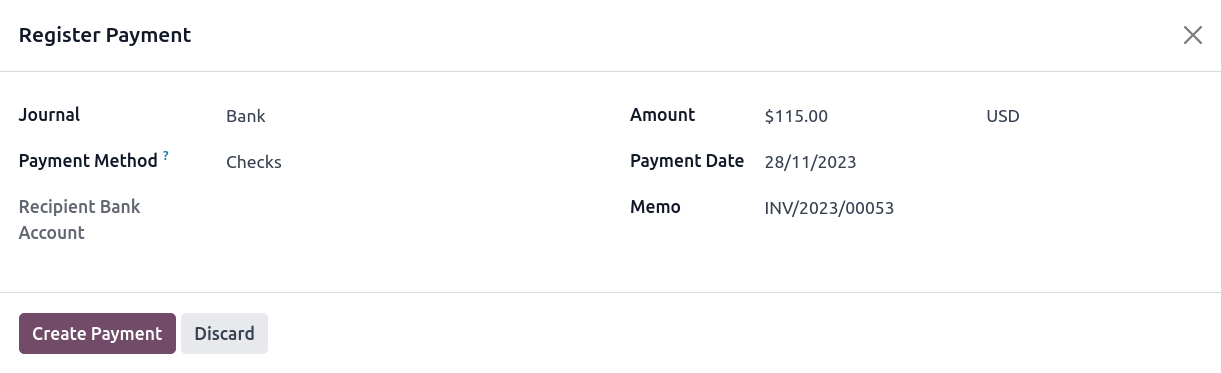
Once you receive a customer check, go to the related invoice (, and click Register Payment. Fill in the payment information:
Journal: Bank;
Payment method: Manual (or Checks if you have created a specific payment method);
Memo: enter the check number;
Nhấp Tạo thanh toán.
The generated journal entries are different depending on the payment registration method chosen.
Bút toán
Tài khoản chưa liên kết
The invoice is marked as In Payment as soon as you record the payment. This operation produces the following journal entry:
Tài khoản |
Statement Match |
Nợ |
Có |
|---|---|---|---|
Khoản phải thu |
100,00 |
||
Biên lai chưa liên kết |
100,00 |
Then, once you receive the bank statements, match this statement with the check of the Outstanding Receipts account. This produces the following journal entry:
Tài khoản |
Statement Match |
Nợ |
Có |
|---|---|---|---|
Biên lai chưa liên kết |
X |
100,00 |
|
Ngân hàng |
100,00 |
If you use this approach to manage received checks, you get the list of checks that have not been cashed in the Outstanding Receipt account (accessible, for example, from the general ledger).
Reconciliation bypass
The invoice is marked as Paid as soon as you record the check.
With this approach, you bypass the use of outstanding accounts, effectively getting only one journal entry in your books and bypassing the reconciliation:
Tài khoản |
Statement Match |
Nợ |
Có |
|---|---|---|---|
Khoản phải thu |
X |
100,00 |
|
Ngân hàng |
100,00 |