
Chủ đề nâng cao
Phần này trình bày các tính năng nâng cao của Odoo.sh liên quan đến container, mô-đun con Git và tác vụ theo lịch.
Container
Mỗi bản dựng được cách ly trong container riêng (container không gian tên Linux). Container này dựa trên hệ thống nền Ubuntu, trên đó cài đặt tất cả các phụ thuộc bắt buộc của Odoo cũng như các gói phổ biến, hữu ích khác.
Nếu dự án của bạn cần các phụ thuộc Python bổ sung hoặc phiên bản mới hơn, bạn có thể định nghĩa một tệp requirements.txt ở thư mục gốc của các nhánh để liệt kê chúng. Nền tảng sẽ đảm bảo các phụ thuộc này được cài đặt trong container của bạn.
Xem thêm
For a concrete example, check out the Odoo Community requirements.txt file.
Ghi chú
Các tệp requirements.txt của mô-đun con cũng được tính đến. Nền tảng sẽ tìm các tệp này trong thư mục cha của mỗi thư mục chứa một mô-đun Odoo.
Cấu trúc thư mục
Vì các container dựa trên nền Ubuntu, cấu trúc thư mục của chúng tuân theo Filesystem Hierarchy Standard.
Các thư mục liên quan đến Odoo.sh gồm:
.
├── home
│    └── odoo
│         ├── backup.daily
│         ├── data
│         │    ├── filestore           Database attachments, as well as the files of binary fields
│         │    └── sessions            Visitors and users sessions
│         ├── logs
│         │    ├── install.log         Database installation logs
│         │    ├── odoo.log            Running server logs
│         │    ├── update.log          Database updates logs
│         │    └── pip.log             Python packages installation logs
│         └── src
│              ├── odoo                Odoo Community source code
│              │    └── odoo-bin       Odoo server executable
│              ├── enterprise          Odoo Enterprise source code
│              ├── themes              Odoo Themes source code
│              └── user                Your repository branch source code
└── usr
     ├── lib
     │    └── pythonX.XX
     │         └── dist-packages       Python X.XX standard libraries
     ├── local
     │    └── lib
     │         └── pythonX.XX
     │              └── dist-packages  Python X.XX third-party libraries
     └── usr
          └── bin
               └── pythonX.X           Python X.XX executable
Shell cơ sở dữ liệu
Khi truy cập container qua shell, bạn có thể truy cập cơ sở dữ liệu bằng lệnh psql.
odoo@odoo-master-1.odoo.sh:~$ psql
psql (16.9)
Type "help" for help.

odoo-master-1=>
Cảnh báo
Luôn sử dụng transactions (ví dụ: BEGIN (...) COMMIT / ROLLBACK) khi một câu lệnh SQL dẫn đến thay đổi (ví dụ: UPDATE, DELETE, ALTER, v.v.), đặc biệt là với cơ sở dữ liệu chính thức của bạn. Cơ chế transaction chính là lưới an toàn của bạn trong trường hợp xảy ra sai sót. Bạn chỉ cần rollback thay đổi để đưa cơ sở dữ liệu trở về trạng thái trước đó.
Đừng quên commit hoặc rollback các transaction. Các transaction đang mở có thể khóa bản ghi trong bảng của bạn, khiến cơ sở dữ liệu đang chạy phải chờ chúng được giải phóng, làm cho máy chủ bị treo vô thời hạn.
Ngoài ra, hãy sử dụng cơ sở dữ liệu thử nghiệm để kiểm tra các câu lệnh trước. Điều này mang lại cho bạn một lớp an toàn bổ sung.
Example
Bạn đã quên đặt điều kiện WHERE. Trong trường hợp này, bạn có thể rollback để hoàn tác thay đổi không mong muốn:
odoo-master-1=> BEGIN;
BEGIN
odoo-master-1=> UPDATE res_users SET password = '***';
UPDATE 457
odoo-master-1=> ROLLBACK;
ROLLBACK
Sau đó, viết lại câu lệnh và commit thay đổi:
odoo-master-1=> BEGIN;
BEGIN
odoo-master-1=> UPDATE res_users SET password = '***' WHERE id = 1;
UPDATE 1
odoo-master-1=> COMMIT;
COMMIT
Chạy máy chủ Odoo
Bạn có thể khởi động một phiên bản máy chủ Odoo từ shell của container. Bạn sẽ không thể truy cập nó từ bên ngoài bằng trình duyệt web, nhưng bạn có thể, ví dụ:
Sử dụng Odoo shell:
odoo-bin shell
>>> partner = env['res.partner'].search([('email', '=', 'asusteK@yourcompany.example.com')], limit=1)
>>> partner.name
'ASUSTeK'
>>> partner.name = 'Odoo'
>>> env['res.partner'].search([('email', '=', 'asusteK@yourcompany.example.com')], limit=1).name
'Odoo'
Cài đặt phân hệ:
odoo-bin -i sale --without-demo=all --stop-after-initMẹo
Đối số
--without-demo=allngăn dữ liệu demo được tải cho tất cả phân hệ.Đối số
--stop-after-initsẽ ngay lập tức tắt phiên bản máy chủ sau khi thao tác hoàn tất.
Cập nhật phân hệ:
odoo-bin -u sale --stop-after-init
Chạy kiểm thử cho phân hệ:
odoo-bin -i sale --test-enable --log-level=test --stop-after-init
Xem thêm
Để tìm đường dẫn addons mà Odoo.sh sử dụng để chạy máy chủ của bạn, hãy tìm "odoo: addons paths" trong nhật ký (~/logs/odoo.log).
2025-02-19 10:51:39,267 4 INFO ? odoo: Odoo version 18.0
2025-02-19 10:51:39,268 4 INFO ? odoo: Using configuration file at /home/odoo/.config/odoo/odoo.conf
2025-02-19 10:51:39,268 4 INFO ? odoo: addons paths: ['/home/odoo/data/addons/18.0', '/home/odoo/src/user', '/home/odoo/src/enterprise', '/home/odoo/src/themes', '/home/odoo/src/odoo/addons', '/home/odoo/src/odoo/odoo/addons']
Cảnh báo
Các thao tác bạn thực hiện trên một phiên bản máy chủ Odoo không được tách biệt; các thay đổi sẽ được phản ánh trong cơ sở dữ liệu. Hãy luôn nhớ thực hiện kiểm thử trong cơ sở dữ liệu staging của bạn.
Gỡ lỗi trong Odoo.sh
Ghi chú
Gỡ lỗi một bản build Odoo.sh không thực sự khác với việc gỡ lỗi một ứng dụng Python khác. Vì vậy, mục tiêu của phần này là trình bày những đặc thù và giới hạn của nền tảng Odoo.sh, với giả định rằng bạn đã biết cách sử dụng công cụ gỡ lỗi.
Bạn có thể sử dụng pdb, pudb, hoặc ipdb để gỡ lỗi mã trên Odoo.sh. Vì máy chủ chạy bên ngoài shell, bạn không thể khởi chạy trình gỡ lỗi trực tiếp từ backend Odoo, do nó cần một shell để hoạt động.
pdb được cài đặt trong mọi container theo mặc định.
Mẹo
Để sử dụng pudb hoặc ipdb, bạn cần cài đặt chúng bằng một trong hai cách:
vĩnh viễn, bằng cách thêm
pudbhoặcipdbvào tệprequirements.txtcủa dự án, hoặctạm thời (chỉ trong bản build hiện tại) bằng cách chạy lệnh phù hợp:
pip install pudb --user
pip install ipdb --user
Để kích hoạt trình gỡ lỗi, hãy thêm đoạn sau vào mã bạn muốn gỡ lỗi:
import sys
if sys.__stdin__.isatty():
    import pdb; pdb.set_trace()
Ghi chú
Điều kiện
sys.__stdin__.isatty()là một giải pháp tạm thời để phát hiện xem bạn có đang chạy Odoo từ một shell hay không.Tiếp theo, lưu tệp và chạy Odoo shell:
odoo-bin shell
Sử dụng Odoo shell để kích hoạt đoạn mã bạn muốn gỡ lỗi.

Phân hệ phụ
Git submodules cho phép bạn liên kết trực tiếp các kho lưu trữ bên ngoài vào dự án của mình mà không cần sao chép mã, giúp đơn giản hóa việc triển khai bằng cách nhân bản các thành phần phụ thuộc cùng với mã nguồn chính của bạn. Bạn duy trì khả năng kiểm soát phiên bản chính xác bằng cách chọn nhánh cụ thể và ghim các bản sửa đổi commit cụ thể để cập nhật bất cứ khi nào bạn muốn.
On Odoo.sh, the platform automatically detects submodules and adds them to your addons path for database installation, provided you configure a deploy key in your project and repository settings when integrating private repositories.
Thêm một phân hệ phụ
Ghi chú
Currently, it is not possible to add private repositories with Odoo.sh. You can nevertheless do so with Git.
From the Branches view of your Odoo.sh project, choose the branch in which you want to add a submodule.
In the upper right corner, click Submodule, then Run on Odoo.sh.
In the dialog box, fill in the following:
Repository URL: the SSH URL of the repository
Mẹo
On GitHub, click Clone, select SSH, and copy the URL.
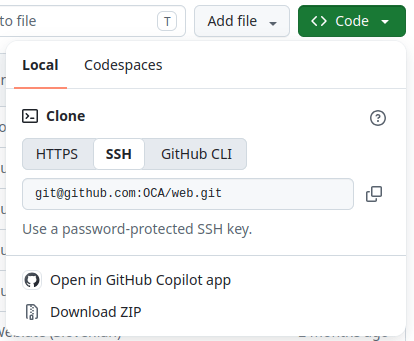
Branch: the specific branch that should be used
Path: the folder in which the submodule should be added to in your branch

Trong terminal, trong thư mục nơi kho lưu trữ Git của bạn được sao chép, checkout nhánh mà bạn muốn thêm phân hệ phụ:
git checkout <branch>
Add the submodule:
git submodule add -b <branch> <git@yourprovider.com>:<username/repository.git> <path>
<git@yourprovider.com>:<username/repository.git>: the SSH URL of the repository you want to add as a submodule
<branch>: the branch you want to use in the above repository
<path>: the folder in which you want to add this submodule
Commit and push the changes:
git commit -a && git push -u <remote> <branch><remote>: the repository on which you want to push your changes. On a standard Git setup, this is origin.
<branch>: the branch on which you want to push your changes. Most likely, the branch you checked out in the first step.
Mẹo
When adding a repository that contains many modules, you may want to ignore some of them if any
are installed automatically. To do so, prefix your submodule folder with a . (e.g.
.folder). The platform will ignore this folder, and you can hand-pick the modules by creating
symbolic links to them from another folder.
Tác vụ đã lên lịch
On the Odoo.sh platform, scheduled actions are implemented slightly differently from a regular Odoo server and are run on a best-effort basis. This is because there might be multiple customers on the same server, and each customer is guaranteed a fair share of the server's resources. Therefore, an exact running time for scheduled actions cannot be guaranteed.
Quan trọng
Do not expect any scheduled action to be run more often than every five minutes.
As the execution time of scheduled actions is limited, it is advised to ensure your scheduled actions:
Work on small batches of records.
Commit their work after processing each batch so that if they are interrupted by the time limit, they do not need to start over.
Are idempotent, i.e, they must not cause side effects if they are started more often than expected.