
网站分析
网站分析帮助网站所有者监控人们如何使用其网站。它提供有关访问者人口统计、行为和互动的数据,有助于改进网站和营销策略。
您可以使用Plausible.io或Google 分析跟踪您的 Odoo 网站流量。我们推荐使用 Plausible.io,因为它注重隐私、轻量级且易于使用。
Plausible 分析仪表板也已经整合到 Odoo 中,可通过:menuselection:`网站–>报告–>分析`访问。
Plausible.io
Odoo hosts its own Plausible.io server and provides a free and ready-to-work Plausible.io solution for Odoo Online databases. Odoo automatically creates and sets up your account. You can start using it by going to .
注解
如果您已经有一个 Plausible.io 账户,并想将其连接到您的 Odoo 在线数据库,您必须创建两个`ir.config.parameters`来使用 Plausible.io 服务器。要执行此操作,请启用:ref:开发者模式<developer-mode>`并进入:menuselection:`常规设置 --> 技术 -- 系统参数。点击 新建 并填写以下 密钥 和 数值 字段:
键 |
值 |
|---|---|
|
|
|
|
然后,按照以下步骤将您的现有帐户与 Plausible.io 服务器连接。
如果您的数据库托管在**Odoo.sh**或**On-premise**上,或者您希望使用自己的 Plausible.io 账户,请按以下步骤操作:
使用以下链接创建或登录 Plausible 账户: https://plausible.io/register。
如果您要创建一个新账户,请执行注册和激活步骤。当要求您提供网站详细信息时,请添加其 域名 而不包括`www`(例如,
example.odoo.com),如有必要,请更改 报告时区。单击 添加代码段 进入下一步。忽略 添加 JavaScript 代码段 说明,单击 开始收集数据。完成后,点击页面左上角的 Plausible 标志,进入 `网站列表<https://plausible.io/sites>`_,然后点击网站旁边的齿轮图标。

在侧边栏中,选择 可见性,然后点击 + 新链接。
输入 名称,密码`字段留空,因为 Odoo中 Plausible 分析仪表盘集成不支持密码,然后点击:guilabel:`创建共享链接。
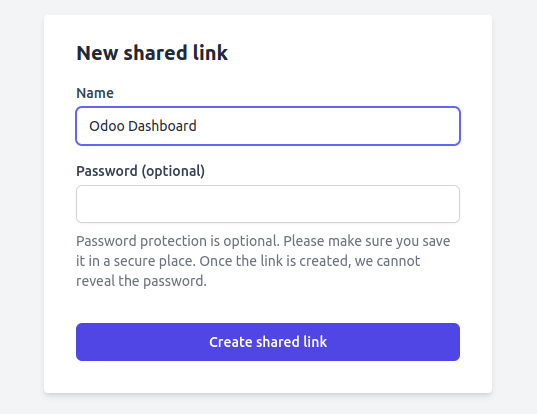
复制共享链接。

在 Odoo 中,转至 。
In the SEO section, enable Plausible Analytics, then paste the Shared Link and click Save.
小技巧
If you have multiple websites, add your websites to your Plausible.io account by going to https://plausible.io/sites and clicking + Add website. In Odoo, in the Website settings, make sure to select the website in the Settings of Website field before pasting the Shared link.
注解
Odoo 会自动推送两个自定义目标:潜在客户开发 和 商店。
Google 分析
要使用 Google Analytics 跟踪您的 Odoo 网站流量:
使用以下链接创建或登录 Google 帐户:https://analytics.google.com。
如果您是首次设置 Google Analytics,请点击开始衡量并完成帐户创建步骤。
If you already have a Google Analytics account, sign in and click the gear icon in the bottom-left corner of the page to access the Admin page. Then, click + Create Property.

Complete the next steps: property creation, business details, and business objectives.
当您到达 数据收集 步骤时,选择网站平台。

Set up your data stream: Specify your Website URL and a Stream name, then click Create stream.
复制衡量 ID。

在 Odoo 中,转至 。
在SEO部分,启用Google Analytics,然后粘贴衡量 ID,并点击保存。
小技巧
If you have multiple websites with separate domains, it is recommended to create one property per domain. In Odoo, in the Website settings, make sure to select the website in the Settings of Website field before pasting the Measurement ID.
Google 标签管理器
GTM is a tag management system that allows you to easily update measurement codes and related code fragments, collectively known as tags on your website or mobile app, directly through the code injector.
警告
某些 GTM 标签使用数据层(例如,高级电子商务追踪数据层)来检索变量并将其发送到 Google Analytics。Odoo 目前不管理数据层。
Google Tag Manager 可能不符合当地的数据保护法规。
To use GTM, proceed as follows:
前往 https://tagmanager.google.com/ 创建或登录 Google 账户。
In the Accounts tab, click Create account.
输入账户名称并选择账户的国家/地区。
在容器名称字段中输入您的网站网址,并选择目标平台。
点击创建并同意服务条款。
Copy the
<head>and<body>codes from the popup window. Then, go to your website, click Edit, go to the Themes tab, scroll down to the Website Settings section, then click <head> and </body> to paste the codes.
注解
数据收集在用于监控网站的营销工具(例如 Google Analytics、Plausible、Facebook Pixel)中,而不是在 Odoo 中。