Configuratie
Toegang tot de POS-instellingen
To access the general POS settings, go to . Then, open the dropdown menu in the Point of Sale field and select the POS to configure.

Notitie
These settings are available to users with the access rights Administration set as Settings.
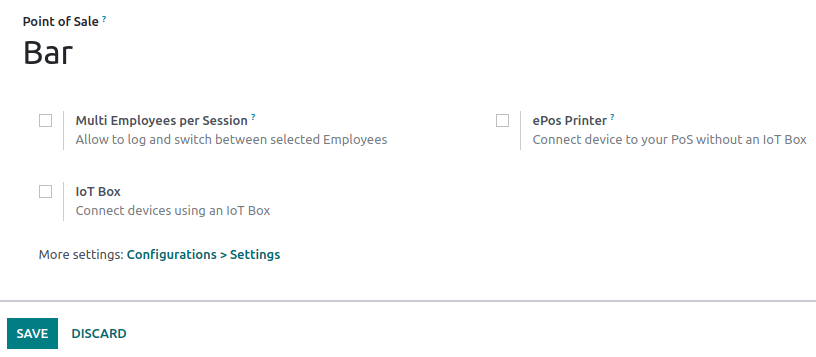
Je kunt ook enkele instellingen configureren vanaf het dashboard door op de verticale ellipsknop (⋮) op een kassakaart te klikken. Hierdoor wordt een pop-upvenster geopend, van waaruit je het volgende kunt doen:
Meerdere werknemers toestaan om in te loggen.
Een ePOS-printer aansluiten en instellen.
Notitie
Deze instellingen zijn beschikbaar voor gebruikers met de toegangsrechten Kooppunt ingesteld als Administrator.
Producten beschikbaar stellen
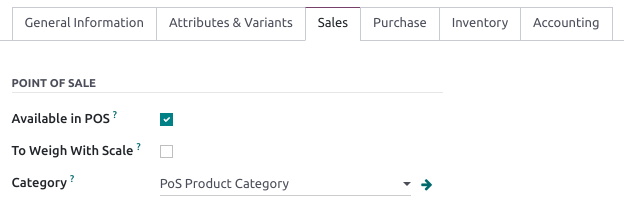
To make products available for sale, go to , and select a product to open the product form. In the Sales tab, enable Available in POS.
PoS-productcategorieën
Configuratie
Met POS-productcategorieën kunnen gebruikers producten categoriseren en een meer gestructureerde en schone POS-interface krijgen.
Om PoS-categorieën te beheren, ga je naar :menuselectie:`Kooppunt --> Configuratie --> PoS-productcategorieën`. Om een nieuwe categorie toe te voegen, klik je op Creëer. Geef de categorie vervolgens een naam in het categorienaam veld.
To associate a category with a parent category, fill in the Parent Category field. A parent category groups one or more child categories.
Example
Assign PoS product categories
Go to and open a product form. Then, go to the Sales tab and fill in the Category field under the Point of Sale section.
Adapt the POS interface
Begin categorie
You can select one product category to display when opening a POS session. To configure it, go to your POS settings and select a PoS category from the dropdown menu of the Start Category field within the PoS Interface section.
Categorieën beperken
You can also limit the categories displayed on your POS interface. To achieve this, go to your POS settings and choose the specific categories to display in the Restrict Categories field within the PoS Interface section.