

I am trying to setup automatic accounting for the purpose of testing having the cost from a purchase order update the linked sales order cost.
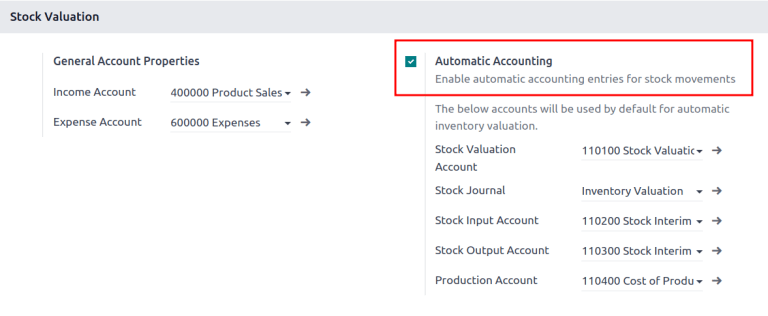
Based on the help instructions I get I am supposed to go to Accounting - Configuration - Settings - Stock Valuation Section. The Problem I am having is I don't see a Stock Valuation Section.
I am on Odoo 18.0 - I am setup as administrator on everything I can be unless there is a security setting that is not visible. I have had other admins in our company try this too.
Any thoughts would be appreciated.
Paul






Is the Inventory App installed?
Thank you for all the feedback - I have verified I am running on Odoo saas - 18.4+e(Enterprise Edition). I have watched all the videos and followed the suggested paths to setup the Automatic Accounting - The Stock Valuation Section to turn on Automatic Accounting is not visible to me.
Ray,
Yes Inventory app is installed
Go to Apps and ensure Inventory is installed.
Go to Inventory > Configuration > Settings.
Enable “Automated Inventory Valuation” or “Real-time (automated) stock valuation”.
Once enabled, the Stock Valuation options will appear in Accounting Settings.
Since you say you're running 18.4 Enterprise:
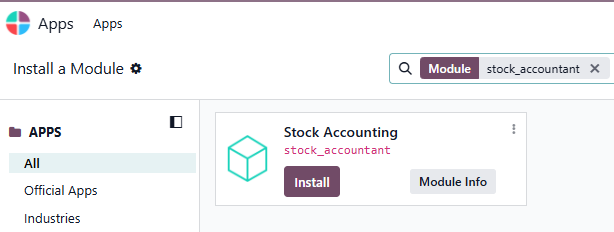
Enable the Developer mode ( https://www.odoo.com/documentation/saas-18.4/applications/general/developer_mode.html), then go to Apps, remove the 'Apps' filter, and search for 'stock_accountant'. If it is not installed -> install it. If it is not there -> click 'Update Apps List' in the top menu, then 'Update'. Now, search for 'stock_accountant' again and install it.
If still no success, contact https://www.odoo.com/help-form since this module, in Odoo Online (SaaS) just cannot
not be there.
Christoph suggestion above resolved the issue. I was able to see the Stock_Accountant app in developer mode, installlininstalling that made the Automatic Accountant section visible to be enabled.