Skip to Content
Odoo Menú
  • Registra entrada
  • Prova-ho gratis
  • Aplicacions
    Finances
    • Comptabilitat
    • Facturació
    • Despeses
    • Full de càlcul (IA)
    • Documents
    • Signatura
    Vendes
    • CRM
    • Vendes
    • Punt de venda per a botigues
    • Punt de venda per a restaurants
    • Subscripcions
    • Lloguer
    Imatges de llocs web
    • Creació de llocs web
    • Comerç electrònic
    • Blog
    • Fòrum
    • Xat en directe
    • Aprenentatge en línia
    Cadena de subministrament
    • Inventari
    • Fabricació
    • PLM
    • Compres
    • Manteniment
    • Qualitat
    Recursos humans
    • Empleats
    • Reclutament
    • Absències
    • Avaluacions
    • Recomanacions
    • Flota
    Màrqueting
    • Màrqueting Social
    • Màrqueting per correu electrònic
    • Màrqueting per SMS
    • Esdeveniments
    • Automatització del màrqueting
    • Enquestes
    Serveis
    • Projectes
    • Fulls d'hores
    • Servei de camp
    • Suport
    • Planificació
    • Cites
    Productivitat
    • Converses
    • Artificial Intelligence
    • IoT
    • VoIP
    • Coneixements
    • WhatsApp
    Aplicacions de tercers Odoo Studio Plataforma d'Odoo al núvol
  • Sectors
    Comerç al detall
    • Llibreria
    • Botiga de roba
    • Botiga de mobles
    • Botiga d'ultramarins
    • Ferreteria
    • Botiga de joguines
    Food & Hospitality
    • Bar i pub
    • Restaurant
    • Menjar ràpid
    • Guest House
    • Distribuïdor de begudes
    • Hotel
    Immobiliari
    • Agència immobiliària
    • Estudi d'arquitectura
    • Construcció
    • Property Management
    • Jardineria
    • Associació de propietaris de béns immobles
    Consultoria
    • Empresa comptable
    • Partner d'Odoo
    • Agència de màrqueting
    • Bufet d'advocats
    • Captació de talent
    • Auditoria i certificació
    Fabricació
    • Textile
    • Metal
    • Mobles
    • Menjar
    • Brewery
    • Regals corporatius
    Salut i fitness
    • Club d'esport
    • Òptica
    • Centre de fitness
    • Especialistes en benestar
    • Farmàcia
    • Perruqueria
    Trades
    • Servei de manteniment
    • Hardware i suport informàtic
    • Sistemes d'energia solar
    • Shoe Maker
    • Serveis de neteja
    • Instal·lacions HVAC
    Altres
    • Nonprofit Organization
    • Agència del medi ambient
    • Lloguer de panells publicitaris
    • Fotografia
    • Lloguer de bicicletes
    • Distribuïdors de programari
    Browse all Industries
  • Comunitat
    Aprèn
    • Tutorials
    • Documentació
    • Certificacions
    • Formació
    • Blog
    • Pòdcast
    Potenciar l'educació
    • Programa educatiu
    • Scale-Up! El joc empresarial
    • Visita Odoo
    Obtindre el programari
    • Descarregar
    • Comparar edicions
    • Novetats de les versions
    Col·laborar
    • GitHub
    • Fòrum
    • Esdeveniments
    • Traduccions
    • Converteix-te en partner
    • Services for Partners
    • Registra la teva empresa comptable
    Obtindre els serveis
    • Troba un partner
    • Troba un comptable
    • Contacta amb un expert
    • Serveis d'implementació
    • Referències del client
    • Suport
    • Actualitzacions
    Github Youtube Twitter Linkedin Instagram Facebook Spotify
    +1 (650) 691-3277
    Programar una demo
  • Preus
  • Ajuda
You need to be registered to interact with the community.
All Posts People Badges
Etiquetes (View all)
odoo accounting v14 pos v15
About this forum
You need to be registered to interact with the community.
All Posts People Badges
Etiquetes (View all)
odoo accounting v14 pos v15
About this forum
Ajuda

Automatic Accounting Setup

Subscriure's

Get notified when there's activity on this post

This question has been flagged
5 Respostes
1305 Vistes
Avatar
Paul Tomczak

I am trying to setup automatic accounting for the purpose of testing having the cost from a purchase order update the linked sales order cost.

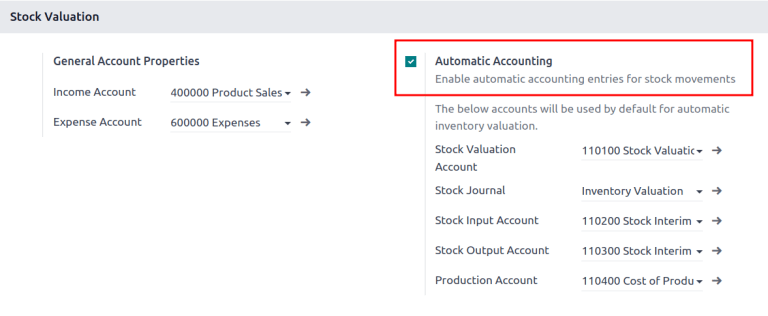
Based on the help instructions I get I am supposed to go to Accounting - Configuration - Settings - Stock Valuation Section.  The Problem I am having is I don't see a Stock Valuation Section.


I am on Odoo 18.0 - I am setup as administrator on everything I can be unless there is a security setting that is not visible.  I have had other admins in our company try this too.


Any thoughts would be appreciated.


Paul

0
Avatar
Descartar
Ray Carnes (ray)

Is the Inventory App installed?

Paul Tomczak
Autor

Thank you for all the feedback - I have verified I am running on Odoo saas - 18.4+e(Enterprise Edition). I have watched all the videos and followed the suggested paths to setup the Automatic Accounting - The Stock Valuation Section to turn on Automatic Accounting is not visible to me.

Paul Tomczak
Autor

Ray,

Yes Inventory app is installed

Karim Kayssi

Go to Apps and ensure Inventory is installed.

Go to Inventory > Configuration > Settings.

Enable “Automated Inventory Valuation” or “Real-time (automated) stock valuation”.

Once enabled, the Stock Valuation options will appear in Accounting Settings.

Paul Tomczak
Autor

Since you say you're running 18.4 Enterprise:

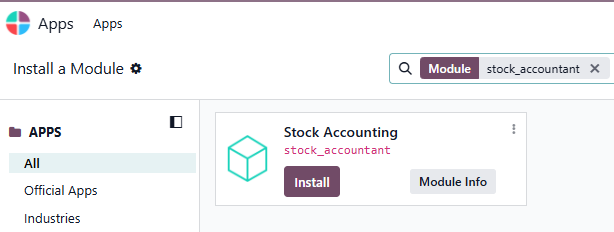
Enable the Developer mode ( https://www.odoo.com/documentation/saas-18.4/applications/general/developer_mode.html), then go to Apps, remove the 'Apps' filter, and search for 'stock_accountant'. If it is not installed -> install it. If it is not there -> click 'Update Apps List' in the top menu, then 'Update'. Now, search for 'stock_accountant' again and install it.

If still no success, contact https://www.odoo.com/help-form since this module, in Odoo Online (SaaS) just cannot

not be there.

Christoph suggestion above resolved the issue. I was able to see the Stock_Accountant app in developer mode, installlininstalling that made the Automatic Accountant section visible to be enabled.

Avatar
NODEX TECHNOLOGIES LLC, JB
Best Answer

Hello,

Maybe you don't have this configured:

Please refer the links :

​1.  Automatic inventory valuation

​2. An Overview of Inventory Valuation in Odoo 18

​3. How to Set Up Accurate Costing Methods in Odoo 18

​4. 


2
Avatar
Descartar
Avatar
Ray Carnes (ray)
Best Answer

You do not have Stock Accounting - stock_accountant - installed:

0
Avatar
Descartar
Avatar
Kylie Grant
Best Answer

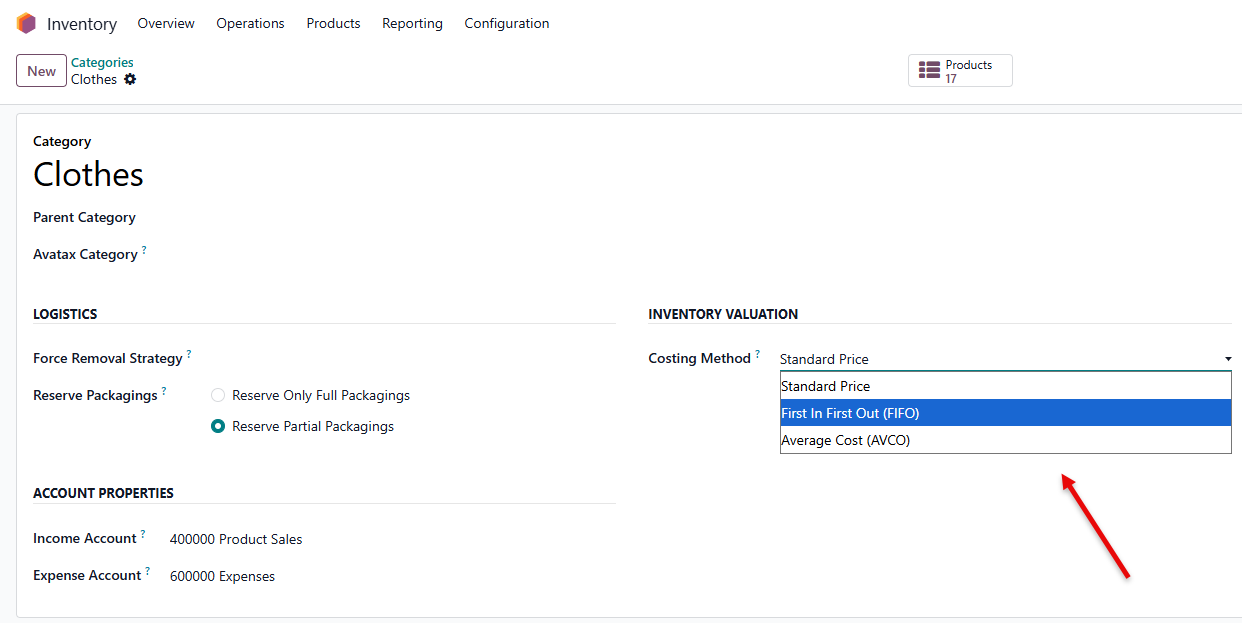
Further to the suggestions already offered, and you are on Odoo Enterprise, check your product categories. Automated valuation needs to be enabled on each product category.  Inventory > Configuration > Products > Categories. AVCO and FIFO (and FEFO, if enabled) are automated valuation methods. 


0
Avatar
Descartar
Avatar
Cybrosys Techno Solutions Pvt.Ltd
Best Answer

Hi,


Please refer to the following.


* https://www.odoo.com/documentation/18.0/applications/inventory_and_mrp/inventory/product_management/inventory_valuation/inventory_valuation_config.html


* https://www.odoo.com/es/forum/ayuda-1/automatic-accounting-stock-inputoutput-account-271498


* https://www.odoo.com/es/forum/ayuda-1/v16-what-is-the-production-account-in-the-accounting-setting-automatic-accounting-section-234374


* https://www.odoo.com/es/event/odoo-experience-2023-3735/track/automating-accounting-excellence-how-odoo-transforms-financial-workflows-5508


Hope it helps

0
Avatar
Descartar
Avatar
Christoph Farnleitner
Best Answer

Automatic Accounting is an Odoo Enterprise feature. If you're running Odoo Community, you don't have access to this.

You can try and search for stock_accountant in Apps. If you can't find it, you're most likely not running an Odoo Enterprise setup (you could verify this at Settings -> General Settings -> Section: About as well).

In case you're not sure whether the feature is actually what you're looking for, you could start a 15-days-trial instance of Odoo Enterprise at https://www.odoo.com/trial.

Also, you could check out https://demo.odoo.com (for a Odoo Enterprise 18.4 setup) or https://runbot.odoo.com (to compare different versions and editions of Odoo).


Edit:

Since you say you're running 18.4 Enterprise:

Enable the Developer mode (https://www.odoo.com/documentation/saas-18.4/applications/general/developer_mode.html), then go to Apps, remove the 'Apps' filter, and search for 'stock_accountant'. If it is not installed -> install it. If it is not there -> click 'Update Apps List' in the top menu, then 'Update'. Now, search for 'stock_accountant' again and install it.

If still no success, contact https://www.odoo.com/help-form since this module, in Odoo Online (SaaS) just cannot not be there.

0
Avatar
Descartar
Enjoying the discussion? Don't just read, join in!

Create an account today to enjoy exclusive features and engage with our awesome community!

Registrar-se
Community
  • Tutorials
  • Documentació
  • Fòrum
Codi obert
  • Descarregar
  • GitHub
  • Runbot
  • Traduccions
Serveis
  • Allotjament a Odoo.sh
  • Suport
  • Actualització
  • Desenvolupaments personalitzats
  • Educació
  • Troba un comptable
  • Troba un partner
  • Converteix-te en partner
Sobre nosaltres
  • La nostra empresa
  • Actius de marca
  • Contacta amb nosaltres
  • Llocs de treball
  • Esdeveniments
  • Pòdcast
  • Blog
  • Clients
  • Informació legal • Privacitat
  • Seguretat
الْعَرَبيّة Català 简体中文 繁體中文 (台灣) Čeština Dansk Nederlands English Suomi Français Deutsch हिंदी Bahasa Indonesia Italiano 日本語 한국어 (KR) Lietuvių kalba Język polski Português (BR) română русский язык Slovenský jazyk Slovenščina Español (América Latina) Español Svenska ภาษาไทย Türkçe українська Tiếng Việt

Odoo és un conjunt d'aplicacions empresarials de codi obert que cobreix totes les necessitats de la teva empresa: CRM, comerç electrònic, comptabilitat, inventari, punt de venda, gestió de projectes, etc.

La proposta única de valor d'Odoo és ser molt fàcil d'utilitzar i estar totalment integrat, ambdues alhora.

Website made with

Odoo Experience on YouTube

1. Use the live chat to ask your questions.
2. The operator answers within a few minutes.

Live support on Youtube
Watch now