Skip to Content
Odoo Menu
  • Sign in
  • Try it free
  • Apps
    Finance
    • Accounting
    • Invoicing
    • Expenses
    • Spreadsheet (BI)
    • Documents
    • Sign
    Sales
    • CRM
    • Sales
    • POS Shop
    • POS Restaurant
    • Subscriptions
    • Rental
    Websites
    • Website Builder
    • eCommerce
    • Blog
    • Forum
    • Live Chat
    • eLearning
    Supply Chain
    • Inventory
    • Manufacturing
    • PLM
    • Purchase
    • Maintenance
    • Quality
    Human Resources
    • Employees
    • Recruitment
    • Time Off
    • Appraisals
    • Referrals
    • Fleet
    Marketing
    • Social Marketing
    • Email Marketing
    • SMS Marketing
    • Events
    • Marketing Automation
    • Surveys
    Services
    • Project
    • Timesheets
    • Field Service
    • Helpdesk
    • Planning
    • Appointments
    Productivity
    • Discuss
    • Approvals
    • IoT
    • VoIP
    • Knowledge
    • WhatsApp
    Third party apps Odoo Studio Odoo Cloud Platform
  • Industries
    Retail
    • Book Store
    • Clothing Store
    • Furniture Store
    • Grocery Store
    • Hardware Store
    • Toy Store
    Food & Hospitality
    • Bar and Pub
    • Restaurant
    • Fast Food
    • Guest House
    • Beverage Distributor
    • Hotel
    Real Estate
    • Real Estate Agency
    • Architecture Firm
    • Construction
    • Estate Management
    • Gardening
    • Property Owner Association
    Consulting
    • Accounting Firm
    • Odoo Partner
    • Marketing Agency
    • Law firm
    • Talent Acquisition
    • Audit & Certification
    Manufacturing
    • Textile
    • Metal
    • Furnitures
    • Food
    • Brewery
    • Corporate Gifts
    Health & Fitness
    • Sports Club
    • Eyewear Store
    • Fitness Center
    • Wellness Practitioners
    • Pharmacy
    • Hair Salon
    Trades
    • Handyman
    • IT Hardware & Support
    • Solar Energy Systems
    • Shoe Maker
    • Cleaning Services
    • HVAC Services
    Others
    • Nonprofit Organization
    • Environmental Agency
    • Billboard Rental
    • Photography
    • Bike Leasing
    • Software Reseller
    Browse all Industries
  • Community
    Learn
    • Tutorials
    • Documentation
    • Certifications
    • Training
    • Blog
    • Podcast
    Empower Education
    • Education Program
    • Scale Up! Business Game
    • Visit Odoo
    Get the Software
    • Download
    • Compare Editions
    • Releases
    Collaborate
    • Github
    • Forum
    • Events
    • Translations
    • Become a Partner
    • Services for Partners
    • Register your Accounting Firm
    Get Services
    • Find a Partner
    • Find an Accountant
    • Meet an advisor
    • Implementation Services
    • Customer References
    • Support
    • Upgrades
    Github Youtube Twitter Linkedin Instagram Facebook Spotify
    +1 (650) 691-3277
    Get a demo
  • Pricing
  • Help

Odoo is the world's easiest all-in-one management software.
It includes hundreds of business apps:

  • CRM
  • e-Commerce
  • Accounting
  • Inventory
  • PoS
  • Project
  • MRP
All apps
You need to be registered to interact with the community.
All Posts People Badges
Tags (View all)
odoo accounting v14 pos v15
About this forum
You need to be registered to interact with the community.
All Posts People Badges
Tags (View all)
odoo accounting v14 pos v15
About this forum
Help

Use Google Fonts locally in Odoo website

Subscribe

Get notified when there's activity on this post

This question has been flagged
googlefonts
8 Replies
9831 Views
Avatar
Mario Gielissen

The Odoo website module uses several Google fonts, hosted by Google servers. Is there a way to override this and host the fonts locally?

1
Avatar
Discard
Avatar
Mario Gielissen
Author Best Answer

A quick and dirty fix:

Comment out in /addons/website/static/src/scss/website.scss:

$-seen-urls: ();
@each $alias, $key in $o-font-aliases-to-keys {
$-url: o-get-font-info($alias, 'url');
@if $-url and index($-seen-urls, $-url) == null {
$-seen-urls: append($-seen-urls, $-url);
// @import url("https://fonts.googleapis.com/css?family=#{unquote($-url)}&display=swap");
}
}

3
Avatar
Discard
Avatar
Pierre Delacroix (pde)
Best Answer

Hello, from Odoo 15, we added a toggle to select if the google font should be served by Google server or by the Odoo server:
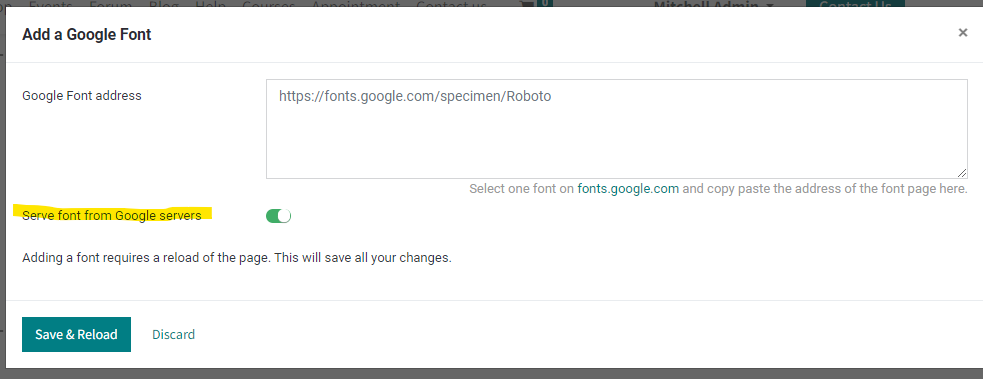
2
Avatar
Discard
Gregor Huyskens

Must be improved!
Please prefill the input field and also supply a dialog to switch all fonts to "local"!
Crucial and legally important function !

Avatar
Jort de Vreeze
Best Answer

I found this tool (no affiliation and unfortunately only in German) helpful to check if all requirements are fulfilled (i.e., check if font is loaded from the Google servers, or not):

https://sicher3.de/google-fonts-checker/

1
Avatar
Discard
Avatar
imad chaikhi
Best Answer

Hi to all
To fix this you can deploy this module :

https://apps.odoo.com/apps/modules/13.0/bytist_fix_google_font/

1
Avatar
Discard
Avatar
Eman Abdulmalik
Best Answer

You will have to load the font files in your static directory and include it as an asset by inheriting the web front end assets xml file then applying the fonts using a css.

1
Avatar
Discard
Mario Gielissen
Author

Indeed, but the Google Fonts/files are still loaded within the website module.

https://github.com/odoo/odoo/blob/675430d53f6ef048b77afe95395bd760d3f5a2be/addons/website/static/src/scss/website.scss

David Fleischmann

Hi guys, is there any update here? Facing the same issue and interested in how you solved this :)

David Fleischmann

Thanks Mario :)
Then we'll patch odoo here

Avatar
Frederik Kramer
Best Answer

Is there an upstream patch for this already. This is becoming a serious threat for German customers. See https://www.datenschutzticker.de/2022/03/einsatz-von-google-fonts-ohne-einwilligung-ist-rechtswidrig/

1
Avatar
Discard
Mario Gielissen
Author

There is a module for replacing Google fonts with BunnyFonts:

https://apps.odoo.com/apps/modules/15.0/hav_remove_google_fonts/

Frederik Kramer

mh thanks but that doesn'r really solve the core problem for the OLG Munich but should be sufficiently good to avoid trouble with lawyers for a while at least ;-)

Mario Gielissen
Author

Even if the fonts are hosted in the EU, the fonts are fetched from a 3rd party. To make 100% sure, put the fonts locally within an addon on the Odoo server.

Frederik Kramer

yes @mario and this one doesn't work without having a doorkeeper route in Odoo as it is an integral part of each website rendered and fetched even before any consent can be given

Frederik Kramer

Besides that oi think thats a core problem to Odoo, that Odoo S.A. should be solving. And i am pretty sure they will as all SaaS instances are similarly affected

Avatar
Gregor Huyskens
Best Answer


There is a way to change the font source  from default "google servers" to a local font set.   (Website Editor -> "Theme" -> Paragraph -> Font Familiy
The dialog is very bad in the sense that all Google fonts are preset as server loaded and instead of allowing a change easily, a broken form asks to replace the (already existing) font source  AND confirm to store this on the Odoo server.
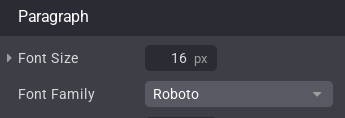
All preset to cloud! (NONSENSE!)
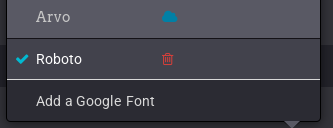
When selecting one of the fonts we hit this broken dialog:
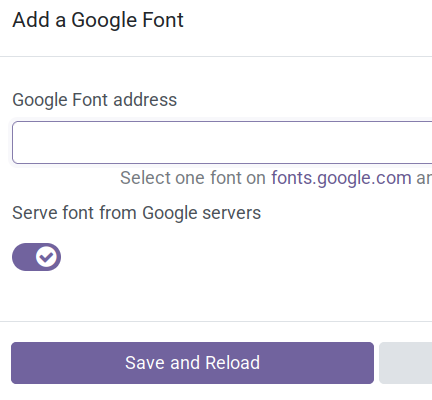
We have to enter the complete font url.  And change the default "Google Server".
You would have to reset all fonts with this lengthy steps instead of finding a simple switch to "local".

This topic is terribly neglected and misformed in Odoo by - probably - some Google "believers" or interest to push Google tools.
Using Google Fonts is a much worse form of tracking usage statistics than any cookies can be.
When hitting a google fonts block  the Website Editor (or other wysiwyg components) can also fail badly without a usefull error.

0
Avatar
Discard
Avatar
Miguel Martínez López
Best Answer

Hi!


I created a module that automatically hosts all the Google fonts used in the website module and replaces the links in the asset bundle with external references to the Google fonts with internal links pointing to the hosted fonts. In this way, privacy problems are mitigated and the solution is more compliant with the European regulation for the GDPR. It works for odoo 18. It's free.


Search this app in the odoo app store: local_google_fonts

0
Avatar
Discard
Enjoying the discussion? Don't just read, join in!

Create an account today to enjoy exclusive features and engage with our awesome community!

Sign up
Related Posts Replies Views Activity
How can we remove font.googleapis..ccs from Odoo 11 reports?
google api fonts
Avatar
0
Feb 19
6066
Stuck at including a new custom font in the web module
fonts
Avatar
Avatar
2
Aug 24
2957
Google Drive and Google Sheets integration is going away Solved
google
Avatar
Avatar
Avatar
3
Mar 24
6350
Odoo 11e and google synchronisation (google sign in, google drive / spreadsheet)
google
Avatar
Avatar
1
Oct 18
3684
I have installed Google spredsheet module, what is next?
google
Avatar
0
Oct 18
4557
Community
  • Tutorials
  • Documentation
  • Forum
Open Source
  • Download
  • Github
  • Runbot
  • Translations
Services
  • Odoo.sh Hosting
  • Support
  • Upgrade
  • Custom Developments
  • Education
  • Find an Accountant
  • Find a Partner
  • Become a Partner
About us
  • Our company
  • Brand Assets
  • Contact us
  • Jobs
  • Events
  • Podcast
  • Blog
  • Customers
  • Legal • Privacy
  • Security
الْعَرَبيّة Català 简体中文 繁體中文 (台灣) Čeština Dansk Nederlands English Suomi Français Deutsch हिंदी Bahasa Indonesia Italiano 日本語 한국어 (KR) Lietuvių kalba Język polski Português (BR) română русский язык Slovenský jazyk slovenščina Español (América Latina) Español ภาษาไทย Türkçe українська Tiếng Việt

Odoo is a suite of open source business apps that cover all your company needs: CRM, eCommerce, accounting, inventory, point of sale, project management, etc.

Odoo's unique value proposition is to be at the same time very easy to use and fully integrated.

Website made with

Odoo Experience on YouTube

1. Use the live chat to ask your questions.
2. The operator answers within a few minutes.

Live support on Youtube
Watch now
