How to configure a numbering system for purchase orders in Odoo?
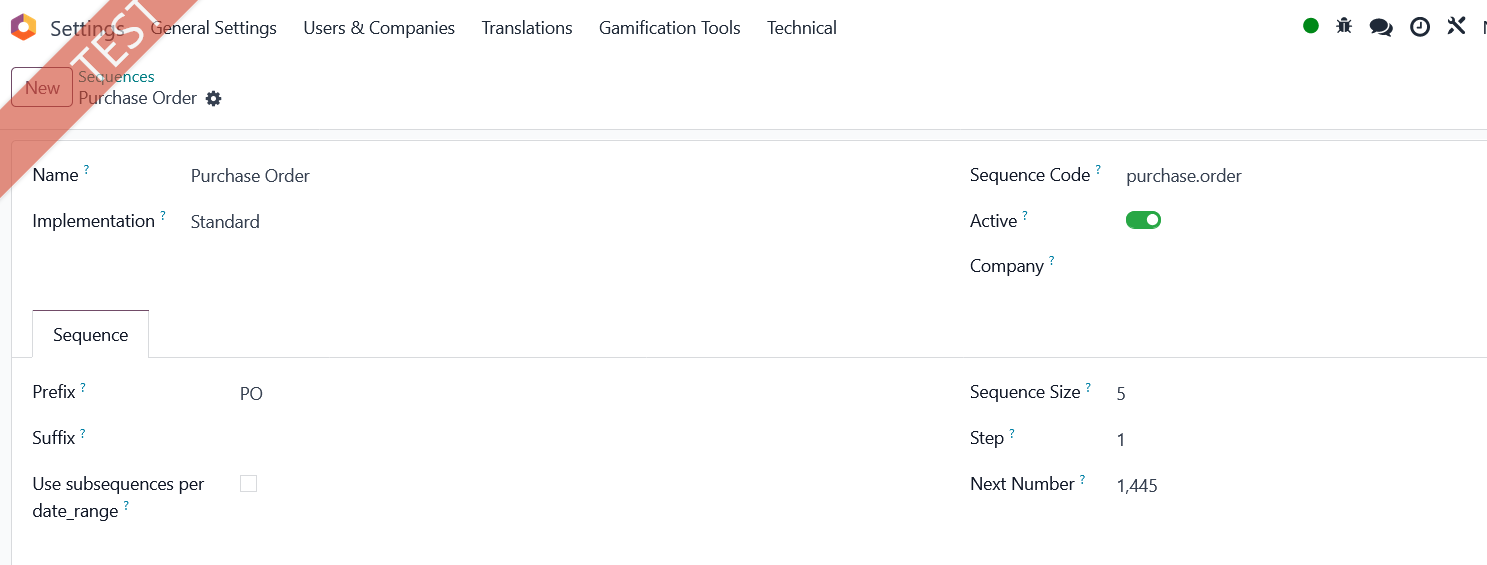
putting a prefix as SH then serial numbering and (if applicable) at end a suffix as GF.

Odoo is the world's easiest all-in-one management software.
It includes hundreds of business apps:

How to configure a numbering system for purchase orders in Odoo?
putting a prefix as SH then serial numbering and (if applicable) at end a suffix as GF.

Activate developer mode. Open app Settings and menu Technical and find Sequences. Open Purchase Order. You can modify the sequence according to your needs.
Create an account today to enjoy exclusive features and engage with our awesome community!
Sign up| Related Posts | Replies | Views | Activity | |
|---|---|---|---|---|

|
0
Nov 25
|
504 | ||

|
0
Nov 25
|
449 | ||


|
1
Nov 25
|
447 | ||



|
3
Sep 25
|
1274 | ||


|
3
Aug 25
|
1894 |
1. Use the live chat to ask your questions.
2. The operator answers within a few minutes.
