
How to configure a numbering system for purchase orders in Odoo?
putting a prefix as SH then serial numbering and (if applicable) at end a suffix as GF.
Odoo is the world's easiest all-in-one management software.
It includes hundreds of business apps:

How to configure a numbering system for purchase orders in Odoo?
putting a prefix as SH then serial numbering and (if applicable) at end a suffix as GF.

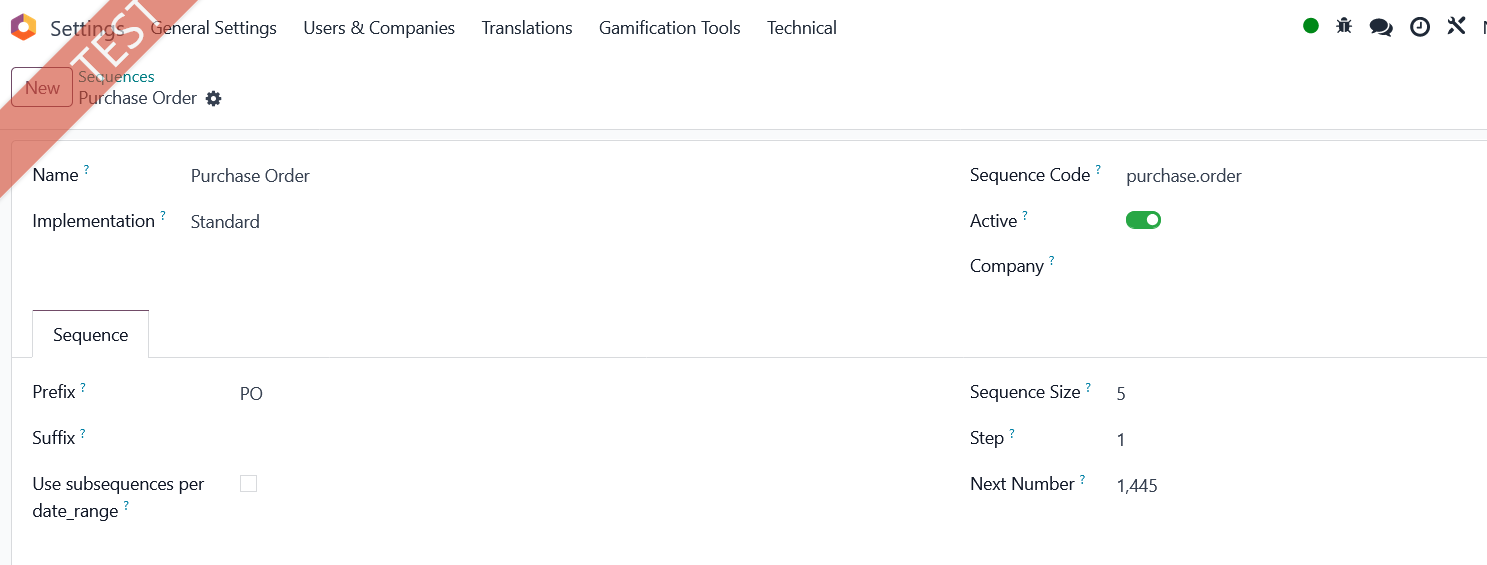
Activate developer mode. Open app Settings and menu Technical and find Sequences. Open Purchase Order. You can modify the sequence according to your needs.
| 関連投稿 | 返信 | ビュー | 活動 | |
|---|---|---|---|---|

|
0
11月 25
|
516 | ||

|
0
11月 25
|
453 | ||


|
1
11月 25
|
491 | ||



|
3
9月 25
|
1310 | ||


|
3
8月 25
|
1945 |
1. Use the live chat to ask your questions.
2. The operator answers within a few minutes.
