Skip to Content
Odoo Menu
  • Prihlásiť sa
  • Vyskúšajte zadarmo
  • Aplikácie
    Financie
    • Účtovníctvo
    • Fakturácia
    • Výdavky
    • Tabuľka (BI)
    • Dokumenty
    • Podpis
    Predaj
    • CRM
    • Predaj
    • POS Shop
    • POS Restaurant
    • Manažment odberu
    • Požičovňa
    Webstránky
    • Tvorca webstránok
    • eShop
    • Blog
    • Fórum
    • Živý chat
    • eLearning
    Supply Chain
    • Sklad
    • Výroba
    • Správa životného cyklu produktu
    • Nákup
    • Údržba
    • Manažment kvality
    Ľudské zdroje
    • Zamestnanci
    • Nábor zamestnancov
    • Voľné dni
    • Hodnotenia
    • Odporúčania
    • Vozový park
    Marketing
    • Marketing sociálnych sietí
    • Email marketing
    • SMS marketing
    • Eventy
    • Marketingová automatizácia
    • Prieskumy
    Služby
    • Projektové riadenie
    • Pracovné výkazy
    • Práca v teréne
    • Helpdesk
    • Plánovanie
    • Schôdzky
    Produktivita
    • Tímová komunikácia
    • Schvalovania
    • IoT
    • VoIP
    • Znalosti
    • WhatsApp
    Third party apps Odoo Studio Odoo Cloud Platform
  • Priemyselné odvetvia
    Retail
    • Book Store
    • Clothing Store
    • Furniture Store
    • Grocery Store
    • Hardware Store
    • Toy Store
    Food & Hospitality
    • Bar and Pub
    • Reštaurácia
    • Fast Food
    • Guest House
    • Beverage distributor
    • Hotel
    Reality
    • Real Estate Agency
    • Architecture Firm
    • Konštrukcia
    • Estate Managament
    • Gardening
    • Property Owner Association
    Poradenstvo
    • Accounting Firm
    • Odoo Partner
    • Marketing Agency
    • Law firm
    • Talent Acquisition
    • Audit & Certification
    Výroba
    • Textile
    • Metal
    • Furnitures
    • Jedlo
    • Brewery
    • Corporate Gifts
    Health & Fitness
    • Sports Club
    • Eyewear Store
    • Fitness Center
    • Wellness Practitioners
    • Pharmacy
    • Hair Salon
    Trades
    • Handyman
    • IT Hardware and Support
    • Solar Energy Systems
    • Shoe Maker
    • Cleaning Services
    • HVAC Services
    Iní
    • Nonprofit Organization
    • Environmental Agency
    • Billboard Rental
    • Photography
    • Bike Leasing
    • Software Reseller
    Browse all Industries
  • Komunita
    Vzdelávanie
    • Tutoriály
    • Dokumentácia
    • Certifikácie
    • Školenie
    • Blog
    • Podcast
    Empower Education
    • Vzdelávací program
    • Scale Up! Business Game
    • Visit Odoo
    Softvér
    • Stiahnuť
    • Porovnanie Community a Enterprise vierzie
    • Releases
    Spolupráca
    • Github
    • Fórum
    • Eventy
    • Preklady
    • Staň sa partnerom
    • Services for Partners
    • Register your Accounting Firm
    Služby
    • Nájdite partnera
    • Nájdite účtovníka
    • Meet an advisor
    • Implementation Services
    • Zákaznícke referencie
    • Podpora
    • Upgrades
    ​Github Youtube Twitter Linkedin Instagram Facebook Spotify
    +1 (650) 691-3277
    Získajte demo
  • Cenník
  • Pomoc
  1. Kurzy
  2. Smart Tutorial - Localización de Chile
  3. eComerce Localización de Chile
Nav
Domov └Smart Tutorial - Localización de Chile └eComerce Localización de Chile

Smart Tutorial - Localización de Chile

0 %

Completed

Course content
  • Módulos y Conceptos básicos
    • Módulos y Conceptos básicos - Localización de Chile 10 xp
      • Kvíz
    • Configuración de datos Maestros - Localización de Chile 10 xp
      • Kvíz
    • Servidor de correo DTE - Localización de Chile 10 xp
      • Kvíz
  • Facturación Electrónica
    • Flujo base de Factura Electrónica - Localización de Chile 10 xp
      • Kvíz
    • Flujo base de Boleta Electrónica - Localización de Chile 10 xp
      • Kvíz
    • Flujo base de Guía de Despacho - Localización de Chile 10 xp
      • Kvíz
    • Flujo Base de Nota de Crédito - Localización de Chile 10 xp
      • Kvíz
    • Factura Electrónica de Exportación de Bienes - Localización de Chile
    • Modo Demo - Localización de Chile
    • eComerce Localización de Chile
    • Facturación Electrónica para Punto de Venta - Localización de Chile 10 xp
      • Kvíz
    • Factoring - Localización Chile 10 xp
      • Kvíz
  • Reportes
    • Reportes Financieros - Localización de Chile 10 xp
      • Kvíz
  • Proceso de Go -Live
    • Go Live Checklist - Localización de Chile 10 xp
      • Kvíz
    • Importación de Facturas abiertas - Localización de Chile 10 xp
      • Kvíz
  • Casos de Uso
    • Cierre de Año - Localización de Chile

eComerce Localización de Chile

Prev Next
Celá obrazovka Zdieľať

eCommerce

En este video te explicaremos como generar Facturas Electrónicas o Boletas desde la app de E-commerce,


Módulo de eCommerce Chileno


  • Generación de boletas o facturas electrónicas desde eCommerce

  • Soporte de campos fiscales requeridos

  • Disponible en Enterprise Odoo v16.3


Requerimientos


Configuración general de facturación electrónica


  • Instalar módulo de eCommerce Chileno l10n_cl_edi_website_sale


Contabilidad > Configuración > Tipos de documentos


  • Activar tipo de documento 33 Factura Electrónica

  • Activar tiṕo de documento 39 Boleta Electrónica


Nota: El módulo de eCommerce Chileno no generará documentos de tipo 110 Factura de Exportación Electrónica de servicios o bienes.


Contabilidad > Configuración > CAFs


  • Cargar archivo CAF obtenido desde la plataforma del SII para ambos tipos de documentos


Nota: Si los CAFs que se ingresaron no empiezan con la Factura o Boleta número 1, la primera Factura y/o Boleta Electrónica deberá hacerse desde la aplicación de Contabilidad manualmente para ingresar el número inicial necesario


 Sitio Web


  • Activar opción de Factura automática

  • Asegurarse de tener una lista de precios creada para el Sitio Web ligado al eCommerce

  • Asegurarse de tener métodos de pago activados para completar el flujo de compra en eCommerce


Productos


  • Para generar la factura desde eCommerce, se debe seleccionar como Política de Facturación la opción de “Cantidades Pedidas” 


Flujos de Facturación Disponibles


Clientes Locales: Los clientes locales tendrán la opción de seleccionar el Tipo de Documento a generar para su compra en la nueva sección de “Información de Facturación”.


  • Los clientes locales que requieran de una factura electrónica deberán de ingresar sus datos fiscales para poder generar este tipo de documento

  • Los clientes locales que requieran de una boleta electrónica no necesitan agregar la información fiscal mencionada anteriormente, ya que la boleta se hará referenciando al Consumidor Final Anónimo


Clientes Extranjero


  • Un cliente se considera extranjero cuando el país de dirección es diferente a Chile

  • Los clientes extranjeros no pasarán por la etapa de “Información de Facturación”

  • Odoo creará una boleta electrónica para este tipo de órdenes


To format your data, many functions can be used, here are some examples.

 Note : This list of functions is not exhaustive, meaning that all functions that are available aren’t listed in the below list, for more functions, we invite you to check the babel documentation, last but not least, modifications on the templates are considered as customization and isn’t covered by our support.

For the following examples, we will introduce mostly some date functions. By default, the format of the date used is the one defined in the settings of the language.

These settings can only be accessed when the developer mode is enabled. Once developer is enabled go to Settings ‣ Translations ‣ Languages and click on one of the languages to see all the settings such as the time format or date format used by the language.

format_date() - formats the date (without the time).

Can be found on the template Purchase Order: Send PO:

The result will look like this:

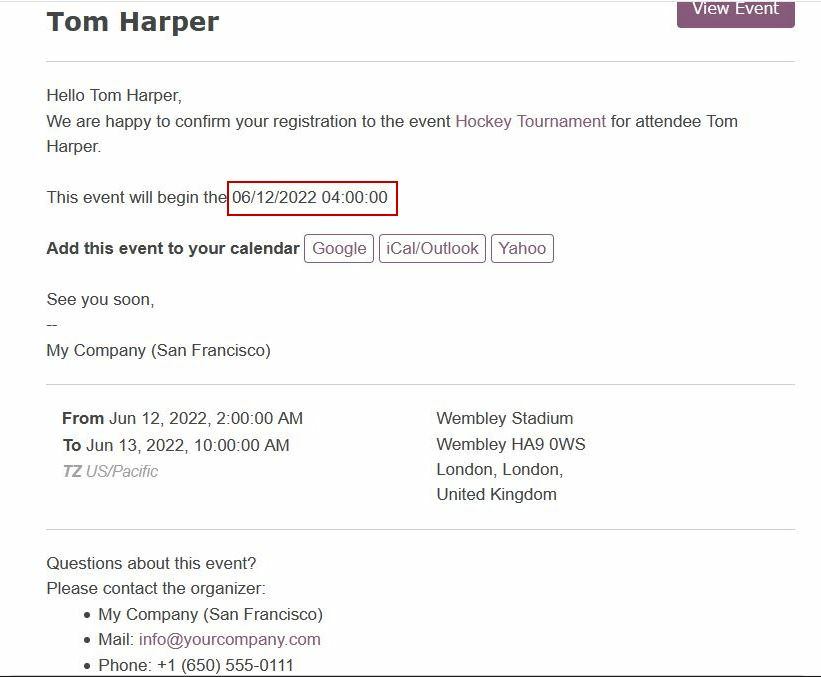
format_datetime() - formats the datetime, defining a specific timezone, in this case Central European Time (CET).

Can be found on the template Event: Registration.

The result will look like this:
format_time() - Similar to the format_datetime function except It’s used only for the time, not a date.

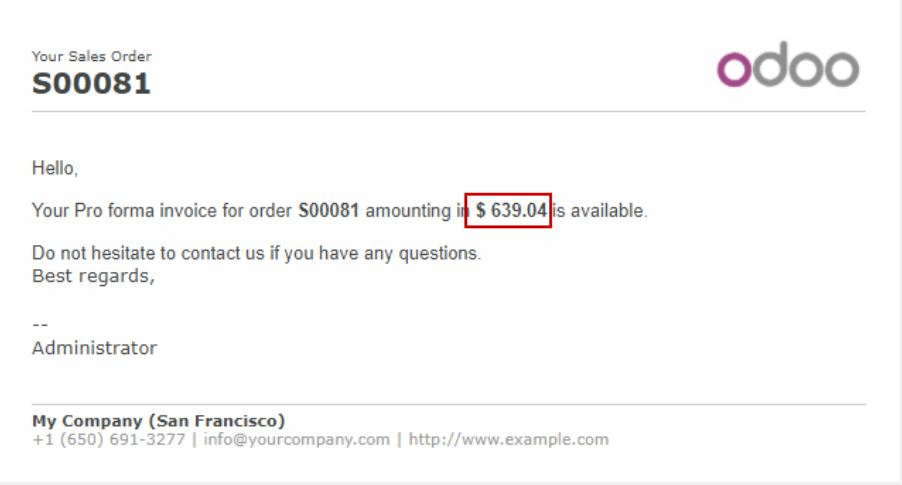
format_amount() - Formats a number, an amount to display the currency depending on the display setting that has been defined on the currency (the debug mode must be activated to see this feature) Accounting ‣ Configuration ‣ Currencies (before or after the amount depending on the convention).
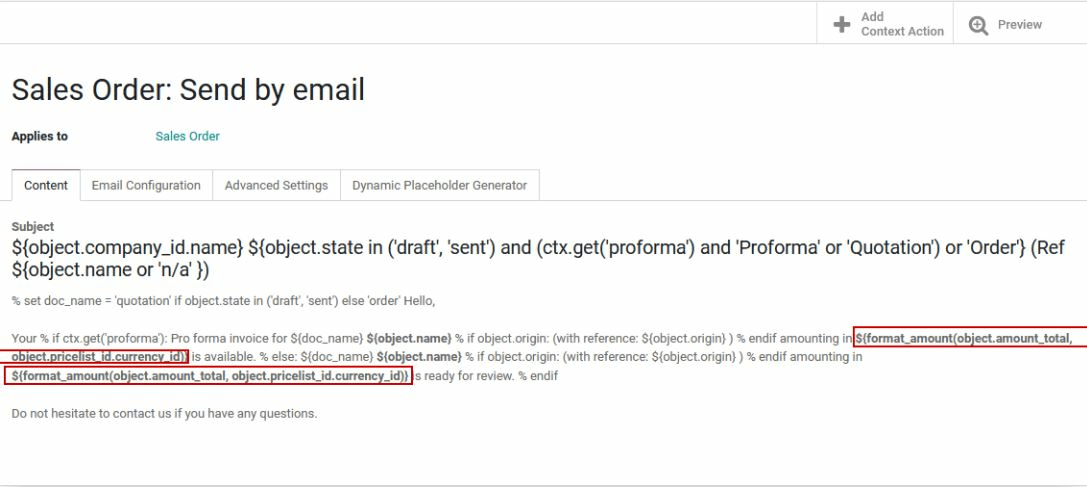
Which will look like this:

  • Info
  • Comments (0)


Rating
3 0

Zatiaľ tu nie sú žiadne komentáre.

Join this Course
to be the first to leave a comment.

Komunita
  • Tutoriály
  • Dokumentácia
  • Fórum
Open Source
  • Stiahnuť
  • Github
  • Runbot
  • Preklady
Služby
  • Odoo.sh hosting
  • Podpora
  • Vyššia verzia
  • Custom Developments
  • Vzdelávanie
  • Nájdite účtovníka
  • Nájdite partnera
  • Staň sa partnerom
O nás
  • Naša spoločnosť
  • Majetok značky
  • Kontaktujte nás
  • Pracovné ponuky
  • Eventy
  • Podcast
  • Blog
  • Zákazníci
  • Právne dokumenty • Súkromie
  • Bezpečnosť
الْعَرَبيّة Català 简体中文 繁體中文 (台灣) Čeština Dansk Nederlands English Suomi Français Deutsch हिंदी Bahasa Indonesia Italiano 日本語 한국어 (KR) Lietuvių kalba Język polski Português (BR) română русский язык Slovenský jazyk slovenščina Español (América Latina) Español ภาษาไทย Türkçe українська Tiếng Việt

Odoo je sada podnikových aplikácií s otvoreným zdrojovým kódom, ktoré pokrývajú všetky potreby vašej spoločnosti: CRM, e-shop, účtovníctvo, skladové hospodárstvo, miesto predaja, projektový manažment atď.

Odoo prináša vysokú pridanú hodnotu v jednoduchom použití a súčasne plne integrovanými biznis aplikáciami.

Website made with

Odoo Experience on YouTube

1. Use the live chat to ask your questions.
2. The operator answers within a few minutes.

Live support on Youtube
Watch now
