
how do i create a user who can only operate in one specific area for example a user who can only work with inventory and not seeing other Apps like sales, crm or accounting
This question has been flagged
3
Replies
1458
Views


Hi,
Login to the db as the admin and enable the developer mode.
Now navigate to the users menu from Settings -> Users & Companies -> Users, if you need to created user hit the New button and if you need to adjust any existing user select and open the user from the list.
* Leave all applications as Empty and select Administrator or User only in the inventory application
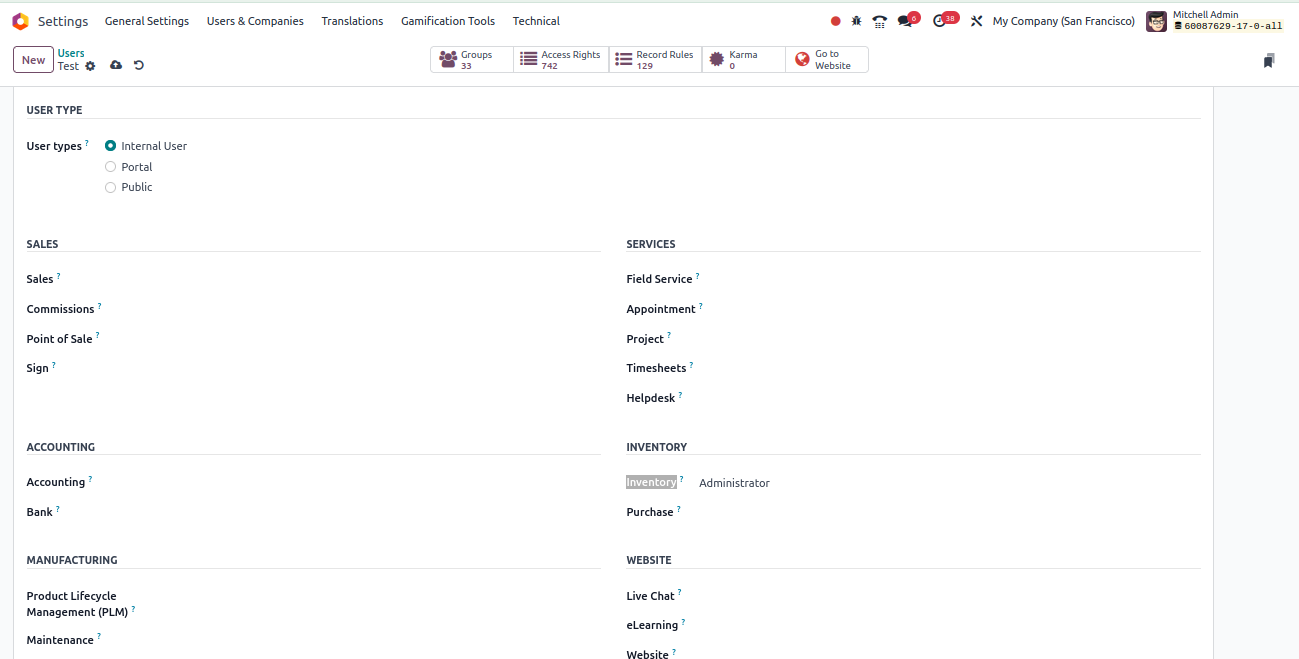
Doing as above, user will have access to the inventory application.
Thanks
Thanks for response.
I am soo grateful for the response

Hi,
- Go to the "Settings" module.
- Under the "Users & Companies" section, select "Users."
- Click on the "Create" button to add a new user.
- Fill in the required user details such as name, email, and password.
- In the "Access Rights" section, under the "Applications" tab, select the specific app(s) that the user should have access to, such as "Inventory."
- Ensure that the user does not have access to other apps like "Sales," "CRM," or "Accounting" by deselecting them.
- Save the changes and close the user creation form.
By following these steps, you'll create a user who can only operate within the specified app(s), such as "Inventory," and won't have access to other apps in Odoo.
Hope it helps
Enjoying the discussion? Don't just read, join in!
Create an account today to enjoy exclusive features and engage with our awesome community!
Sign up