
Lost the admin access while changing password and loging out how can I get back my access ?
This question has been flagged
3
Replies
1517
Views


Hi,
If you’ve lost admin access in Odoo after changing your password and logging out, you can recover it directly from the database or through the command line. The easiest way is to reset the password via the PostgreSQL database. You can connect to your database (using pgAdmin or psql), locate the admin user in the res_users table, and update the password field with a new one. For example:
UPDATE res_users SET password = 'newpassword' WHERE login = 'admin';
After this, you can log in again using the new password.
If you’re on Odoo.sh, you won’t have direct database access, but you can still recover admin access by enabling developer/mode via shell and using the Odoo command line. Run a command like:
1- ./odoo-bin shell -d <your_database>
2-Then execute:
env['res.users'].browse(2).write({'password': 'newpassword'})
User ID 2 is typically the main admin in most databases.)
In case you have no access at all, contact the Odoo.sh project owner or another admin user who can reset your password from the user settings screen.
As a best practice, always ensure there’s at least one backup admin user in your database with full access rights. This prevents complete lockouts if something goes wrong with the main admin credentials.
Hope it helps

In general, you have two options.
Using odoo-bin shell:
Going for this option, you will need to have basic knowledge of using the command-line interface (CLI) of you operating system. Furthermore, you will need to have at least some knowledge of your setup (i.e. when there are multiple python versions installed in your system).
First you will need to find the odoo-bin file and your configuration file for that server (most of the time called odoo.conf or .odoorc in some setups) of your installation. Once found, run *
python /path/to/odoo-bin shell --config=/path/to/odoo.conf -d name_of_database
in the CLI. Then, within that shell, run
env['res.users'].search([('login', '=', 'admin')])where admin is the user name for whom you need to reset the password. This should result in a line similar to
res.users(2,)
Note: If there is no integer value between the brackets (i.e. only reads res.users() ), the user name given does not exist in this database (-> check for typos or try another user)!
Then, run **
env['res.users'].browse(2).write({'password': 'admin123'})where 2 in browse(2) reflects the integer value from the previous command and admin123 is your new password. This should result in
True
as an result.
Finally, save the changes (this is a crucial step) to the database by running
self.env.cr.commit()
and exit the shell by typing
exit()
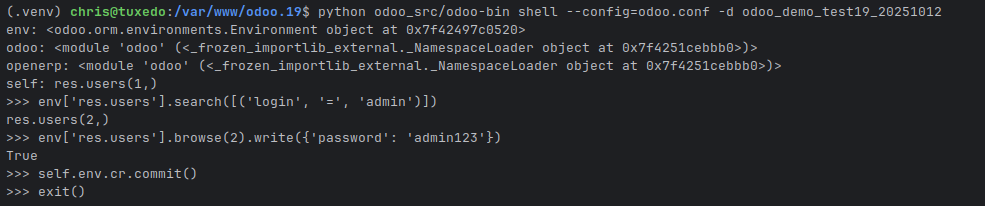
This whole process could look something like this:
Using postgresql:
Alternatively, you can reset the password of any user directly in the database as well. This again will require you having some knowledge of your setup.
You may try to install pgAdmin (http://pgadmin.org/download) to ease the process of connecting to your database. This will still require that you know your host, port, username and password or can retain that information from your odoo.conf file.
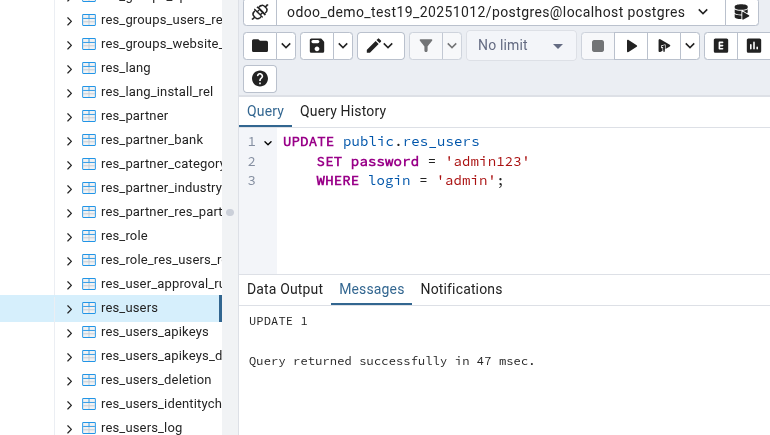
Ultimately, you will need to run
UPDATE public.res_users
	SET password = 'admin123'
	WHERE login = 'admin';
Again, login 'admin' is your username, password 'admin123' is your new password.
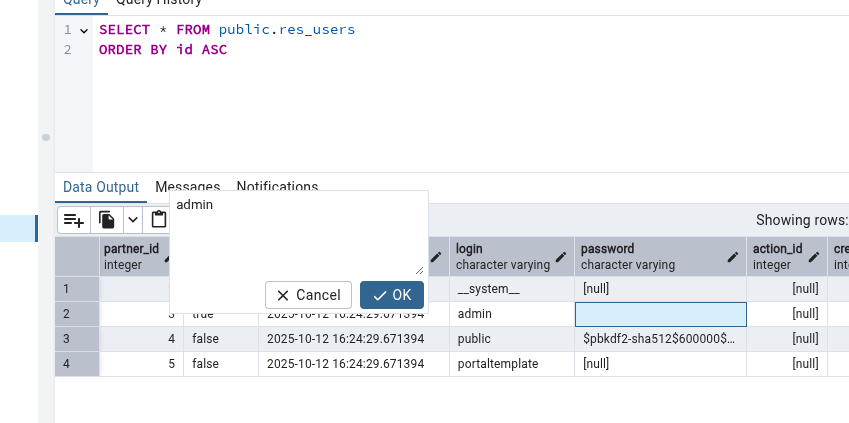
In pgAdmin you could also just navigate to the res_users table of your database, show all records and directly override the password. Note that, similar to the odoo-bin shell your will still need to commit the change - in this case you can hit the F6 key on your keyboard to do so.
Alternatively, this can be done using the CLI as well (again, authentication depends highly on your setup):
(.venv) chris@tuxedo:/var/www/odoo.19$ psql -h localhost -d odoo_demo_test19_20251012
Password for user chris:
psql (17.5 (Ubuntu 17.5-1.pgdg20.04+1))
SSL connection (protocol: TLSv1.3, cipher: TLS_AES_256_GCM_SHA384, compression: off, ALPN: postgresql)
Type "help" for help.

odoo_demo_test19_20251012=# UPDATE public.res_users SET password = 'admin123' WHERE login = 'admin';
UPDATE 1
odoo_demo_test19_20251012=# \q
Notes:
* It is potentially possible that you can skip --config=/path/to/odoo.conf and -d name_of_database depending on the postgresql setup and whether you run multiple database in your system. Note that skipping the database name may connect you to a database that is not actually the one you want to update!
Also, if you run into an error saying something about 'port being in use already', stop the Odoo server and try to connect to the shell again.
** If you're sure about the username (login), you could obviously just directly run
env['res.users'].search([('login', '=', 'admin')]).write({'password': 'admin123'})Final notes:
If you are confident to work your way around the CLI of your OS or the database does not hold any important data, try above. If you don't and the data is crucial to your company, get yourself help!
And, for anyone curious, Odoo will re-hash the password in the database the first time this user logs in again!

open terminal and login vps check the location odoo file after than you can change it
Enjoying the discussion? Don't just read, join in!
Create an account today to enjoy exclusive features and engage with our awesome community!
Sign up
Do you have access to the postgresql database and know how to run a command there? Then its just a matter of finding your user in the res_users table and overwritting the value of password.
Where is the odoo setup?
I don't know anything about postgrsql
Do you know, where the odoo-bin file is located for your Odoo installation?