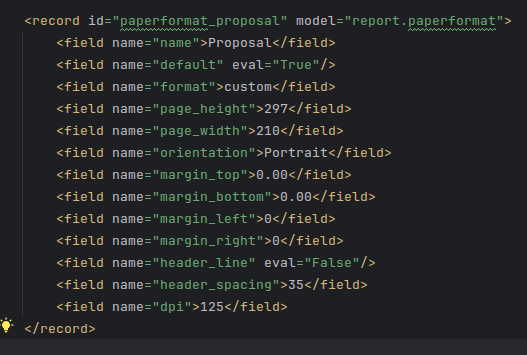
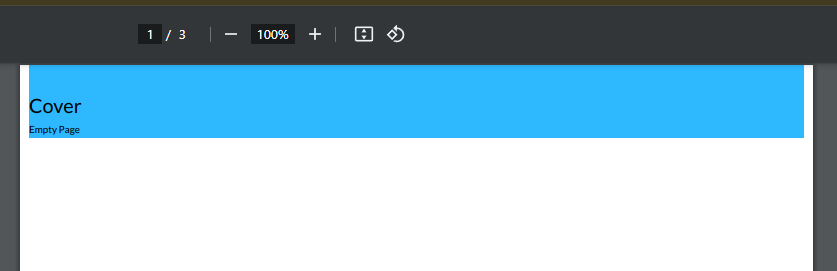
I've tried add this paper format to my xml. I've put 0 margin to all side but the result, there still margin on the left and the right side. I try to change the margin to negative value, but the pdf can't be open

Odoo is the world's easiest all-in-one management software.
It includes hundreds of business apps:

I've tried add this paper format to my xml. I've put 0 margin to all side but the result, there still margin on the left and the right side. I try to change the margin to negative value, but the pdf can't be open

Hi,
Its because the body tag of the pdf report has a class named container-fluid and it has properties
.container, .o_container_small, .container-fluid, .container-xxl, .container-xl, .container-lg, .container-md, .container-sm {
width: 100%;
padding-right: var(--bs-gutter-x, 15px);
padding-left: var(--bs-gutter-x, 15px);
margin-right: auto;
margin-left: auto;
}
So you need to unset the property of padding (which is not recommended)
You could do this to make your custom pdf to your preference
.container-fluid {
padding-right: unset !important;
padding-left: unset !important;
}
If
not changing try around it by changing the report type from pdf to html
and then click on print pdf and it will redirect you to an html view
and change around there by inspecting the view
Hope it helps
Create an account today to enjoy exclusive features and engage with our awesome community!
Sign up| Related Posts | Replies | Views | Activity | |
|---|---|---|---|---|
|
PDF reports
Solved
|


|
5
Jul 25
|
3504 | |
|
Wrong PDF Format
Solved
|

|
2
Mar 24
|
4071 | |

|
0
Nov 22
|
3951 | ||

|
0
Sep 17
|
6184 | ||

|
0
Mar 15
|
4584 |
1. Use the live chat to ask your questions.
2. The operator answers within a few minutes.
