
How to Add a Button Inside Action Menu?
Odoo is the world's easiest all-in-one management software.
It includes hundreds of business apps:
- CRM
- e-Commerce
- Accounting
- Inventory
- PoS
- Project
- MRP
This question has been flagged
2
Replies
2476
Views


Hi Alex,
Add Button inside Action Menu
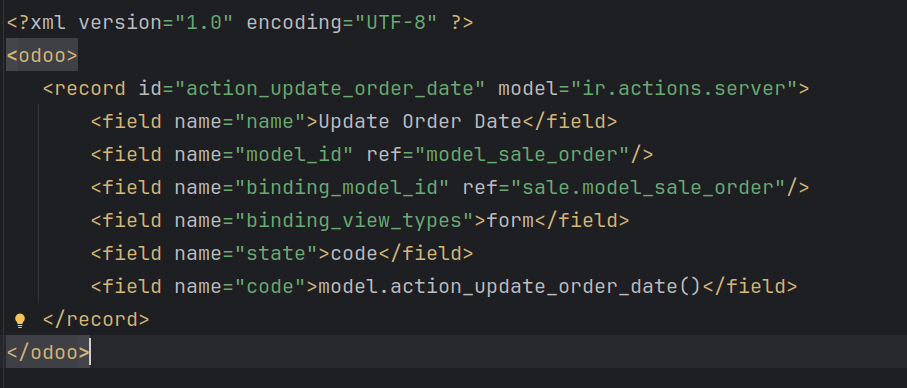
And You will see view
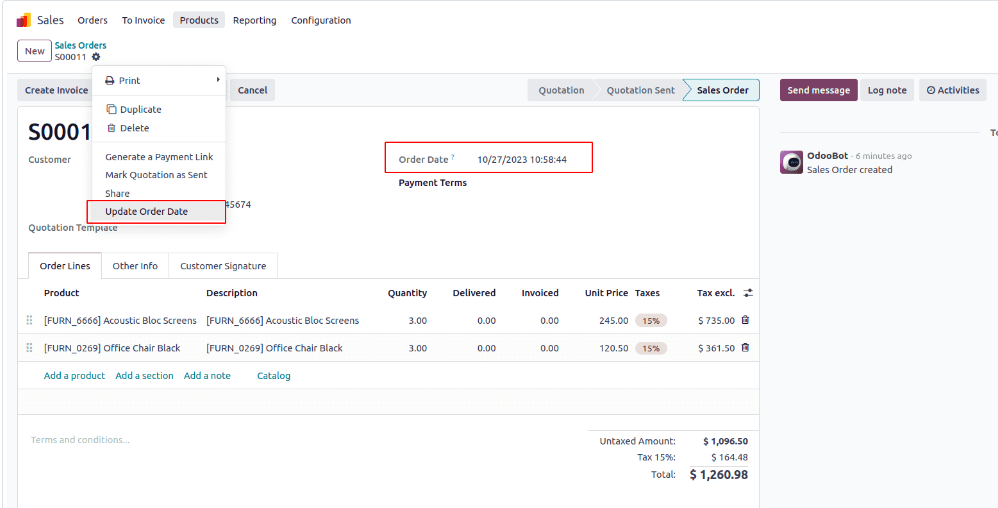
Thanks.

Hi,
Try the following code,
1. Create python file.
from odoo import fields, models
class SaleOrder(models.Model):
_inherit = 'sale.order'
def function_nam(self):
print('HELLO')
2. create Xml file.
<?xml version="1.0" encoding="UTF-8" ?>
<odoo>
<record id="action_update_order_date" model="ir.actions.server">
<field name="name">Print HEllo</field>
<field name="model_id" ref="model_sale_order"/>
<field name="binding_model_id" ref="sale.model_sale_order"/>
<field name="binding_view_types">
<field name="state">code</field>
<field name="code">model.function_
</record>
</odoo>
Please refer to this blog:
https://www.cybrosys.com/blog/how-to-add-a-button-inside-action-menu-in-odoo-17
Hope it helps
Enjoying the discussion? Don't just read, join in!
Create an account today to enjoy exclusive features and engage with our awesome community!
Sign up